hit-lacus edited a comment on issue #1166: Prepare DebugTomcat and Integration Test in Hadoop3 Env URL: https://github.com/apache/kylin/pull/1166#issuecomment-603216501 # Prepare Env ### Deploy Docker in Linux Install lastest **Docker-CE** in a Linux machine (NOT mac or windows because macvlan do not support them), you could choose Centos 7 or Ubuntu 16.04 or even higher version. I recommend to use the Linux machine has at least 3cores(6 threads) and 13 GB memory. Here is mine, as an example: ```sh [root@docker-node ~]# docker version Client: Docker Engine - Community Version: 19.03.8 API version: 1.40 Go version: go1.12.17 Git commit: afacb8b Built: Wed Mar 11 01:27:04 2020 OS/Arch: linux/amd64 Experimental: false Server: Docker Engine - Community Engine: Version: 19.03.8 API version: 1.40 (minimum version 1.12) Go version: go1.12.17 Git commit: afacb8b Built: Wed Mar 11 01:25:42 2020 OS/Arch: linux/amd64 Experimental: false containerd: Version: 1.2.13 GitCommit: 7ad184331fa3e55e52b890ea95e65ba581ae3429 runc: Version: 1.0.0-rc10 GitCommit: dc9208a3303feef5b3839f4323d9beb36df0a9dd docker-init: Version: 0.18.0 GitCommit: fec3683 ``` ```sh [root@docker-node ~]# lsb_release -a LSB Version: :core-4.1-amd64:core-4.1-noarch:cxx-4.1-amd64:cxx-4.1-noarch:desktop-4.1-amd64:desktop-4.1-noarch:languages-4.1-amd64:languages-4.1-noarch:printing-4.1-amd64:printing-4.1-noarch Distributor ID: CentOS Description: CentOS Linux release 7.7.1908 (Core) Release: 7.7.1908 Codename: Core ``` Please make sure docker node meet following requirement: 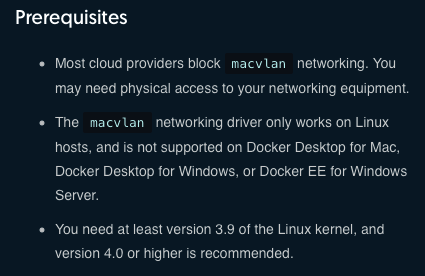 ### Prepare docker image and start HDP3 container - Get the images from somewhere. ```sh [root@docker-node ~]# docker images REPOSITORY TAG IMAGE ID CREATED SIZE hortonworks/sandbox-hdp 3.0.1 ae1d1779b081 16 months ago 27.5GB ``` - Create a docker network, please DO choose the **macvlan**, and don't forget to replace subnet, gateway, parent to the meaningful value in your env. For more information, please check docker documentation. This is the official manual, https://docs.docker.com/network/network-tutorial-macvlan/ . ```sh [root@docker-node ~]# docker network create -d macvlan \ --subnet=10.1.0.1/24 \ --gateway=10.1.0.1 \ --ip-range=10.1.0.1/24 \ -o parent=eth0 \ lacus-macvlan-net ``` - Start a HDP3.0 container with some port exposed. You can replace network and name with other what youy like. ```sh [root@docker-node ~]# docker run --name LacusHadoop3 --privileged \ --hostname "sandbox-hdp.hortonworks.com" \ --network=lacus-macvlan-net \ -p 1080:1080 \ -p 4200:4200 \ -p 7777:7777 \ -p 7788:7788 \ -p 8000:8000 \ -p 8080:8080 \ -p 8744:8744 \ -p 8886:8886 \ -p 9088:9088 \ -p 9089:9089 \ -p 61080:61080 \ -p 61888:61888 \ -p 4040:4040 \ -p 6080:6080 \ -p 8042:8042 \ -p 8088:8088 \ -p 8188:8188 \ -p 8198:8198 \ -p 8888:8888 \ -p 9995:9995 \ -p 11000:11000 \ -p 15000:15000 \ -p 16010:16010 \ -p 18081:18081 \ -p 19888:19888 \ -p 21000:21000 \ -p 50070:50070 \ -p 50075:50075 \ -p 50111:50111 \ -p 8081:8081 \ -p 8585:8585 \ -p 3000:3000 \ -p 10002:10002 \ -p 30800:30800 \ -p 2182:2182 \ -p 2202:2202 \ -p 4557:4557 \ -p 6627:6627 \ -p 6667:6667 \ -p 9090:9090 \ -p 9091:9091 \ -p 15500:15500 \ -p 1100:1100 \ -p 1111:1111 \ -p 1988:1988 \ -p 2100:2100 \ -p 2181:2181 \ -p 2201:2201 \ -p 2222:2222 \ -p 4242:4242 \ -p 5007:5007 \ -p 5011:5011 \ -p 6001:6001 \ -p 6003:6003 \ -p 6008:6008 \ -p 6188:6188 \ -p 6668:6668 \ -p 7070:7070 \ -p 8005:8005 \ -p 8020:8020 \ -p 8032:8032 \ -p 8040:8040 \ -p 8050:8050 \ -p 8082:8082 \ -p 8086:8086 \ -p 8090:8090 \ -p 8091:8091 \ -p 8765:8765 \ -p 8889:8889 \ -p 8983:8983 \ -p 8993:8993 \ -p 9000:9000 \ -p 9083:9083 \ -p 9996:9996 \ -p 10000:10000 \ -p 10001:10001 \ -p 10015:10015 \ -p 10016:10016 \ -p 10020:10020 \ -p 10500:10500 \ -p 10502:10502 \ -p 12049:12049 \ -p 12200:12200 \ -p 15002:15002 \ -p 16000:16000 \ -p 16020:16020 \ -p 16030:16030 \ -p 18080:18080 \ -p 33553:33553 \ -p 39419:39419 \ -p 42111:42111 \ -p 50079:50079 \ -p 50095:50095 \ -p 60000:60000 \ -p 60080:60080 \ -d hortonworks/sandbox-hdp:3.0.1 ``` ### Check container ```sh [root@docker-node ~]# docker ps CONTAINER ID IMAGE COMMAND CREATED STATUS PORTS NAMES 9a6cf570e89a hortonworks/sandbox-hdp:3.0.1 "/usr/sbin/init" 5 hours ago Up 5 hours LacusHadoop3 [root@docker-node ~]# docker exec LacusHadoop3 ip addr show eth0 13: eth0@if2: <BROADCAST,MULTICAST,UP,LOWER_UP> mtu 1500 qdisc noqueue state UNKNOWN group default link/ether 02:42:0a:01:00:02 brd ff:ff:ff:ff:ff:ff link-netnsid 0 inet 10.1.0.2/16 brd 10.1.255.255 scope global eth0 valid_lft forever preferred_lft forever ``` Now you know the ip address of your container is `10.1.0.2`. ### Login container You can login the container via ssh in your laptop, username is `root` and password is `hadoop`. And the first you login, you have to change the password from `hadoop` to another more complex one. ```sh [YOUR_NAMR@YOUR_DESKTOP ~]ssh [email protected] ``` On the another hand, you can login the container via docker(in docker node). ```sh [root@docker-node ~]# docker exec -it LacusHadoop3 bash [root@sandbox-hdp /]# ``` ### Modify hosts file Add following line into your `/etc/hosts`. ```sh 10.1.0.2 sandbox-hdp.hortonworks.com lacus ``` ### Clean up If you want to restart from the begining, or just want to remove everything, please check following command. ```sh docker stop LacusHadoop3 docker rm LacusHadoop3 docker network rm lacus-macvlan-net ```
----------------------------------------------------------------
This is an automated message from the Apache Git Service.
To respond to the message, please log on to GitHub and use the
URL above to go to the specific comment.

For queries about this service, please contact Infrastructure at:
[email protected]


With regards,
Apache Git Services

