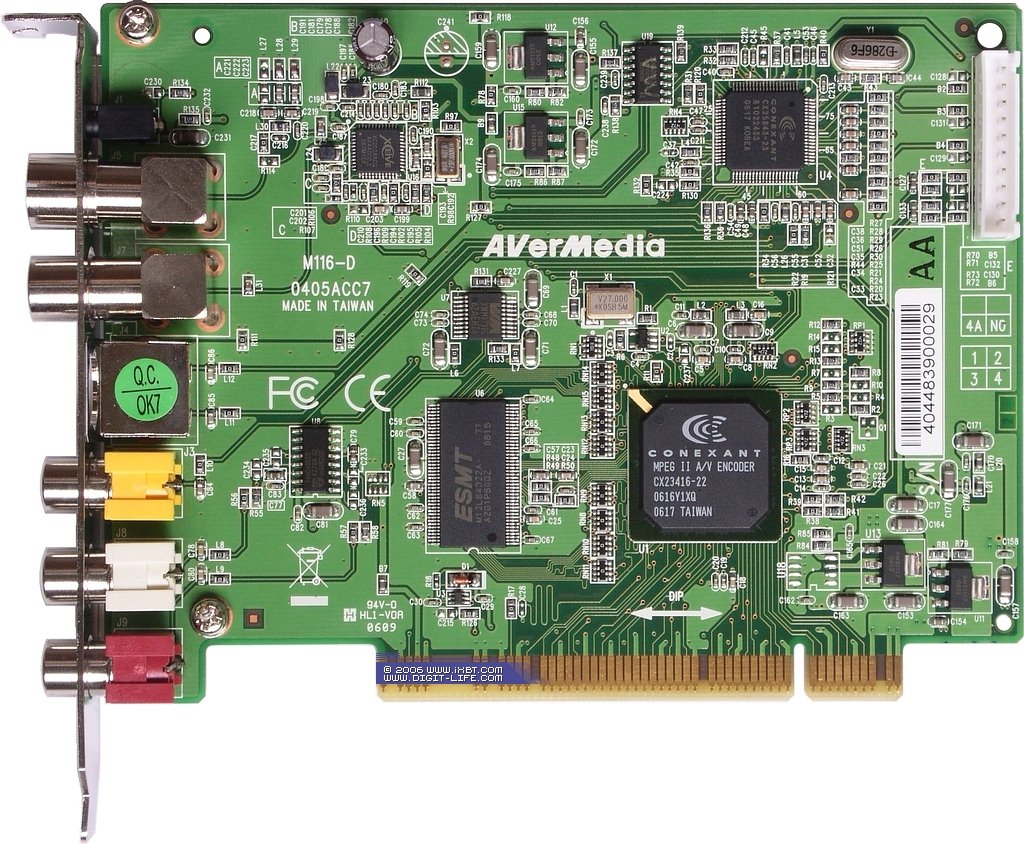
On Monday 23 July 2007 00:03:00 Abylai Ospan wrote:
> Hello !
>
> I have successfully running video on this card but can't obtain the
> sound. Output of "v4l2-ctl --log-status --device=/dev/video0" command
> is:
>
> Status Log:
>
>    ivtv0: =================  START STATUS CARD #0  =================
>    tuner 1-0061: Tuner mode:      analog TV
>    tuner 1-0061: Frequency:       400.00 MHz
>    tuner 1-0061: Standard:        0x00000007
>    cx25840 1-0044: Video signal:              present
>    cx25840 1-0044: Detected format:           PAL-BDGHI
>    cx25840 1-0044: Specified standard:        PAL-BDGHI
>    cx25840 1-0044: Specified video input:     S-Video (Luma In3,
> Chroma In7)
>    cx25840 1-0044: Specified audioclock freq: 48000 Hz
>    cx25840 1-0044: Detected audio mode:       forced mode
>    cx25840 1-0044: Detected audio standard:   no detected audio
> standard cx25840 1-0044: Audio muted:               no
>    cx25840 1-0044: Audio microcontroller:     stopped
>    cx25840 1-0044: Configured audio standard: automatic detection
>    cx25840 1-0044: Configured audio system:   automatic standard and
> mode detection
>    cx25840 1-0044: Specified audio input:     External
>    cx25840 1-0044: Preferred audio mode:      stereo
>    cx25840 1-0044: Selected 65 MHz format:    autodetect
>    cx25840 1-0044: Selected 45 MHz format:    chroma
>    ivtv0: Video Input: S-Video 1
>    ivtv0: Audio Input: Line In 1
>    ivtv0: Tuner: TV
>    ivtv0: Stream: MPEG-2 Program Stream
>    ivtv0: VBI Format: No VBI
>    ivtv0: Video:  720x576, 25 fps
>    ivtv0: Video:  MPEG-2, 4x3, Variable Bitrate, 2000000, Peak
> 2500000 ivtv0: Video:  GOP Size 12, 2 B-Frames, GOP Closure
>    ivtv0: Audio:  48 kHz, Layer II, 224 kbps, Stereo, No Emphasis, No
> CRC
>    ivtv0: Spatial Filter:  Manual, Luma 1D Horizontal, Chroma 1D
> Horizontal, 0
>    ivtv0: Temporal Filter: Manual, 8
>    ivtv0: Median Filter:   Off, Luma [0, 255], Chroma [0, 255]
>    ivtv0: Status flags: 0x00000000
>    ivtv0: Stream encoder MPEG: status 0x0118, 1% of 4096 KiB (128
> buffers) in use
>    ivtv0: Stream encoder YUV: status 0x0000, 0% of 2037 KiB (161
> buffers) in use
>    ivtv0: Stream encoder VBI: status 0x0000, 0% of 1023 KiB (40
> buffers) in use
>    ivtv0: Stream encoder PCM audio: status 0x0000, 0% of 1021 KiB
> (227 buffers) in use
>    ivtv0: Read MPEG/VBI: 150026176/0 bytes
>    ivtv0: ==================  END STATUS CARD #0  ==================
>
>
> As I understand the card can't detect audio system:
>    cx25840 1-0044: Detected audio standard:   no detected audio
> standard cx25840 1-0044: Audio muted:               no
>
> But when I'm rading from /dev/video0 I see the audio PES packets
> (0xc0 PID). It's looks like this packets is "fake" or "silence". This
> is first 64 bytes dump of this packets:
> 0x0 0 1 c0 7 ec 80 80 9 21 10 43 64 a9 ff ff ff ff ff fd b4 0 bb 11
> 11 11 11 11 11 dd 11 11 11 24 92 49 24 92 51 0 0 35 0 e aa aa aa aa
> aa aa aa aa aa aa a1 86 cf 3c 30 c3 b 6d aa aa
It's silent audio. That's normal if no audio is detected.

> And of course there is silence in headphones.
>
> I'v trying to get registers with command "v4l2-dbg -R
> type=i2cdrv,chip=cx25840,min=0x805,max=0x809 -d /dev/video0" and I'v
> get following error messages:
> ioctl: VIDIOC_DBG_G_REGISTER
>
>           00 01 02 03 04 05 06 07 08 09 0A 0B 0C 0D 0E 0F
> ioctl: VIDIOC_DBG_G_REGISTER failed for 0x805
> ioctl: VIDIOC_DBG_G_REGISTER failed for 0x806
> ioctl: VIDIOC_DBG_G_REGISTER failed for 0x807
> ioctl: VIDIOC_DBG_G_REGISTER failed for 0x808
> ioctl: VIDIOC_DBG_G_REGISTER failed for 0x809
> 00000800:
>
> and following messages in dmesg:
> Jul 23 02:01:38 streamer2 ivtv0: i2c ID 0x00000000 (gpio) not found
> for command 0xc0185650!
> Jul 23 02:01:38 streamer2 ivtv0: i2c ID 0x00000000 (gpio) not found
> for command 0xc0185650!
> Jul 23 02:01:38 streamer2 ivtv0: i2c ID 0x00000000 (gpio) not found
> for command 0xc0185650!
> Jul 23 02:01:38 streamer2 ivtv0: i2c ID 0x00000000 (gpio) not found
> for command 0xc0185650!
> Jul 23 02:01:38 streamer2 ivtv0: i2c ID 0x00000000 (gpio) not found
> for command 0xc0185650!
>
> I'v trying to change audio_conf with following command "./v4l2-dbg -r
> chip=cx25840,reg=0x808,val=0x1f -d /dev/video0". This command
> completed successfully but nothing is changed.

You need to have 'advanced debugging' for multimedia devices enabled in the
kernel config. And you need to run v4l2-dbg as root.

Note that v4l2-dbg only works with kernel 2.6.22 and up, if you are using an
older kernel then you should use the ivtvctl utility that is included with
ivtv-0.10.x.

But it is much more likely that the card settings are wrong. I assume that you
use the Gotview PCI DVD2 Deluxe cardtype. Is that still the case? The fact that
you don't get any audio can be caused by one of two things:

1) you need to set some GPIO bit for line-in audio. You can experiment with
ivtvctl -i. Try ivtvctl -i dir=0xffff,val=0 and ivtvctl -i
dir=0xffff,val=0xffff. If either of these makes a difference, then it is likely
to be a GPIO setting. By experimenting try to narrow it down to the exact bit.

2) the card has a mixer chip that also needs to be set. Looking at the picture
(http://www.ixbt.com/monitor/images/aver-m116-plus/aver-m116-plus-front.jpg) I
see a Philips chip and a 'WM' chip. I can't read the exact type, but I suspect
it is one of these two chips (probably the WM: that's used by Hauppauge as
well). Can you report the exact chips that are on this card? Then I can check
if one of these is indeed a mixer chip.

Regards,

        Hans
_______________________________________________
ivtv-devel mailing list
[email protected]
http://ivtvdriver.org/mailman/listinfo/ivtv-devel