On Thu, Jun 20, 2013 at 2:16 AM, <[email protected]> wrote:

>
>
> Right now I'm not able to spend any more money on my hobby so I have to
> make do with the equipment I already have.  So that's why I am trying to
> figure out how to use the serial pass-through feature of the Wisp628.
>
> So if I am understanding correctly from what you said, I should be using
> the serial_software.jal library, is that correct?
>
> I found the sample file called 16f877a_serial_software.jal.  Can I modify
> that sample file and make it work for my 16f877 chip and use the serial
> pass-through feature of the Wisp628?  If so, how should I modify it?
>
Even I have a Wisp myself (gift from Wouter) I have never test serial
communication via wisp.  My suggestion will be to test the code on a direct
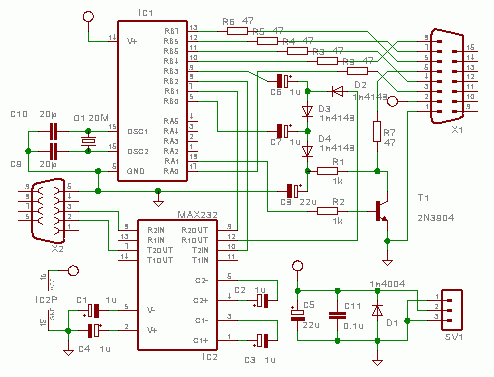
serial connection between your PIC16F877 and PC via MAX232. The hardware
interface is exactly the one with MAX232 from wisp:
http://www.voti.nl/wisp628/pics/wisp628-100.gif, you have only to duplicate
it for the PIC16F877.

Spend a litlle time examining the jallib code and use either the hardware
or the serial example from the jallib, with the Jal compiler provided with
the examples. This will makes things simpler.

Vasile


>
> One more question:  I'm a little bit confused because right now the
> pass-through feature is using pins 3 and 4 on the programmer.  But in the
> wiring diagram for the programmer which is shown on Wouter's website it
> shows that pins 7 and 8 on the programmer can be used for "asynch". (
> http://www.voti.nl/wisp628/index.html).  So can either set of wires on
> the programmer be using for serial pass-through?
>
> Thanks very much for your help!  I'm excited to learn how this all works.
> :-)
> Shawn
>
>
>
> On Sunday, June 2, 2013 7:20:18 PM UTC-6, Joep wrote:
>
>> Hi Shawn,
>>
>> Welcome!
>>
>> I'm not sure on what particular point your serial comms fail, so let give
>> you some general directions.
>> First of all, note the difference between serial hardware and serial
>> software.
>> Most jallib examples are based on serial hardware (using the uart) and,
>> as a result, are fixed to the uart pins (25/26). To use this with the
>> wisp628, you need to connect pins 25/26 to pins 8/7 of the programmer. Use
>> the appropriate passtrough command (auxillary pins and inverted iirc)
>> Examples of wouter and also bert use programming pins for serial comms.
>> This saves two wires and two pins but require serial software (which is not
>> as efficient and versatail as serial hw) and set this up for those specfic
>> pins; you can choose normal and inverted signals in serial sw as long as
>> you use the matching passtrough command.
>> Note that there is also a speed limit on the passtrough mode of the
>> wisp628.115k2 - common for serail hw - is not supported, so start out at
>> 1200 baud or so. You may increase it a bit once you got it working.
>>
>> Having said this, my advice would be to use the wisp628 for programming
>> and get a '5v arduino ftdi cable' (or breakout box) for the serial comms
>> and use serial hw. Supports much higer speed, no command need to entered
>> after ach programming cyle - you can leave you terminal prog open - and you
>> can  be get one for less than 10 $ on ebay.
>>
>> Joep
>>
>>
>> Op zondag 2 juni 2013 schreef ([email protected]) het volgende:
>>
>> Hi, I'm new here.  I'm also kind of a beginner with PIC programming.  A
>>> number of years ago I bought the PIC16F877 and the Wisp628 programmer
>>> designed by Wouter van Ooijen.  I was using the JAL language, but didn't
>>> get very far in my learning before I had to put it all on the back burner
>>> for a number of years.  So now I want to get back into it again.  But
>>> things have changed and I kind of need a little bit of help.
>>>
>>> Of course I did the "Blink an LED" project, and everything is in working
>>> order.  Now I want to move to serial communications between the PIC and the
>>> PC.  But I would like to use the serial passthrough feature of the Wisp628,
>>> (which I think uses pins B6 and B7 on the PIC).  I had this mostly working
>>> a number of years ago using the JAL example on Wouter's website - see
>>> http://www.voti.nl/blink/**index.html<http://www.voti.nl/blink/index.html>,
>>> at the bottom of the page.  But that example uses the "vintage" version of
>>> JAL, and I want to learn how to use the new version.
>>> So I was trying to follow the example project on http://www.**
>>> justanotherlanguage.org/**content/jallib/tutorials/**
>>> tutorial_serial_communication<http://www.justanotherlanguage.org/content/jallib/tutorials/tutorial_serial_communication>,
>>> but it is not designed to use the serial passthrough feature of the Wisp628
>>> programmer.  It uses pins RX and TX instead.
>>>
>>> So, can somebody help me translate the "vintage" JAL code on this page
>>> (last example at the bottom),
>>> http://www.voti.nl/blink/**index.html<http://www.voti.nl/blink/index.html>,
>>> to use the modern JAL libraries?
>>>
>>> Thanks!
>>> Shawn
>>>
>>> --
>>> You received this message because you are subscribed to the Google
>>> Groups "jallib" group.
>>> To unsubscribe from this group and stop receiving emails from it, send
>>> an email to jallib+unsubscribe@**googlegroups.com.
>>> To post to this group, send email to [email protected].
>>> Visit this group at
>>> http://groups.google.com/**group/jallib?hl=en<http://groups.google.com/group/jallib?hl=en>
>>> .
>>> For more options, visit
>>> https://groups.google.com/**groups/opt_out<https://groups.google.com/groups/opt_out>
>>> .
>>>
>>>
>>>
>>  --
> You received this message because you are subscribed to the Google Groups
> "jallib" group.
> To unsubscribe from this group and stop receiving emails from it, send an
> email to [email protected].
> To post to this group, send email to [email protected].
> Visit this group at http://groups.google.com/group/jallib.
>
> For more options, visit https://groups.google.com/groups/opt_out.
>
>
>

--
You received this message because you are subscribed to the Google Groups
"jallib" group.
To unsubscribe from this group and stop receiving emails from it, send an email
to [email protected].
To post to this group, send email to [email protected].
Visit this group at http://groups.google.com/group/jallib.
For more options, visit https://groups.google.com/groups/opt_out.