Funny -- I've been reading Programming in Scala as a PDF too :-)

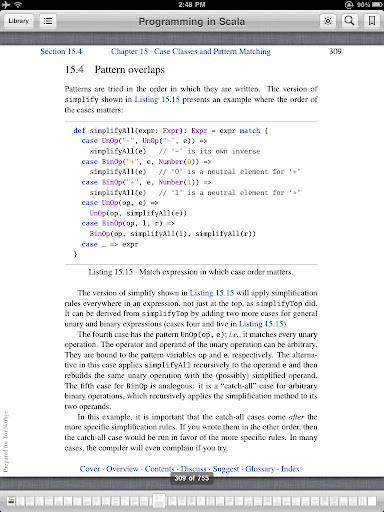
Here's an iPad screen capture from the page I happened to be on:
http://lh5.ggpht.com/_PkzBdpmSG-Y/TJaGEnlUMXI/AAAAAAAABgQ/MBURFPcLaSM/IMG_0050.jpg

(Picasa insisted on converting the pure .png file to a .jpg so there
may be some compression artifacts but it's pretty close to what I
see.)

As you can see one nice thing about the PDF support in the iPad is
that you get colored syntax highlighting. And hyperlinking (the blue
tokens in the text and at the bottom) works really well. But unlike
the Kindle app, there's no ability to annotate and take notes.

-- Tor

On Sep 19, 10:30 am, Cédric Beust ♔ <[email protected]> wrote:
> Here is what a technical book looks like on the new Kindle:
>
> http://imgur.com/R96co
>
> (this is a page from Programming in Scala)
>
> The display looks actually nicer than it does in the picture (which I took
> with my phone, and the colors look a bit washed out because of the light
> that I was using).
>
> My only complaint is that code snippets are using a fainter ink so they're a
> bit harder to read than the text (which looks amazing on the new Kindle).
>
> --
> Cédric
>
>
>
>
>
> On Sun, Sep 19, 2010 at 9:23 AM, Tor Norbye <[email protected]> wrote:
> > I've been happily using the iPad as an ebook reader. I've mostly been
> > using the Kindle app, since Amazon has (by far) the best selection of
> > technical books. The app also has most of the features you mention
> > (highlight passages (and jump to your highlights), add notes, indexing
> > and hyperlinks, and it can show illustrations). I also like holding my
> > finger on a word and instantly getting the dictionary definition of it
> > (the kindle app downloads a dictionary into your library and uses
> > it.)
>
> > There are two downsides:
> > (1) I haven't been able to get it to do text-to-speech. I've seen the
> > "howto" pages which tells you how to enable the accessibility speech
> > features on the ipad, but the Kindle app doesn't seem to play nice
> > with it; it only reads the sentences you click on, you can't just get
> > it started (which I sometimes want while driving).
> > (2) It doesn't do PDFs.
>
> > Luckily, the Apple iBooks application handles PDFs so I read those on
> > the ipad as well, just not with the Kindle app. (There are probably
> > many ways to do it, but the most convenient way I've found is to use
> > Dropbox; throw your PDFs in there, then in Dropbox on the iPad, open
> > the PDF, and then there's a "Open With" action in the top right window
> > where you can send the PDF to iBooks; it now stays in your book
> > collection there.)
>
> > I like the screen and I've spent a lot of hours reading on it. Having
> > said that, it's a bit heavy, so I never end up holding it above my
> > head as I would a book when reading lying down, instead I support it
> > on one side (the orientation lock is great).
>
> > I've seen Dick's new Kindle and it's pretty sweet. I did however find
> > myself attempting to "swipe" the screen all the time to scroll, zoom
> > in etc. I like the screen density of the Kindle but the iPad interface
> > better. A next gen iPad with an iphone 4 screen density might be nice.
> > Or better yet, an Android device with a form factor even more
> > optimized as an e-reader!
>
> > -- Tor
>
> > On Sep 19, 8:49 am, Jan Goyvaerts™ <[email protected]> wrote:
> > > I read the newest Kindle could indeed annotate pdf's. But honestly, 6"
> > for a
> > > technical manual ? Weird is that the DX' OS can't be upgraded to the
> > level
> > > of Kindle 3's...
>
> > > The iPad might be a good choice, but a bit of overkill for just reading.
> > Or
> > > maybe somebody in here has feedback about this ? Is an iPad any good as
> > an
> > > ebook reader ?
>
> > > Personally I am waiting for the wetab to be released (
> >http://wetab.mobi/en).
> > > It's Linux (MeeGo), so MAYBE it can be tweaked to do what I want from it.
> > It
> > > *should* be released the day after tomorrow.
>
> > > On Sun, Sep 19, 2010 at 14:57, B Smith-Mannschott <[email protected]
> > >wrote:
>
> > > > I got a Kindle DX (9.7") (of the current generation, which is charcoal
> > > > grey) recently. I went with the larger DX because I wanted something I
> > could
> > > > read my (largish) collection of PDF programming and computer science
> > books
> > > > on. Papers too. The DX has the resolution to display PDFs designed for
> > US
> > > > Letter  or A4 printing readably in almost all cases. (Two column
> > conference
> > > > papers in 9pt LaTeX can be a little tough on the eyes.)
>
> > > > The screen is so much nicer for reading than an LCD! But, it's not
> > color. I
> > > > don't find I miss that. PDF support seems good. It is possible to zoom
> > or
> > > > view a half-page at a time by switching to landscape mode. Searching is
> > > > supported, but only within the current document. Annotation is
> > supported in
> > > > Kindle e-books, but not in PDF. I've read that PDF annotation is
> > supported
> > > > on the newest 6" kindle, but that's neither here nor there. As to
> > separate
> > > > notes: I'd suggest something with a real keyboard or a pen and a pad of
> > > > paper.
>
> > > > I'm very happy with the DX, but then I've never developed the habit of
> > > > annotating the documents I'm reading so I don't miss the fact that I
> > can't
> > > > do this with PDFs.
>
> > > > // Ben
>
> > > > On Sat, Sep 18, 2010 at 23:35, Jan Goyvaerts™ <[email protected]
> > >wrote:
>
> > > >> Hi,
>
> > > >> By any chance, does somebody here knows about a suitable ebook reader
> > for
> > > >> technical reading ? Not just books with endless text, but also with
> > > >> pictures, drawings and such.
>
> > > >> What I'm looking for:
> > > >> * For pdf documents.
> > > >> * Presenting the content well.
> > > >> * Indexing the books so I can search for keywords in the collection.
> > > >> * Allow highlighting and/or annotating.
> > > >> * Preferably with the possibility to write separate notes.
>
> > > >> One of the Kindle maybe ?
>
> > > >> Thanks In Advance !
>
> > > >> Jan
>
> > > >> --
> > > >> You received this message because you are subscribed to the Google
> > Groups
> > > >> "The Java Posse" group.
> > > >> To post to this group, send email to [email protected].
> > > >> To unsubscribe from this group, send email to
> > > >> [email protected]<javaposse%2bunsubscr...@googlegroups
> > > >>  .com>
> > <javaposse%2bunsubscr...@googlegroups .com>
> > > >> .
> > > >> For more options, visit this group at
> > > >>http://groups.google.com/group/javaposse?hl=en.
>
> > > >  --
> > > > You received this message because you are subscribed to the Google
> > Groups
> > > > "The Java Posse" group.
> > > > To post to this group, send email to [email protected].
> > > > To unsubscribe from this group, send email to
> > > > [email protected]<javaposse%2bunsubscr...@googlegroups
> > > >  .com>
> > <javaposse%2bunsubscr...@googlegroups .com>
> > > > .
> > > > For more options, visit this group at
> > > >http://groups.google.com/group/javaposse?hl=en.
>
> > --
> > You received this message because you are subscribed to the Google Groups
> > "The Java Posse" group.
> > To post to this group, send email to [email protected].
> > To unsubscribe from this group, send email to
> > [email protected]<javaposse%2bunsubscr...@googlegroups
> > .com>
> > .
> > For more options, visit this group at
> >http://groups.google.com/group/javaposse?hl=en.
>
> --
> Cédric

--
You received this message because you are subscribed to the Google Groups "The
Java Posse" group.
To post to this group, send email to [email protected].
To unsubscribe from this group, send email to
[email protected].
For more options, visit this group at
http://groups.google.com/group/javaposse?hl=en.