Andre Dietisheim [http://community.jboss.org/people/adietish] modified the
document:
"Create Eclipse Ecore (EMF) Models manually"

To view the document, visit: http://community.jboss.org/docs/DOC-15705

--------------------------------------------------------------
h1. *Forewords*

EMF provides a runtime and tools that allow you to create ecore object models.
The starting point is a model definition. It may be created out of a XML Schema
(XSD), annotated java classes, etc.  but you will mostly craft one by hand.
This document attempts to describe the process involved in the later. It will
show you the basic steps to create an ecore model implementation and give you
some more advanced hints here and there.


There are a few tutorials available on
http://www.eclipse.org/modeling/emf/docs/#tutorials eclipse.org, the best one
(to my eyes's) the one provided by
http://www.vogella.de/articles/EclipseEMF/article.html Lars Vogella.

h1. Get started, create an EMF Project
To get started, create an empty EMF project.


http://community.jboss.org/servlet/JiveServlet/showImage/102-15705-15-5332/new-empty-emf-project.jpg

http://community.jboss.org/servlet/JiveServlet/downloadImage/102-15705-15-5332/449-428/new-empty-emf-project.jpg


You'll get a new project, that's set up to work with the EMF framework.
What's pops to your eyes is that there's a *model* directory in this project.
That´s the folder that will hold the ecore files, the model definitions (not a
must but a standard so far).

h1. Create a Model Definition
Create a new ecore model file in this folder by selecting the folder and
invoking the new ecore model wizard.


http://community.jboss.org/servlet/JiveServlet/showImage/102-15705-15-5333/new-ecore-file.jpg

http://community.jboss.org/servlet/JiveServlet/downloadImage/102-15705-15-5333/450-436/new-ecore-file.jpg


h1. Create a Package
You can now add classes to your package. There are different editors you may
use to edit your ecore file. The most common one is Sample Ecore Model Editor
that is included in the Eclipse modeling edition. Alternatively you may also
use text based editors like  http://wiki.eclipse.org/Emfatic Emfatic or
http://www.eclipse.org/modeling/emft/?project=ecoretools Ecore Diagram Editor
or the  http://www.soyatec.com/euml2/ eUML2 Editor.

We created an empty ecore model so far, so the next step is to create a package
in your model. You set its name, Ns Prefix and Ns URI.

* *name*: a simple term (not required to be unique)
* *Ns prefix*: ~shoretened 'java package' name (not required to be unique)
* *Ns URI*: some real (or bogus) unique URI where the scheme might be found.

h4. example: org.eclipse.emf.cdo.ui.defs
I have a plugin/module in cdo called *org.eclipse.emf.cdo.ui.defs*
The ecore model for it has the following declarations:

*name*: defs
*Ns prefix*: cdo.ui.defs
*Ns URI*:  http://www.eclipse.org/emf/CDO/ui/defs/1.0.0
http://www.eclipse.org/emf/CDO/ui/defs/1.0.0

h1. Add Classes
You can now add classes to your package. There are different editors at hand
that you may use to edit your ecore file. The most common one is the *Sample
Ecore Model Editor* that is included in the Eclipse modeling edition.
Alternatively you may also use text based editors like
http://wiki.eclipse.org/Emfatic Emfatic or  http://www.eclipse.org/Xtext/
Xtext. There are also graphical editors around like the*
http://www.eclipse.org/modeling/emft/?project=ecoretools Ecore Diagram Editor
or the eUML2 Editor.*

Ecore files define classes that will be generated in a later step. The
generated java classes are not plain POJOs but extend
http://download.eclipse.org/modeling/emf/emf/javadoc/2.5.0/index.html?org/eclipse/emf/ecore/package-summary.html
 EObject. You may therefore only define elements that EObjects may have. There
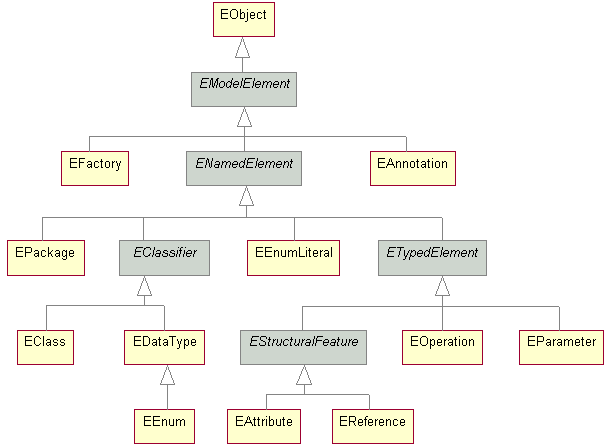
are *Classes, Attributes*, *References*, *Operations*, etc. A quick look at the

http://download.eclipse.org/modeling/emf/emf/javadoc/2.5.0/org/eclipse/emf/ecore/doc-files/EcoreHierarchy.gif
 EObject class diagram may help you get in touch with the terms used in EMF.

EObjects offer various capabilities that are not (or at least at high cost)
offered with plain POJOs. Extending EObjects in your model classes offers you
all these capabilities free of charge:

* *serialization* (XML, XMI, binary, database based persistence, etc.)
* *change propagation*
* ** *validation*
* ** *object* *query*
* ** etc.

Furthermore the EMF ecosystem holds plenty of frameworks that extend it in
various areas. Using EObject based POJOs allows you to take advantage of all
these powerful frameworks.

A disadvantage is that EMF's pretty invasive. You get all its power, but you
mostly have to stick to EObjects. This usually isn't prroblematic in client
(aka Eclipse IDE/RCP or other RCP platforms) projects, but might be a problem
in server side projects. You may tell the generator
http://wiki.eclipse.org/EMF/Recipes#Recipe:_Generating_Pure_API_With_No_Visible_EMF_Dependencies
 not to extend EObjects, but you'll loose all benefits the powerful EMF runtime
offers to you. Another solution emerged lately with Eclipse
http://martintaal.wordpress.com/2010/05/18/introducing-the-texo-project/ Texo.
Texo generates plain POJOs and offers a runtime that unleasehes most of the emf
runtime capabilities.

h1. All Ways lead to Rome
*
*
There are usually several ways to get to the desired result (aka generated java
code). The best way to find out about them is to get
http://www.amazon.com/EMF-Eclipse-Modeling-Framework-2nd/dp/0321331885/ref=sr_1_1?ie=UTF8&s=books&qid=1282042712&sr=8-1
 Eclipse Modeling Framework book or trial and error.
A rule of thumb is to have all referenced classes available in your model
definition. This is evident for ecore classes. But if your ecore classes use
references to plain java types (that are not part of your ecore model in the
strict sense) you'll have to declare those java types in the ecore model. In
other words, the ecore model needs to know about all types (ecore or plain
java) that are part of your model.

h4. example: Use EDataTypes for Java types
Let's say that my modeled class CDOEditorDefs has a method execute() that
throws an ExecutionException. I could add that method by hand but as a matter
of taste I prefer to declare that method in my model.
My model does not know anything about this exception so far, so there's no way
to get the correct signature generated out of the box . I'll therefore have  to
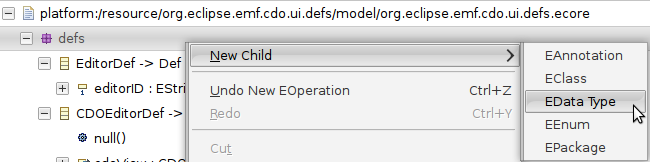
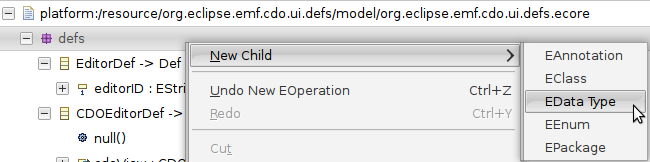
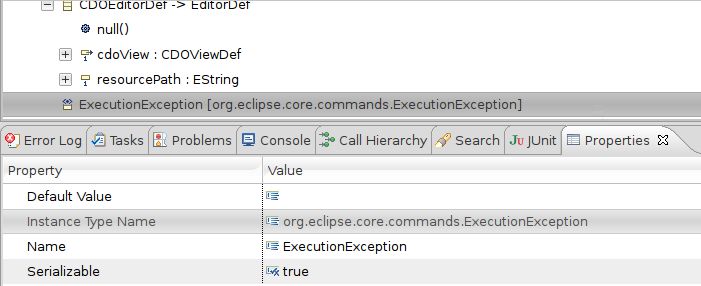
declare this exception in model. I create a DataType *ExecutionException*.

create an EDataType:


http://community.jboss.org/servlet/JiveServlet/showImage/4911/declare-datatype.png

http://community.jboss.org/servlet/JiveServlet/downloadImage/4911/declare-datatype.png


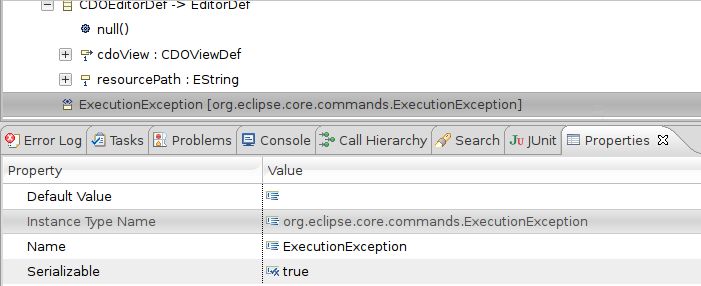
Give it an instance type name so it won't be generated but is referencable:


http://community.jboss.org/servlet/JiveServlet/showImage/4913/declare-executionexception.jpg

http://community.jboss.org/servlet/JiveServlet/downloadImage/4913/declare-executionexception.jpg


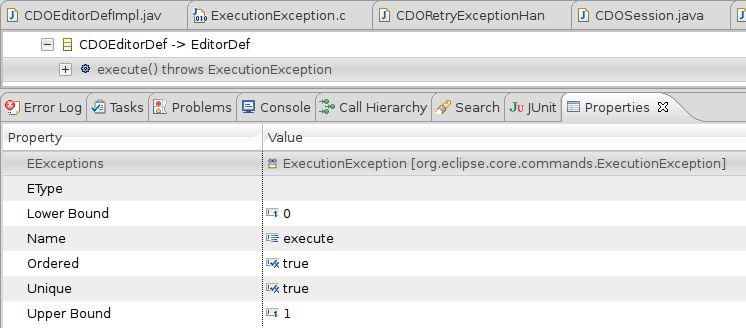
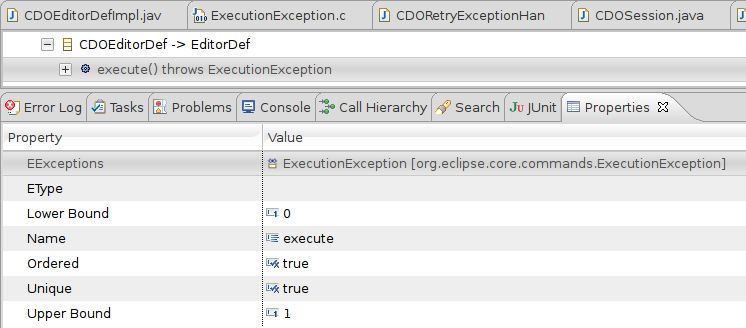
Set the execute method (operation) to throw the ExecutionException:


http://community.jboss.org/servlet/JiveServlet/showImage/4914/declare-throws-executionexception.jpg

http://community.jboss.org/servlet/JiveServlet/downloadImage/4914/declare-throws-executionexception.jpg


The generated method now throws the given Exception:


http://community.jboss.org/servlet/JiveServlet/showImage/4915/generated-throws-executionexception.jpg

http://community.jboss.org/servlet/JiveServlet/downloadImage/4915/generated-throws-executionexception.jpg

h4. example: Use Instance Type Name to model Java Interfaces

A very common problem is to have modeled (ecore-) classes extend Java
Interfaces. For instance this could be java.lang.Comparable
The best way to achieve that is to model a class Comparable. Do not model its
operation as this is just a mirror of the real java interface in the
ecore-world.
Interfaces are modeled as supertypes in ecore. You therefore cannot use
EDataTypes here  as they cannot be supertypes of ecore classes. Nevertheless
you can achieve that in a slight different manner: You model a (real) ecore
class, but you set its *instance type name:* *java.lang.Comparable*. You can
now add the Comparable class to the super type of each ecore-class that shall
implement Comparable. The generator will not generate an ecore class that's
called Comparable but it will include java.lang.Comparable in the interface
that your ecore-classes implement.

+*Not sure I follow this example and what we're trying to illustrate.  Would
example code help?*+

h1. Get prepared to generate code, create a Genmodel
This is mostly straight forward. Select the ecore file and create a genmodel
for it.  Select your ecore file and start a new *EMF Generator Model* wizard.
The wizard will allow you to create a so called Generator Model that holds all
settings which are important to the code generation process.


http://community.jboss.org/servlet/JiveServlet/showImage/102-15705-15-5335/new-genmodel.jpg

http://community.jboss.org/servlet/JiveServlet/downloadImage/102-15705-15-5335/450-272/new-genmodel.jpg


There are 2 settings that might be of interest to you:

'*All*' (property group when the package is selected):
- *Base Package*: the base package all ecore classes get generated to
- *Prefix*: Prefix that the factory- and package-class get


http://community.jboss.org/servlet/JiveServlet/showImage/102-15705-15-5337/edit-genmodel.jpg

http://community.jboss.org/servlet/JiveServlet/downloadImage/102-15705-15-5337/311-251/edit-genmodel.jpg


example (still using the cdo.ui.defs example):

*Base Package*:  org.eclipse.emf.cdo.ui
*Prefix*: CDOUIDefs

Package-class gets CDOUIDefsPackage, Factory gets CDOUIDefsFactory, etc. All
classes get generated to the package org.eclipse.emf.cdo.ui

Further modifications you might be interested in are the suffixes of the
sub-packages (the defaults creates an 'impl' package where it puts all
implementation classes). It can be modified by selecting the '*Package
Suffixes*' and choosing the properties '*Implementation*' and '*Interfaces*'.
The naming of the implementation- and interface-classes may be changed, too.
You find those settings if you select the root-node of the tree in the
genmodel-editor and choose the '*Model*' property group. You'll find 'Class
Name Pattern' and 'Interface Name Pattern' among the available properties. The
explanations for the values show up in the statusbar (default is '*{0}impl*'
and '*{0}*').


http://community.jboss.org/servlet/JiveServlet/showImage/102-15697-11-4849/genmodel-classname-pattern.png

http://community.jboss.org/servlet/JiveServlet/downloadImage/102-15697-11-4849/genmodel-classname-pattern.png

Once you're done defining your generator model, you simply need to generate the
implementation classes. Select the package you want to generate, right click
and select the implementation you want to create. You may choose among the
models, the editor, the tests.


http://community.jboss.org/servlet/JiveServlet/showImage/102-15697-11-4850/genmodel-generate.png

http://community.jboss.org/servlet/JiveServlet/downloadImage/102-15697-11-4850/genmodel-generate.png


h1. Modify the Generated Classes
Ecore is built to be modified, the basic usage-pattern is to code and generate
hand-in-hand. To tell the generator not to override your modifications you need
to set the javadoc-annotation to anything different than *...@generated*. Good
practice says that you should set it to '@generated NOT'. Good practice also
tells you to annotate any manually added method by *...@added*, but its
optional though.
There is another handy that allows you to modify and get the generated code. If
you want to have your code instead of the generated one, you just annotate
accordingly and the generator will preserve your code. If you want the
generated code, too, you'd need to create a method that has the original name +
a suffix 'Gen'

example:

/**
*
* @generated NOT
*/
public void setName(String name) {
    YOUR OWN CODE
}

/**
*
* @generated
*/
public void setNameGen(String name) {
    GENERATOR provides the generated code in here
}

After making your modifications, you simply need to re-generate the ecore
classes. (+*How?*+)

h1. Refactor generated Code and Regenerate
The code generator in EMF's is pretty capable when it's up to merge manual code
changes in generated code. It respects *...@generated* tags and preserves your
handwritten code in generated classes.
If you rename a class in your ecore file though, it won't be able to detect
your change. EMF has no clue that you renamed ecore class definitions. It will
not be able to detect your java files because they have the old name. It will
generate new artifacts and merging will not occur. You could copy your changes
manually, but this is pretty cumbersome, there's a better approach to this use
case:
Refactor/rename the generated java classes in a first step. Rename your ecore
class definitions in a second step and regenerate afterwards. EMF will detect
the preexisting artifacts and merge your manual code changes with the generated
content. You will not have to copy your code manually.

--------------------------------------------------------------

Comment by going to Community
[http://community.jboss.org/docs/DOC-15705]

Create a new document in JBoss Tools at Community
[http://community.jboss.org/choose-container!input.jspa?contentType=102&containerType=14&container=2128]
_______________________________________________
jboss-user mailing list
[email protected]
https://lists.jboss.org/mailman/listinfo/jboss-user