David Jorm [http://community.jboss.org/people/dfj] modified the document:
"Adding Papyrus MDT UML tools to JBDS"

To view the document, visit: http://community.jboss.org/docs/DOC-16623

--------------------------------------------------------------
JBDS does not ship with a UML tool, but a wide variety of modeling tools are
available for the eclipse platform. The papyrus MDT eclipse component provides
a simple, feature complete, open source UML editor. To install it on JBDS,
perform the following steps:

1. Select Help -> Install New Software...
2. Add the following software update repositories:1. antlr -
http://antlreclipse.sourceforge.net/updates/
http://antlreclipse.sourceforge.net/updates/
2. emf -  http://download.eclipse.org/modeling/emf/updates/releases/
http://download.eclipse.org/modeling/emf/updates/releases/
3. gmf -  http://download.eclipse.org/modeling/gmp/updates/releases/
http://download.eclipse.org/modeling/gmp/updates/releases/
4. modisco -  http://download.eclipse.org/modeling/mdt/modisco/updates/release/
http://download.eclipse.org/modeling/mdt/modisco/updates/release/
5. orbit -
http://download.eclipse.org/tools/orbit/downloads/drops/S20110304120314/repository/

http://download.eclipse.org/tools/orbit/downloads/drops/S20110304120314/repository/
6. papyrus -
http://download.eclipse.org/modeling/mdt/papyrus/updates/releases/helios
http://download.eclipse.org/modeling/mdt/papyrus/updates/releases/helios
7. xtext -  http://download.eclipse.org/modeling/tmf/updates/releases
http://download.eclipse.org/modeling/tmf/updates/releases
8. ocl -  http://download.eclipse.org/modeling/mdt/ocl/3_0/updates/releases/
http://download.eclipse.org/modeling/mdt/ocl/3_0/updates/releases/
9. m2t_xpand -
http://www.eclipse.org/modeling/download.php?file=/modeling/m2t/xpand/downloads/drops/1.0.1/R201008251147/m2t-xpand-Update-1.0.1.zip

http://www.eclipse.org/modeling/download.php?file=/modeling/m2t/xpand/downloads/drops/1.0.1/R201008251147/m2t-xpand-Update-1.0.1.zip
 (Archive)
10. emft_mwe -
http://www.eclipse.org/modeling/download.php?file=/modeling/emft/mwe/downloads/drops/1.0.2/R201102151014/emft-mwe-Update-1.0.2.zip

http://www.eclipse.org/modeling/download.php?file=/modeling/emft/mwe/downloads/drops/1.0.2/R201102151014/emft-mwe-Update-1.0.2.zip
 (Archive)

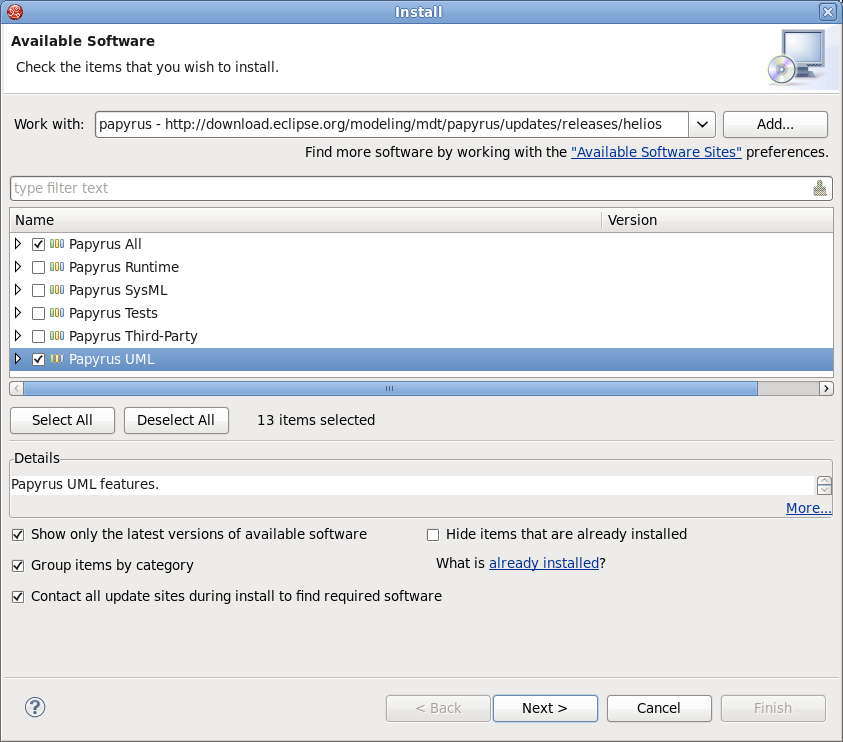
3. Select "papyrus" from the Work with: list.
4. Choose "Papyrus All" and "Papyrus UML" as shown below:
http://community.jboss.org/servlet/JiveServlet/showImage/102-16623-1-14326/install_papyrus.png

http://community.jboss.org/servlet/JiveServlet/downloadImage/102-16623-1-14326/450-395/install_papyrus.png

5. Run the software installation.
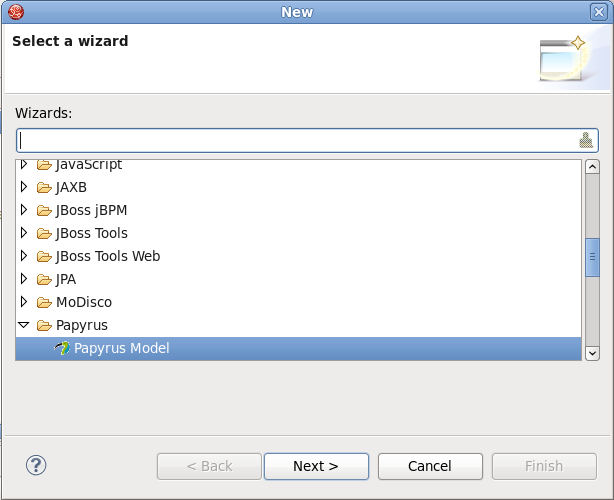
6. Within a project, right click and select New -> Other... then select Papyrus
Model as shown below:
http://community.jboss.org/servlet/JiveServlet/showImage/102-16623-1-14327/new_papyrus.png

http://community.jboss.org/servlet/JiveServlet/downloadImage/102-16623-1-14327/450-366/new_papyrus.png

Refer to the  http://www.eclipse.org/modeling/mdt/papyrus/ Papyrus site for
more information on using the tool in your project.
--------------------------------------------------------------

Comment by going to Community
[http://community.jboss.org/docs/DOC-16623]

Create a new document in JBoss Tools at Community
[http://community.jboss.org/choose-container!input.jspa?contentType=102&containerType=14&container=2128]
_______________________________________________
jboss-user mailing list
[email protected]
https://lists.jboss.org/mailman/listinfo/jboss-user