Fred Bricon [http://community.jboss.org/people/fbricon] modified the blog post:
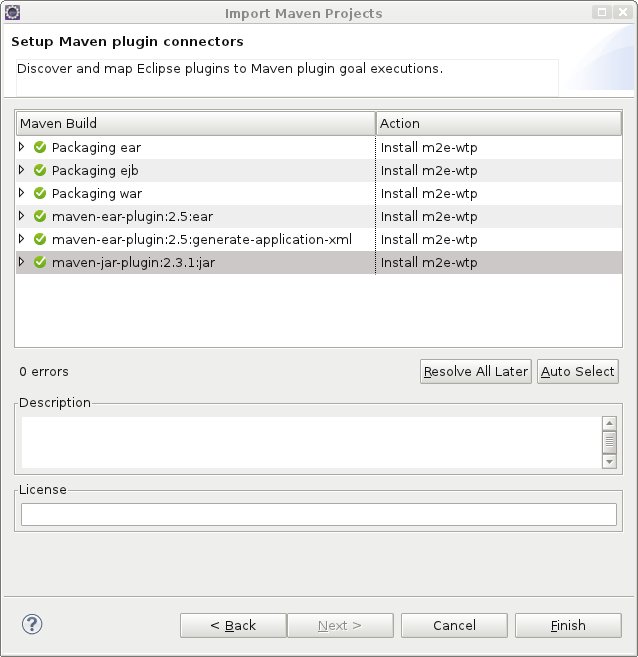
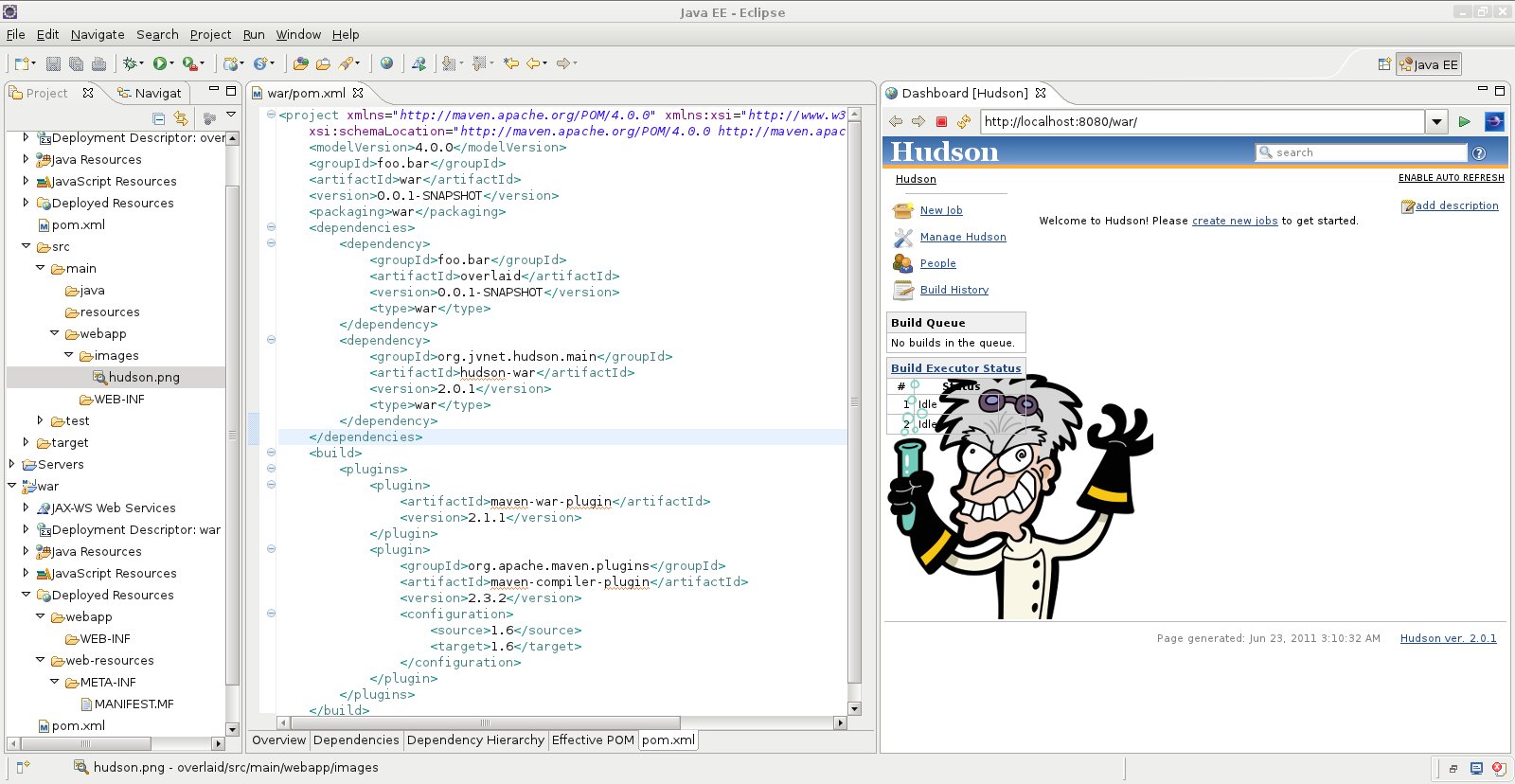
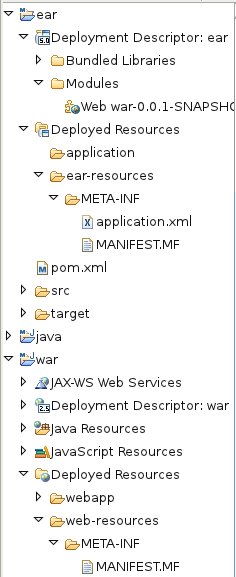
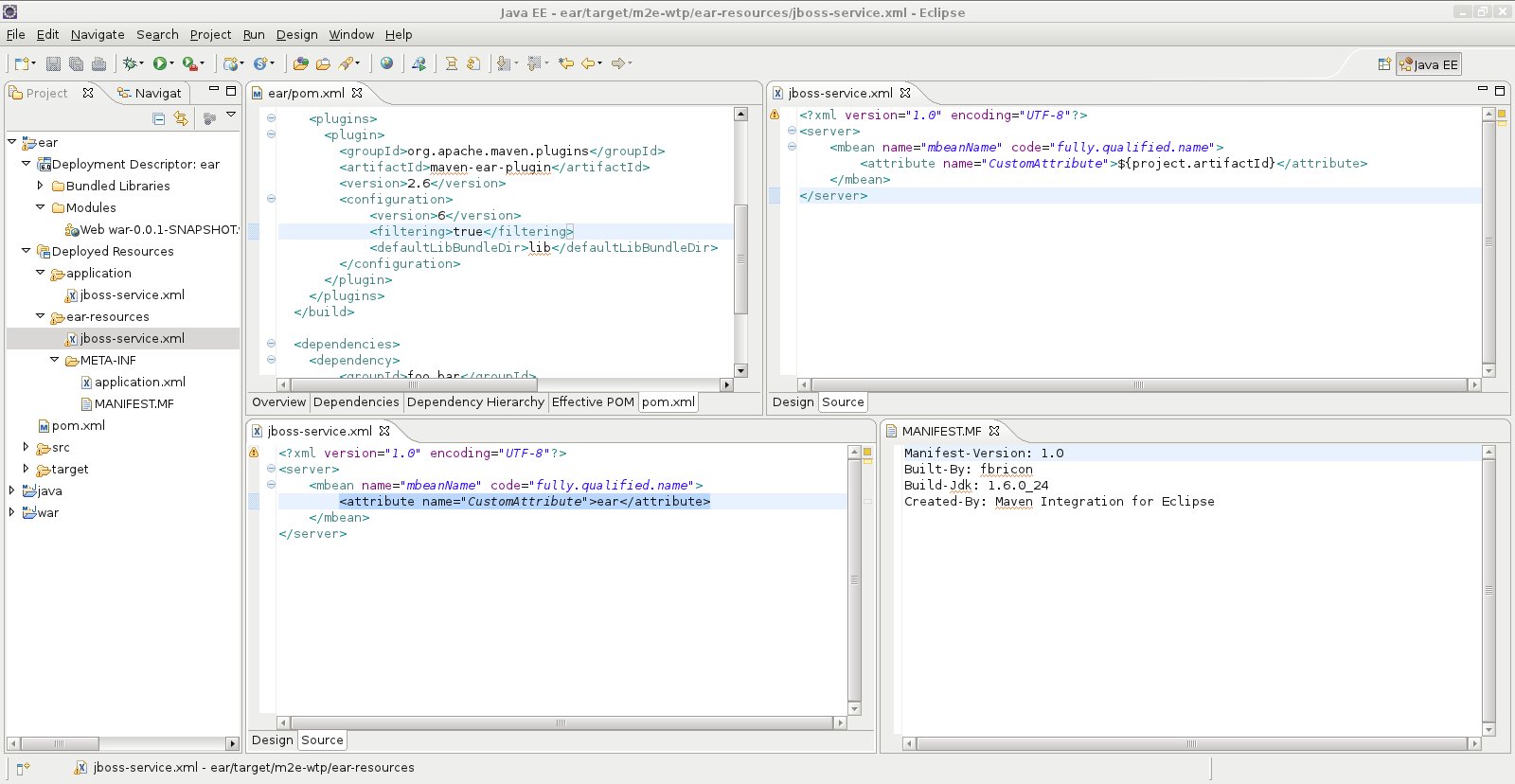
"m2e(clipse)-wtp 0.13.0 : New & Noteworthy" To view the blog post, visit: http://community.jboss.org/community/tools/blog/2011/06/23/m2eclipse-wtp-0130-new-noteworthy -------------------------------------------------------------- h3. Embracing Indigo So, Eclipse 3.7 a.k.a. Indigo has been released. This year, 62 Eclipse projects were made available on the same day. Part of the release train is M2E 1.0.0, which succesfully graduated from the Eclipse incubator. Congrats to all the teams involved! m2e-wtp 0.13.0 is finally available as well. Last minute bugs prevented an earlier release and m. As you will discover, the WTP integration with Maven is thighter than ever! The complete release notes are available here (https://issues.sonatype.org/secure/ReleaseNote.jspa?projectId=10310&version=11013), but let's take a quick look at what's new and noteworthy : h3. Discovery / installation Once m2e is installed, there are several ways to install m2e-wtp. First you need to wipe the m2eclipse-extras update site from your memory (and eclipse), it only contains m2e 0.12.0 compatible plugins : 1) Import existing Java EE projects into the workspace; You'll be proposed to install the m2e-wtp plugin : http://community.jboss.org/servlet/JiveServlet/downloadImage/38-3913-16576/450-463/m2e-wtp-discovery.jpg (http://community.jboss.org/servlet/JiveServlet/showImage/38-3913-16576/m2e-wtp-discovery.jpg) click on Finish and the installation will proceed. Your projects will be imported but the workspace will have to be restarted. 2) Go to Window > Preferences > Maven > Discovery and click on "Open catalog". Select m2e and proceed with the installation. 3) Old school installation : Use this update site : https://repository.sonatype.org/content/sites/forge-sites/m2eclipse-wtp/0.13.0/S/0.13.0.20110623-0455/ h3. Experimental war overlay support Finally, after all these years, m2e-wtp offers support for http://maven.apache.org/plugins/maven-war-plugin/overlays.html maven war overlays. The idea is to share common resources between several web applications. One use case could be to easily share logos, style sheets etc... in a corporate environment. All you need to do is declare in your web application pom.xml a dependency to another war artifact. <project xmlns=" http://maven.apache.org/POM/4.0.0 http://maven.apache.org/POM/4.0.0"; xmlns:xsi=" http://www.w3.org/2001/XMLSchema-instance http://www.w3.org/2001/XMLSchema-instance"; xsi:schemaLocation=" http://maven.apache.org/POM/4.0.0 http://maven.apache.org/POM/4.0.0 http://maven.apache.org/xsd/maven-4.0.0.xsd http://maven.apache.org/xsd/maven-4.0.0.xsd";> <modelVersion>4.0.0</modelVersion> <groupId>foo.bar</groupId> <artifactId>war</artifactId> <version>0.0.1-SNAPSHOT</version> <packaging>war</packaging> <dependencies> <dependency> <groupId>foo.bar</groupId> <artifactId>overlaid</artifactId> <version>0.0.1-SNAPSHOT</version> <type>war</type> </dependency> </dependencies> </project> By default, all the contents of the overlaid artifact will be copied to the deployment directory of the web application, minus the MANIFEST.MF. *The resources of the web application take precedence, in case of duplicate files*. If your project depends on a war archive (from your local repository), that dependency will be unzipped under target/m2e-wtp/overlays/<dependency>/ before being deployed to your server, according to the overlay configuration (you can select what files are included/excluded). For instance : <plugin> <groupId>org.apache.maven.plugins</groupId> <artifactId>maven-war-plugin</artifactId> <version>2.1.1</version> <configuration> <overlays> <overlay> <groupId>foo.bar</groupId> <artifactId>overlaid</artifactId> <excludes> <exclude>WEB-INF/lib/*</exclude> </excludes> </overlay> </overlays> </configuration> </plugin> ... won't deploy the jars from overlaid (project or archive)/WEB-INF/lib If the dependency is another web project in your workspace, the deployed resources will be dynamically determined from the overlay configuration and any file changed in the overlaid project will be automatically redeployed to the target server. Below is an example where the "war" project depends on an "overlaid" war project and hudson-war-2.0.1.war(before you asked, it's because this one is available in central). The images/hudson.png file is present in both overlay artifacts. The file is picked from "overlaid", since it's declared first in the pom. The deployed "war" project is a fully fledged CI server http://community.jboss.org/servlet/JiveServlet/showImage/38-3913-16569/war-overlay.jpg http://community.jboss.org/servlet/JiveServlet/downloadImage/38-3913-16569/450-232/war-overlay.jpg As of now, unsupported features of war overlays are : - filtering - exclusions of resources from the main project (defined as <overlay></overlay>) There's plenty of room for performance optimizations, and it still needs to be tested "on the field" so please, please, do not consider this feature as production ready, it's still experimental. Also note that the WTP overlay metadata format (in .settings/org.eclipse.wst.common.component) has changed and is incompatible with older development builds of m2e-wtp 0.13.0. So if you used previous nightly builds, you should reimport your projects without their eclipse metadata (.project, .classpath, .settings/) h3. Removal of WTP classpath libraries http://community.jboss.org/servlet/JiveServlet/showImage/38-3913-16570/classpath-containers.jpg http://community.jboss.org/servlet/JiveServlet/downloadImage/38-3913-16570/253-419/classpath-containers.jpg Since its infancy, m2e-wtp suffered from outstanding classpath resolution issues when unit tests were being run. It turned out some dependencies were being leaked by the WebApp and EAR classpath libraries, installed by default on Java EE projects. Having these libraries also required extra code complexity to move workspace dependencies from one library to the other. In m2e-wtp, a rather radical solution was taken : remove these WTP libraries after they're being automatically added by WTP. Guess what? it solved all the classpath issues occurring during tests and simplified the code. So from now on, you will just see the following libraries in the project explorer : h3. h3. 'Deployed Resources' node in the Project View http://community.jboss.org/servlet/JiveServlet/showImage/38-3913-16572/deployed-folders.jpg http://community.jboss.org/servlet/JiveServlet/downloadImage/38-3913-16572/236-577/deployed-folders.jpg Previous m2-wtp versions displayed a *Web Resources* node, for Web projects, or *Application Resources* for EARs, in the Project View. These nodes aggregate the content that must be deployed on the server / packaged in the final archive. A *Web Resources* node is already provided by JBoss Tools for projects having the JSF Facet installed. So, in order to avoid confusion, the nodes contributed by m2e-wtp have been renamed more appropriately to *Deployed Resources* : h3. Maven-generated MANIFEST.MF Up until now, in m2e-wtp, the manifest was generated "manually" using WTP's API, for web projects only. In the process, the man ifest kinda fixed some maven shortcomings in order to handle skinny wars (didn't add a classpath prefix for EJBs, contrary to maven). Now, for Web, EAR, EJB, Utility and Connector projects, the manifest is generated via a call to the Maven's archiver. That means no more impedance mismatch between Maven and Eclipse manifests. http://maven.apache.org/shared/maven-archiver/index.html Manifest customization is reflected on the fly in the generated file. For jar, ejb and connector projects, it is generated under target/classes. For web projects, it goes under target/m2e-wtp/web-resources/ and for EARs, goes under target/m2e-wtp/ear-resources/ http://community.jboss.org/servlet/JiveServlet/showImage/38-3913-16571/manifest-support.jpg http://community.jboss.org/servlet/JiveServlet/downloadImage/38-3913-16571/450-232/manifest-support.jpg Since the EAR library is gone, the manifest is no longer used to reflect compile classpath within Eclipse and is only used for runtime classpath resolution. Since it now follows the same rules as Maven, how do you handle skinny wars with EJBs and classpath prefix? One solution is to use your own Class-Path entry, which will be appended with the classpath computed by the maven archiver. So, for instance : will generate something like : Manifest-Version: 1.0 Built-By: fbriconBuild-Jdk: 1.6.0_24Class-Path: sample-ejb-0.0.1-SNAPSHOT.jar lib/sample-util-0.0.1-SNAPSH OT.jarCreated-By: Maven Integration for Eclipse Of course, the *"Created-By: Maven Integration for Eclipse"* entry can be overwritten using your own value : Finally, we tried to delete all MANIFESTS.MFs automatically generated by WTP. So hopefully, your source control shouldn't be polluted anymore. h3. Support for EAR Resource filtering m2e-wtp now supports http://maven.apache.org/plugins/maven-ear-plugin/examples/filtering-sources.html EAR resource filtering, pretty much the same way http://community.jboss.org/en/tools/blog/2011/05/03/m2eclipse-wtp-0120-new-noteworthy Web projects do. Just add the filtering attribute to your maven-ear-plugin configuration : http://community.jboss.org/community/tools/blog/2011/06/23/m2eclipse-wtp-0130-new-noteworthy/... http://community.jboss.org/community/tools/blog/2011/06/23/m2eclipse-wtp-0130-new-noteworthy/... </configuration> </plugin> </plugins> </build> Filtered resources are generated under target/m2e-wtp/ear-resources/ http://community.jboss.org/servlet/JiveServlet/showImage/38-3913-16573/ear-filtering.jpg http://community.jboss.org/servlet/JiveServlet/downloadImage/38-3913-16573/450-232/ear-filtering.jpg h3. Dropped support for Eclipse 3.5 and older versions In order to support war overlays, m2e-wtp 0.13.0 is taking advantage of several APIs that were made available in Eclipse 3.6 ( Helios). The direct consequence is it's not longer compatible with Eclipse 3.5 (Galileo) based platforms and of course older versions. However it's been tested against Eclipse 3.6 and 3.7 on the continuous integration server at JBoss. h3. Now, what next? Well, we're gonna see how the overlay support stands in the wild. If necessary, one or more 0.13.x bugfixes can be made available "quickly". One of the problem that delayed this release is a https://bugs.eclipse.org/bugs/show_bug.cgi?id=350138 conflict between m2e-wtp and the pom properties configurator. This lead us to remove the latter from m2e marketplace catalog to avoid confusion. I hope we can find a solution quickly in order to restore that plugin in the marketplace. Next version (0.14.) should include Dali support, Application Client packaging support, bug fixes and https://issues.sonatype.org/browse/MECLIPSEWTP#selectedTab=com.atlassian.jira.plugin.system.project%3Aroadmap-panel more... As always, if you find any issue or would like to see new useful features in m2e-wtp, please open a ticket at https://issues.sonatype.org/browse/MECLIPSEWTP https://issues.sonatype.org/browse/MECLIPSEWTP Enjoy, Fred. PS: Again, special kudos to Igor Fedorenko who supported me during this not-so-trivial release. --------------------------------------------------------------
_______________________________________________
jboss-user mailing list
[email protected]
https://lists.jboss.org/mailman/listinfo/jboss-user