Fred Bricon [http://community.jboss.org/people/fbricon] modified the blog post:
"m2e(clipse)-wtp 0.14.0 : New & Noteworthy"

To view the blog post, visit:
http://community.jboss.org/community/tools/blog/2011/09/30/m2eclipse-wtp-0140-new-noteworthy

--------------------------------------------------------------
Maven Integration for Eclipse WTP 0.14.0, a.k.a m2eclipse-wtp, a.k.a m2e-wtp is
out the door. This new release brings its share of new features and
enhancements, as well as a bunch of bug fixes. The complete release notes are
available
https://issues.sonatype.org/secure/ReleaseNote.jspa?projectId=10310&version=11250
 here.

m2e-wtp 0.14.0 works with Eclipse Helios and Indigo, requires at least m2e 1.0
and mavenarchiver plugin > 0.14.0 (0.15.0 should be automatically installed).
As usual, m2e-wtp can be installed from :
*  the Maven Discovery mechanism : Window > Preferences > Maven > Discovery >
Open catalog
*  the  http://marketplace.eclipse.org/content/maven-integration-eclipse-wtp
Eclipse Marketplace : Help > Eclipse Marketplace
*  the update site :
*http://download.jboss.org/jbosstools/updates/m2eclipse-wtp/
http://download.jboss.org/jbosstools/updates/m2eclipse-wtp/*

So what's new and noteworthy in 0.14.0? Let's see :

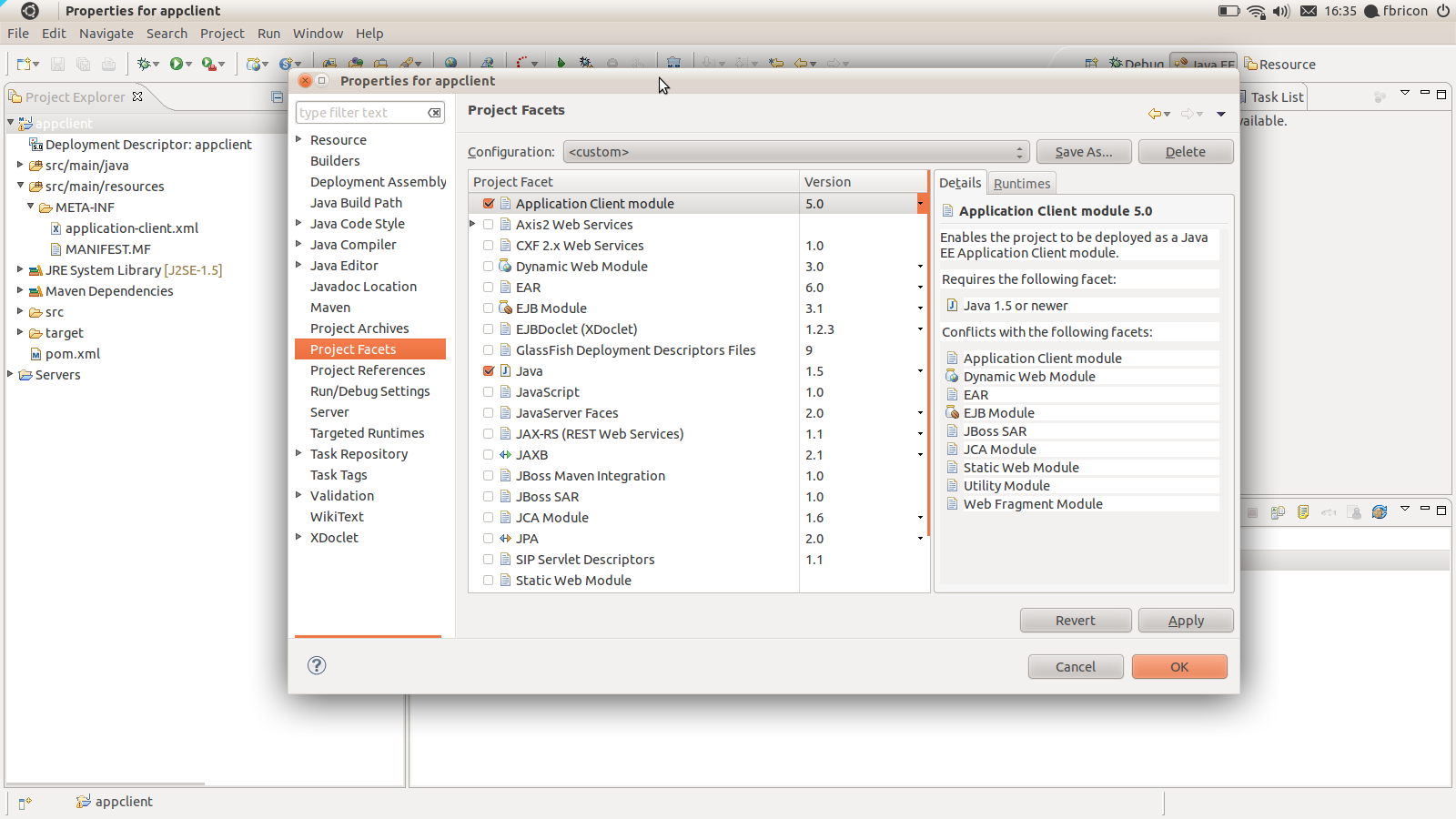
h3. New support for Application Client projects

Application Client packaging has been introduced with the new
http://maven.apache.org/plugins/maven-acr-plugin/ maven-acr-plugin. Support for
app-client type dependencies has been  http://jira.codehaus.org/browse/MEAR-137
added in maven-ear-plugin 2.6. Since Application Client projects are natively
supported in WTP, we added a new configurator for app-client projects. When an
app-client project is imported / configured via m2e, the Application Client
Facet will be automatically installed, its version inferred from the contents
of META-INF/application-client.xml. Filtering of the deployment descriptor is
supported.

<plugin>
  <groupId>org.apache.maven.plugins</groupId>
  <artifactId>maven-acr-plugin</artifactId>
  <version>1.0</version>
  <extensions>true</extensions>
  <configuration>
    <archive>
      <manifest>
        <mainClass>foo.bar.appclient.Main</mainClass>
      </manifest>
    </archive>
    <filterDeploymentDescriptor>true</filterDeploymentDescriptor>
  </configuration>
</plugin>


http://community.jboss.org/servlet/JiveServlet/showImage/38-4192-17064/appclient.png

http://community.jboss.org/servlet/JiveServlet/downloadImage/38-4192-17064/450-252/appclient.png

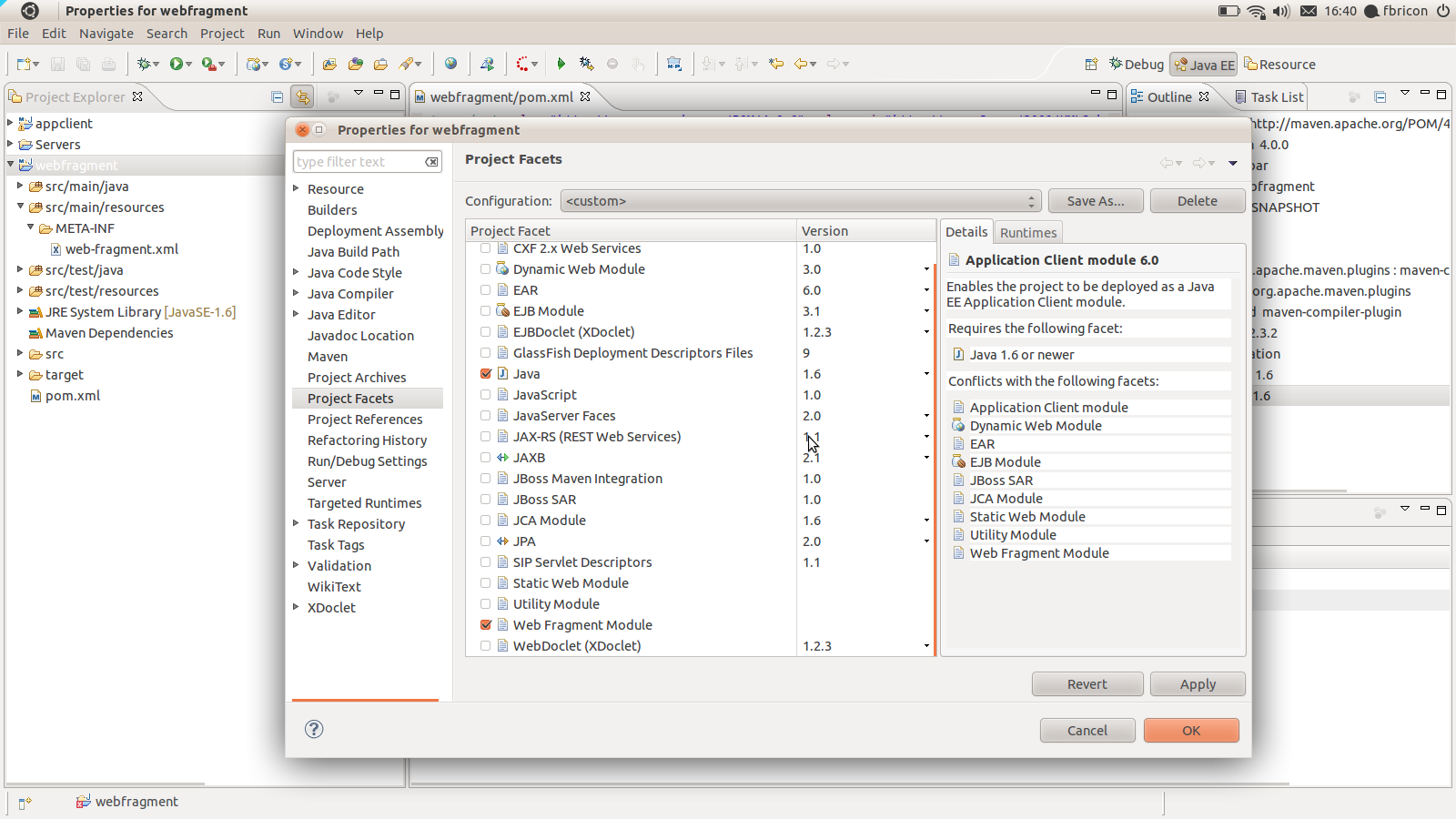
h3. New support for Web Fragment projects

If a project contains a META-INF/web-fragment.xml in it's compilation output
folder, the Web Fragment Facet is automatically installed upon maven project
configuration (the Utility Facet is removed if necessary). Note that, as per
the Java EE6 spec - and WTP is very picky about it-, Web Fragment projects
*must* use Java 1.6. Failure to comply will fail the configuration and an error
marker will be displayed.


http://community.jboss.org/servlet/JiveServlet/showImage/38-4192-17065/webfragment.png

http://community.jboss.org/servlet/JiveServlet/downloadImage/38-4192-17065/450-252/webfragment.png

h3. The use of target/m2e-wtp/web-resources is now optional

Remember, target/m2e-wtp/web-resources/
https://github.com/sonatype/m2eclipse-wtp/wiki/What-is-this-web-resources-folder%3F
  is used to allow the deployment of automatically generated web resources with
WTP.
On some occasions however, having target/m2e-wtp/web-resources/ might cause
some troubles (incompatibilities with WTP editors,
https://issues.sonatype.org/browse/MECLIPSEWTP-136 IBM RAD,
https://issues.sonatype.org/browse/MECLIPSEWTP-180 using
Servlet.getRealPath(...) in your code).
As a workaround, you can choose to not use target/m2e-wtp/web-resources/ and
generate the pom.properties and MANIFEST.MF files in your source directory
instead (It'll be your responsibility to add these files to your SCM ignore
list).
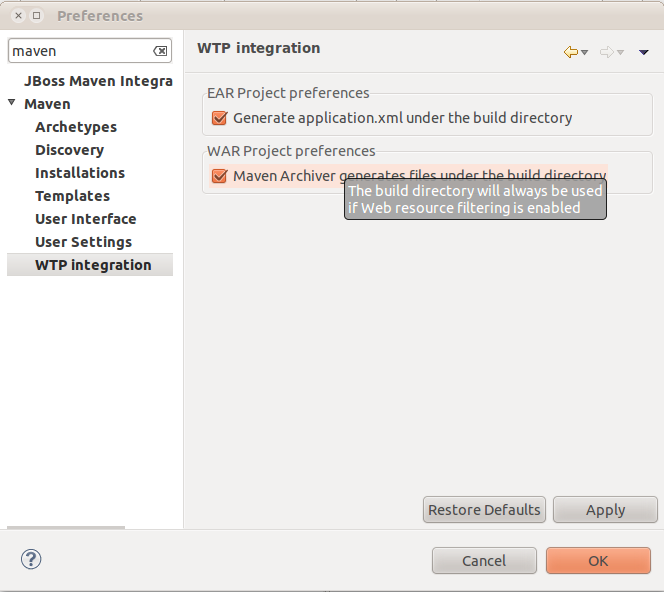
In order to remove target/m2e-wtp/web-resources/ from the list of deployed
folders, you need to change some preferences :
* on your project only : right-click on the project > Properties > Maven > WTP
: check "Enable Project Specific Settings" and uncheck "Maven Archiver
generates files under the build directory"
* on the whole workspace : Window > Preferences > Maven > WTP : uncheck "Maven
Archiver generates files under the build directory"


http://community.jboss.org/servlet/JiveServlet/showImage/38-4192-17067/war-preferences.png

http://community.jboss.org/servlet/JiveServlet/downloadImage/38-4192-17067/450-400/war-preferences.png

Please note that *this setting will be overridden if web resource filtering is
in use*, that is if the maven-war-plugin
http://maven.apache.org/plugins/maven-war-plugin/examples/adding-filtering-webresources.html
 configuration declares <webResources> or sets <filterDeploymentDescriptor> to
true. The reason is simple : you don't want to see your source files
overwritten by the filtering mechanism (and it would also lead to some
not-so-funny build loops).

h3. Custom file name mapping for web project dependencies

Since the maven-war-plugin allows file name customization for librairies and
TLDs, based on patterns (
http://maven.apache.org/plugins/maven-war-plugin/examples/file-name-mapping.html

http://maven.apache.org/plugins/maven-war-plugin/examples/file-name-mapping.html),
 we added the the same feature in m2e-wtp. That will allow you to use a
version-less name mapping for dependencies, like :

 <plugin>
<groupId>org.apache.maven.plugins</groupId>
<artifactId>maven-war-plugin</artifactId>
<version>2.1.1</version>
<configuration>
<outputFileNameMapping>@{groupId}@-@{artifactId}@.@{extension}@</outputFileNameMapping>
  </configuration>
</plugin>

The trick here is, in order to support non default filename mappings of
dependencies listed in the Maven Library, the artifact is copied to the build
directory (the target/ folder by default) under its new name. So if you happen
to run a clean build of your project, wiping out that directory, you will need
to manually run "Maven > Update Project configuration" on your project.

h3. Option to not publish overlay changes automatically

In order to support publishing of overlay changes automatically, m2e-wtp
aggressively cleared the cache of the servers your application is deployed to.
However, The overlay feature still being in an experimental state, we decided
to be more conservative with regard to server publishing, so a new
"Automatically republish servers on overlay modification" preference has been
added to *Window > Preferences > Server > Overlays*.


http://community.jboss.org/servlet/JiveServlet/showImage/38-4192-17066/overlay-republishing-preference.png

http://community.jboss.org/servlet/JiveServlet/downloadImage/38-4192-17066/450-394/overlay-republishing-preference.png

Overlays support is not bound to Maven, that's why it's under the Server
preferences.

h3. Support for the new tag="defaultRootSource" introduced in WTP 3.3.1

When several source folders are declared in the
.settings/org.eclipse.wst.common.component file, WTP prior to 3.3.1 (Indigo
SR1) tended to generate files (web.xml, faces-config.xml, ...) in the first
folder it found. Since web projects define +target/m2e-wtp/web-resources+ as
the first source folder (+target/m2e-wtp/ear-resources/+ for EAR projects),
that would cause some issues. In WTP 3.3.1, a new tag has been introduced,
designed to indicate which source folder should be used by default, when files
need to be looked for / generated. m2e-wtp now adds this tag when WTP 3.3.1 is
installed :

<project-modules id="moduleCoreId" project-version="1.5.0">
    <wb-module deploy-name="web-0.0.1-SNAPSHOT">
        <wb-resource deploy-path="/"
source-path="/target/m2e-wtp/web-resources"/>
        <wb-resource deploy-path="/" source-path="/src/main/webapp"
tag="defaultRootSource"/>
        <wb-resource deploy-path="/WEB-INF/classes"
source-path="/src/main/java"/>
         <property name="context-root" value="multi-web"/>
        <property name="java-output-path" value="/multi-web/target/classes"/>
    </wb-module>
</project-modules>


h3. A bit of documentation

As many projects, unfortunately, m2e-wtp doesn't shine in the documentation
area. I've been using the github Wiki (
https://github.com/sonatype/m2eclipse-wtp/wiki
https://github.com/sonatype/m2eclipse-wtp/wiki) to start a relatively modest
FAQ. I'm planning on adding more content in the near future, but I'm also
hoping the community at large will want to contribute some docs of its own. You
just need a github account to be able to edit the Wiki.


As always, if you find any issue, please open a bug report at
https://issues.sonatype.org/browse/MECLIPSEWTP
https://issues.sonatype.org/browse/MECLIPSEWTP (and don't forget to attach some
test projects).

Happy coding.

Fred.
 https://twitter.com/#%21/fbricon https://twitter.com/#!/fbricon
--------------------------------------------------------------

Comment by going to Community
[http://community.jboss.org/community/tools/blog/2011/09/30/m2eclipse-wtp-0140-new-noteworthy]
_______________________________________________
jboss-user mailing list
[email protected]
https://lists.jboss.org/mailman/listinfo/jboss-user