Fred Bricon [https://community.jboss.org/people/fbricon] modified the blog post:
"CSS and JS minification using Eclipse, Maven and WRO4J"

To view the blog post, visit:
https://community.jboss.org/community/tools/blog/2012/01/17/css-and-js-minification-using-eclipse-maven-and-wro4j

--------------------------------------------------------------
While developping web applications, it's common best practice to minify (and
sometimes obfuscate) static resources such as javascript and css files.
Such resource processing can be done either at build time or at run time,
depending on the tools you're using.
Surprisingly, tooling and documentation is rather scarce when it comes to web
resource optimization in the Eclipse World.
On the other hand, maven has a wide variety of plugins wrapping around
well-known 3rd party optimizers. In particular,
http://code.google.com/p/wro4j/ Web Resource Optimizer for Java, a.k.a WRO4J is
a :

"Free and Open Source Java project which brings together almost all the modern
web tools: JsHint, CssLint, JsMin,
Google Closure compressor, YUI Compressor, UglifyJs, Dojo Shrinksafe, Css
Variables Support, JSON Compression,
Less, Sass, CoffeeScript and much more. In the same time, the aim is to keep it
as simple as possible and as
extensible as possible in order to be easily adapted to application specific
needs."

http://code.google.com/p/wro4j/


While WRO4J can be used at runtime, it also provides a maven plugin if you
prefer a build time approach :  http://code.google.com/p/wro4j/wiki/MavenPlugin
wro4j-maven-plugin,.

Since Eclipse WTP allows you to incrementally deploy changed resources in your
workspace directly to your prefered application server,
having a way to do on-the-fly resource optimization deployment would be great,
wouldn't it?

Now, m2e (the Maven Integration for Eclipse plugin) users probably know, or
will know soon enough, that m2e doesn't run maven plugins it doesn't know
about. So having

<plugins>
  <plugin>
    <groupId>ro.isdc.wro4j</groupId>
    <artifactId>wro4j-maven-plugin</artifactId>
    <version>${wro4j.version}</version>
    <executions>
      <execution>
        <phase>compile</phase>
        <goals>
          <goal>run</goal>
        </goals>
      </execution>
    </executions>
    <configuration>
      <targetGroups>all</targetGroups>
      <destinationFolder>${basedir}/src/main/webapp/wro/</destinationFolder>
      <contextFolder>${basedir}/src/main/webapp/</contextFolder>
    </configuration>
  </plugin>
</plugins>


would result in the dreaded
http://wiki.eclipse.org/M2E_plugin_execution_not_covered "plugin execution not
covered" error. Indeed, since Eclipse is all about incremental building (i.e.
builds modified resources as soon as they're saved),
triggering long-running maven plugin every time a file is changed in the
workspace would be a disaster. So m2e requires users to be explicit about what
maven plugins should be run and when.
As a consequence, in order for these unknown plugins to be run on incremental
builds, users need to modify their project pom.xml (or their parent pom.xml)
and add a lifecycle-mapping configuration like (in the case of wro4j) :


<pluginManagement>

<plugins>
    <!--This plugin's configuration is used to store Eclipse m2e settings only.
It has no influence on the Maven build itself.-->
    <plugin>
        <groupId>org.eclipse.m2e</groupId>
        <artifactId>lifecycle-mapping</artifactId>
        <version>1.0.0</version>
        <configuration>
            <lifecycleMappingMetadata>
                <pluginExecutions>
                    <pluginExecution>
                        <pluginExecutionFilter>
                            <groupId>ro.isdc.wro4j</groupId>
                            <artifactId>wro4j-maven-plugin</artifactId>
                            <versionRange>[1.0,)</versionRange>
                            <goals>
                                <goal>run</goal>
                            </goals>
                        </pluginExecutionFilter>
                        <action>
                            <execute/>
                        </action>
                    </pluginExecution>
                </pluginExecutions>
            </lifecycleMappingMetadata>
        </configuration>
    </plugin>
    ...
</plugins>


Eventually, that lifecycle mapping would execute WRO4J on each and every file
change in your project. That's a bit extreme, but the biggest problem is the
generated files wouldn't be synchronized with the workspace so wouldn't be
deployed automatically on a WTP server.

Here comes the  https://github.com/fbricon/m2e-wro4j m2e-wro4j connector : it's
an eclipse plugin (in its early phase) that :
* allows wro4j-maven-plugin to be invoked when .js, .css, .coffee, .less, .scss
files are modified. Modifying the pom.xml also triggers the m2e-wro4j connector.
* is always invoked on clean builds
* updates the output folders so the changes can be visible directly in Eclipse
and deployed directly via WTP if needed
* automatically translates
*${project.build.directory}/${project.build.finalName}/* output directories to
*${project.build.directory}/m2e-wtp/web-resources/* if m2e-wtp is detected
* Provides a wro4j-maven-plugin template, available on ctrl+space in the pom
editor, in the <plugins> section :

https://community.jboss.org/servlet/JiveServlet/showImage/38-4446-17791/wro4j-template.png

https://community.jboss.org/servlet/JiveServlet/downloadImage/38-4446-17791/450-185/wro4j-template.png

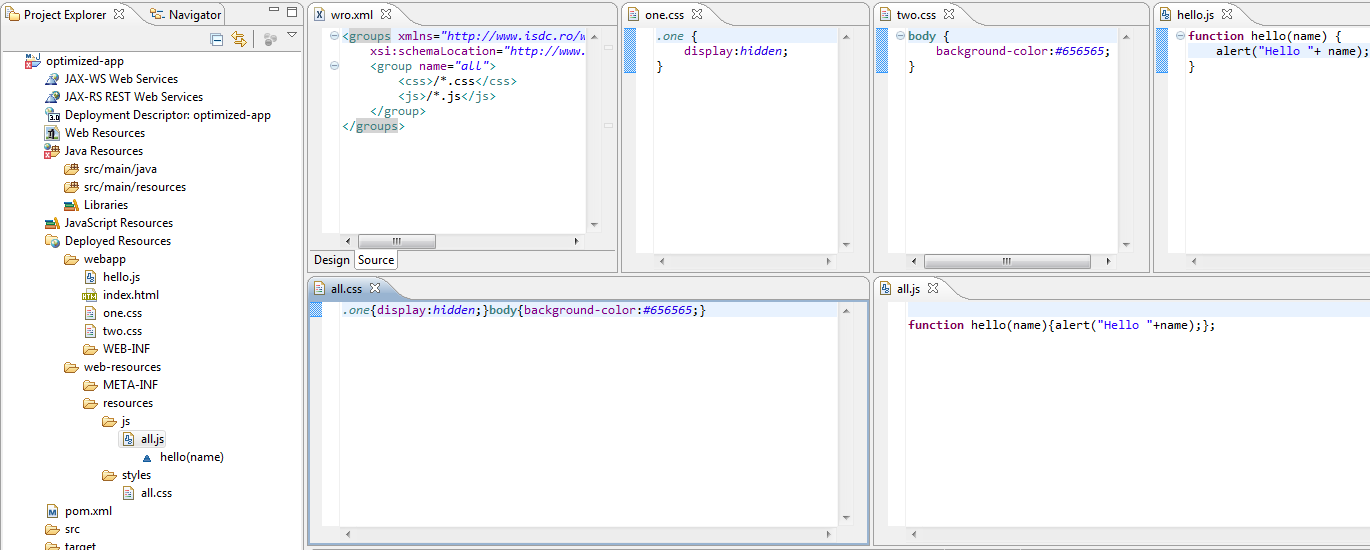
Using the above wro4j-maven-plugin configuration, and provided you have an
wro.xml descriptor under +src/main/webapp/WEB-INF+, you can see in the
following example the 2 css files are combined and minified into one all.css
file under +/target/m2e-wtp/web-resources/resources/styles/+ and the javascript
file is minified under +/target/m2e-wtp/web-resources/resources/styles/all.js+

https://community.jboss.org/servlet/JiveServlet/showImage/38-4446-17792/wro4j-optimization.png

https://community.jboss.org/servlet/JiveServlet/downloadImage/38-4446-17792/450-180/wro4j-optimization.png


If you're interested in trying m2e-wro4j, you can install it from the following
p2 update site :
http://download.jboss.org/jbosstools/builds/staging/m2e-wro4j/all/repo/
http://download.jboss.org/jbosstools/builds/staging/m2e-wro4j/all/repo/

Please be aware this initial version is really in its alpha stage (was coded in
a day). Issues can be opened at  https://github.com/fbricon/m2e-wro4j/issues
https://github.com/fbricon/m2e-wro4j/issues

For all your WRO4J or wro4j-maven-plugin specific issues, I strongly encourage
you to :
* read the WRO4J  http://code.google.com/p/wro4j/wiki/GettingStarted getting
started page and the http://code.google.com/p/wro4j/wiki/MavenPlugin  Maven
plugin documentation
* ask the google group directly :  http://groups.google.com/group/wro4j?pli=1
http://groups.google.com/group/wro4j

Hope it helps.

Fred
--------------------------------------------------------------

Comment by going to Community
[https://community.jboss.org/community/tools/blog/2012/01/17/css-and-js-minification-using-eclipse-maven-and-wro4j]
_______________________________________________
jboss-user mailing list
[email protected]
https://lists.jboss.org/mailman/listinfo/jboss-user