Max Rydahl Andersen [https://community.jboss.org/people/maxandersen] modified
the blog post:
"Excited about JBoss AS 7.1 Part III: Quickstarts Frenzy"

To view the blog post, visit:
https://community.jboss.org/community/tools/blog/2012/03/01/excited-about-jboss-as-71-part-iii-quickstarts-frenzy

--------------------------------------------------------------
This is the last of a
https://community.jboss.org/community/tools/blog/2012/02/27/jboss-as-71-is-out--what-am-i-excited-about
 series of
https://community.jboss.org/community/tools/blog/2012/02/29/excited-about-jboss-as-71-part-ii-developer-friendly-security
 blog
https://community.jboss.org/community/tools/blog/2012/02/28/excited-about-jboss-as-71-part-i-deployable-datasources
 posts covering three features I have had a personal interest in making it into
AS 7.1 and the upcoming JBoss Enterprise Application Platform (EAP) 6.

Todays topic is about Quickstarts.
h2. Quickstart Frenzy

The team doing AS Quickstarts have worked with the tools team on making sure
all of the quickstarts have been developed, tested and verified to work nice
and clean out of the box for developers - including making them equally +Just
Work+ no matter if you are using command line or when using them with an IDE
such as  http://jboss.org/tools JBoss Tools and
http://devstudio.jboss.com/earlyacess Developer Studio.

This was even true with AS 7.0 and if you missed our recent
http://jboss.org/aerogear AeroGear launch you should go look since this
Mobile/HTML5 driven project used the tools to show of AeroGear’s magic and one
of the key drivers on making this so nice and clean was with the help of the
Maven based quickstarts and the power of AS 7, OpenShift and well - kick ass
tools if you ask me  :)

You will be seeing more of these things happening going forward when other
projects gets upto speed with AS 7 and start to have a full experience on AS 7
together with Quickstarts that works well with tools.

Now back to the AS 7.1 quickstarts. The following is a listing of the curent
quickstarts available for  http://www.jboss.org/jbossas/downloads/ download at
jboss.org

* bean-validation - Bean Validation, JPA
* bmt - EJB, Programmatically control transactions
* cdi-injection - CDI injections & qualifiers + Servlet
* cmt - EJB, how to use container managed transactions
* ejb-in-ear - EJB + JSF, JAR and WAR deployed as EAR
* ejb-in-war - EJB + JSF deployed as a war
* ejb-remote - shows how to access EJBs remotely (EJB + JNDI)
* forge-from-scratch - Forge
* greeter - CDI + JSF + JPA + EJB + JTA
* h2-console - H2 Database console
* helloworld -Very basic CDI + Servlet
* helloworld-gwt - GWT
* helloworld-html5 - Very basic HTML5
* helloworld-jms - JMS
* helloworld-jsf - Very basic CDI + JSF
* helloworld-mdb - Very basic JMS and MDBs
* helloworld-osgi - OSGi
* helloworld-rs - CDI + JAX-RS
* helloworld-singleton - Singleton Session Bean
* hibernate3 - Hibernate 3
* hibernate4 - Hibernate 4
* jts - Using JTS to coordinate distributed transactions
* kitchensink - CDI + JSF + JPA + EJB + JPA + JAX-RS + BV
* kitchensink-ear - kitchensink as an EAR archive
* kitchensink-html5-mobile - kitchensink using HTML5, suitable for mobile and
tablet computers
* kitchensink-jsp - kitchensink converted to use JSP
* log4j - JBoss Modules, Class loading, logging
* numberguess - CDI + JSF
* payment-cdi-event - CDI
* servlet-async - CDI + Asynchronous Servlet + Asynchronous EJB
* servlet-filterlistener - Servlet Filter and Listener
* wsat-simple - Simple WS-AT JAX-WS Web service
* wsba-coordinator-completion-simple - Simple WS-BA JAX-WS Web service with
coordinator driven completion
* wsba-participant-completion-simple - Simple WS-BA JAX-WS Web service with
participant driven completion

As you might notice the number of quickstarts have grown from 5 in AS 7.0 to 33
in AS 7.1.

These quickstarts cover a broad range of technologies all setup to run on AS
7.1 and all follows more or less the same structure:

* contains a README.html/.md with explanation of what the example does
* a pom.xml following good best practices when building projects that uses JEE
& JBoss API
* is importable into JBoss Tools and Developer Studio

Mind you that because of the last two points (pom.xml + importable into tools)
you should see that it is just as usable in other IDE’s that support import of
Maven projects such as Netbeans, Intellij and others.

That is the power of Maven - no matter how much we all love to complain about
Maven’s shortcomings as a build tool, the fact it is prevalant, has all major
dependencies available and works from both command line and IDE’s is a huge win.

h2. Migrating from Community and Product
JBoss AS 7 and EAP 6 is the first release of JBoss which are built primarily
with Maven. This change also makes it possible to finally easily use proper
dependency managemment when building applications using JBoss AS 7 and EAP.

We’ve even gone so far to make sure that it is easier to move from AS 7 to EAP
6 - for plain applications it should just be a matter to adjust the
Bill-Of-Materials (BOM) POM used in your <dependencyManagement> section in your
pom.xml.

To do this presented a challenge since EAP 6 as the productized rebuilt version
of AS 7 would get an overlap of Maven Group/Artifact/Version-identifiers (GAV)
if not done properly. If you’ve used build systems with dependency management
you know overlapping Maven GAV's presents a problem of possibly ambigious
dependencies when doing builds. Especially with Maven which caches and stores
all its artifacts in one location, namely ~/.m2/repository. Imagine what
happens if you first built against Maven central/JBoss.org repositories and
then later used an EAP Maven repository where GAV were the same but the actual
artifacts behind them were not. Such setup will be catastrophic for any
software release, no matter if mission critical or just for fun.

Therefore we have taken this into account and JBoss EAP build team ensures that
no GAV “overlapping” occurs by adding the -redhat-<number> qualifier to
anything that is part of an EAP based product such as JBoss EAP 6.

This ensures continuity for developers using AS 7 and wanting to test and go to
production against EAP 6 and doing this change is illustrated well when looking
at the difference between quickstarts in JBoss AS 7 and those bundled with EAP
6.

Here is a snippet from the dependency management part of AS 7.1 quickstart:
<dependency>
    <groupId>org.jboss.spec</groupId>
    <artifactId>jboss-javaee-6.0</artifactId>
    <version>3.0.0.Beta1</version>
    <type>pom</type>
    <scope>import</scope>
</dependency>

And here is the same from an EAP 6 quickstart:
<dependency>
    <groupId>org.jboss.spec</groupId>
    <artifactId>jboss-javaee-6.0</artifactId>
    <version>3.0.0.Beta1-redhat-1</version>
    <type>pom</type>
    <scope>import</scope>
</dependency>

Notice, the difference ? The only difference is ‘-redhat–1’ in the version tag.

This small change ensures that your build now will use EAP 6 supported
productized binaries instead of the community bits as long as you do not list
the explicit version of your specific dependencies and let the BOM POM be the
"manager" of the versions.

It is a subtle difference with great potential.

This means that users applications can be built targeting community releases
early on and when relevant start targeting productized versions with an easy
change of the BOM.

And as a sideeffect it also becomes easy for you to try out experimental new
features in future community releases of JBoss AS 7, 8, etc. by just picking
the right version in the dependency management section.

Note: as productized versions stabilizes, gets security and bug fixes some
differences will occur which might require some other changes but with the
conventions of the -redhat qualifier and usage of so called Maven
Bill-Of-Material(BOM)-pom’s it becomes easy migrate and there is a central
place and format to outline the build differences that applies to you as a user
of JBoss AS and EAP.
h2. JBoss Tools and Quickstarts
There are two easy ways to get started with quickstarts from within JBoss Tools.

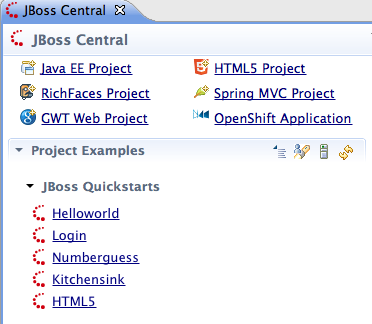
The first one is simply to open JBoss Central and pick one of the Quickstarts
listed in the project example section:

https://community.jboss.org/servlet/JiveServlet/showImage/38-4668-18064/jbosscentralquickstarts.png

https://community.jboss.org/servlet/JiveServlet/downloadImage/38-4668-18064/310-270/jbosscentralquickstarts.png


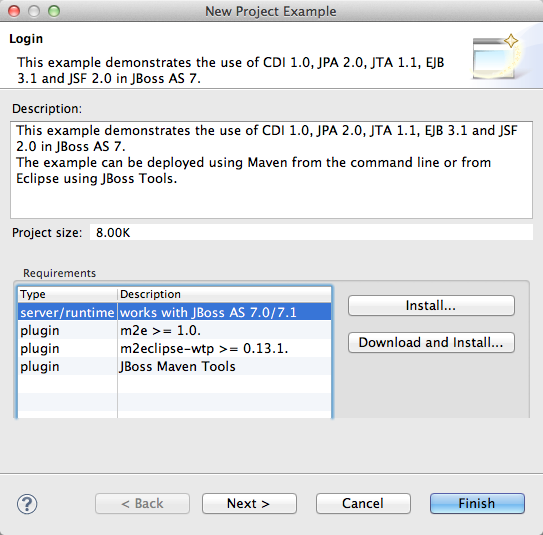
When starting such example you get a short description plus option to download
any missing plugins or server runtimes (such as AS 7.1).
Note: at time of writing the current M5 release of JBoss Tools targets AS 7.0,
AS 7.1 will be targeted in upcoming JBoss Tools release.


https://community.jboss.org/servlet/JiveServlet/showImage/38-4668-18065/projectexamplefirstpage.png

https://community.jboss.org/servlet/JiveServlet/downloadImage/38-4668-18065/310-305/projectexamplefirstpage.png


This makes it easy to get started - the only thing you need is to download
JBoss Tools or Developer Studio and it will help you get the remaining
dependencies.

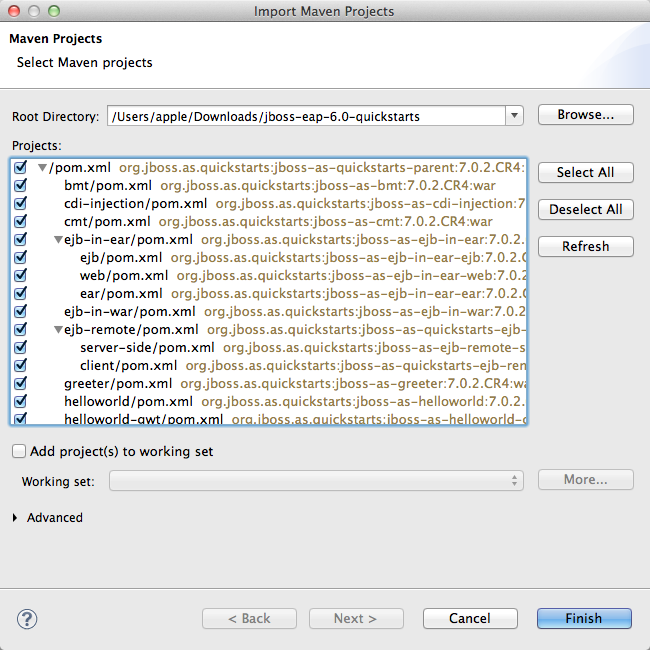
Alternatively if you prefer to download everything manually and have access to
all quickstarts in on go then simply Download the quickstarts and use the
‘Existing Maven Projects’ Import wizard.


https://community.jboss.org/servlet/JiveServlet/showImage/38-4668-18066/mavenimport.png

https://community.jboss.org/servlet/JiveServlet/downloadImage/38-4668-18066/450-450/mavenimport.png


In this wizard you can import a subset or all quickstarts as you see fit. After
that JBoss Tools will with help of m2eclipse and m2e-wtp import the projects
and you can start trying out JBoss AS 7 or EAP 6.

And as a final touch if you target AS 7 the examples will be setup to use
community binaries but if you target EAP 6 we will enable the enterprise flag
for the archetypes which will make the created project target EAP productized
binaries instead via the usage of the -redhat qualifiers instead.
h2. What if I don’t want to use Maven ?

For easy distribution of quickstarts and making sure it works in the many
different environments users work in it is the best option available today.

We do though understand and realize not everyone likes to use Maven for their
projects and for this we’ve added a feature in JBoss Tools which allows you to
convert a Maven Eclipse project to a “plain” Eclipse project.

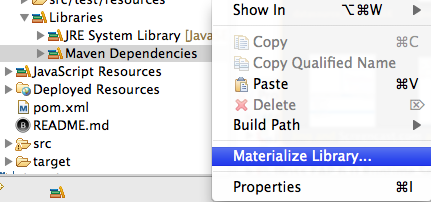
The feature is available via right click on any classpath library such as
“Maven Dependencies” and is called “Materialize Library”

https://community.jboss.org/servlet/JiveServlet/showImage/38-4668-18067/materializelibrarymenu.png

https://community.jboss.org/servlet/JiveServlet/downloadImage/38-4668-18067/310-145/materializelibrarymenu.png


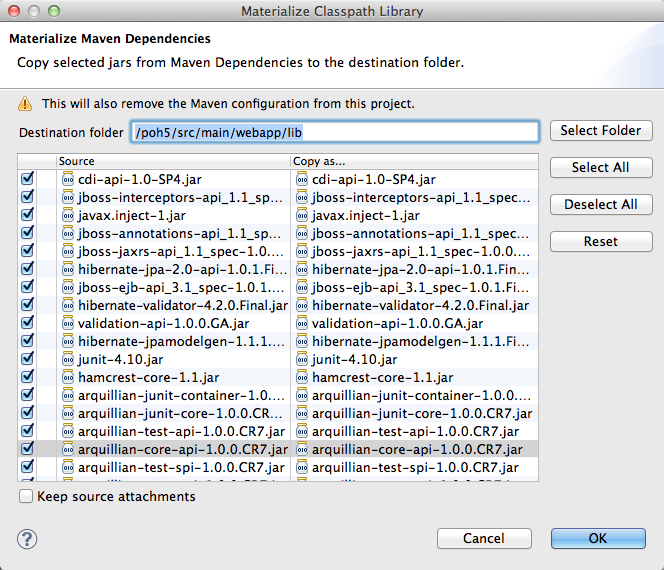
This feature materializes (i.e. copy) the Maven classpath libraries from being
located in ~/.m2/repository to a directory into your project + disabling the
Maven Nature and thus you end up with a “Maven free” project.


https://community.jboss.org/servlet/JiveServlet/showImage/38-4668-18068/materializelibrarydialog.png

https://community.jboss.org/servlet/JiveServlet/downloadImage/38-4668-18068/450-386/materializelibrarydialog.png


This means you can use the Maven based quickstarts, import it, apply
“Materialize Library” and end up with a project that has no dependency to Maven
builds and you can create a build in your favorite alternative build tool.

Everybody wins.

h2. The End
This brings to the end of my blog series concerning the main three features in
AS 7 I get excited about:
https://community.jboss.org/community/tools/blog/2012/02/28/excited-about-jboss-as-71-part-i-deployable-datasources
 Deployable datasources,
https://community.jboss.org/community/tools/blog/2012/02/29/excited-about-jboss-as-71-part-ii-developer-friendly-security
 Developer Friendly Security and finally the Quickstart Frenzy.

Of course there are plenty of other features in AS 7.0 and 7.1 to get excited
about, things like the ~1–4 second startup time, the scritable management API,
domain multi node setup, unfied configuration files and more.

But the ones that excites me this time around are the ones that I found to be
most helpful for developers and makes tooling integration easier/better.

I’ve told you what excites me in AS 7.1, now I would love to hear what feature
of AS 7.1 excites you ?
--------------------------------------------------------------

Comment by going to Community
[https://community.jboss.org/community/tools/blog/2012/03/01/excited-about-jboss-as-71-part-iii-quickstarts-frenzy]
_______________________________________________
jboss-user mailing list
[email protected]
https://lists.jboss.org/mailman/listinfo/jboss-user