Nope, not in an easy way anyways. The icon names are “hard-coded” depending on
the state of the slave. You could do some ugly JS hack in you property’s
summary.jelly where you change the src value of the img tag. But that could
break as soon as core changes something on the page.
Robert Sandell
Software Tools Engineer - SW Environment and Product Configuration
Sony Mobile Communications

From: [email protected] [mailto:[email protected]] On
Behalf Of Dzmitry Bahdanovich
Sent: den 30 juni 2014 14:38
To: [email protected]
Subject: Customize Jenkins Node - modify computer icon

Hi Gurus!


I develop a new plugin for Jenkins and have to add some additional properties
to nodes. To do it, I extended class NodeProperty<>, so my changes now are
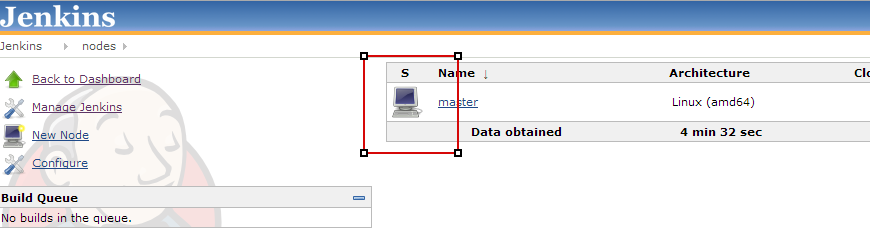
persisted by Jenkins. But now I want to replace Icon displayed at /computer
page for the nodes which I modified (in other words for nodes which contain my
CustomNodePorperty object )

Is it possible? Could you please suggest some entry point so I can further
investigate it by myself? Or do you know any Jenkins plugins which do the same
things? (I will download and investigate it)

[https://lh4.googleusercontent.com/-uUPQs5PL_To/U7FaGmMosuI/AAAAAAAAACo/Iaj71lY91ck/s320/master.png]<https://lh4.googleusercontent.com/-uUPQs5PL_To/U7FaGmMosuI/AAAAAAAAACo/Iaj71lY91ck/s1600/master.png>


Thanks you very much!

Dzmitry


--
You received this message because you are subscribed to the Google Groups
"Jenkins Developers" group.
To unsubscribe from this group and stop receiving emails from it, send an email
to
[email protected]<mailto:[email protected]>.
For more options, visit https://groups.google.com/d/optout.

--
You received this message because you are subscribed to the Google Groups
"Jenkins Developers" group.
To unsubscribe from this group and stop receiving emails from it, send an email
to [email protected].
For more options, visit https://groups.google.com/d/optout.