[
https://issues.jenkins-ci.org/browse/JENKINS-11941?page=com.atlassian.jira.plugin.system.issuetabpanels:all-tabpanel
 ]
jacob_robertson resolved JENKINS-11941.
---------------------------------------

      Assignee: jacob_robertson  (was: mdonohue)
    Resolution: Fixed

Look for this feature in the most recent version 1.29.

It is explained on the wiki @
https://wiki.jenkins-ci.org/display/JENKINS/Configuration+Slicing+Plugin under
the "String slicing multiple Builders" section.

> Configuration Slicing Plugin's "Execute shell slicer" lists first execute
> shell step only
> -----------------------------------------------------------------------------------------
>
>                 Key: JENKINS-11941
>                 URL: https://issues.jenkins-ci.org/browse/JENKINS-11941
>             Project: Jenkins
>          Issue Type: Improvement
>          Components: configurationslicing
>         Environment: Debian squeeze, Configuration Slicing Plugin, Version
> 1.26, Jenkins version 1.440
>            Reporter: Michael Prokop
>            Assignee: jacob_robertson
>
> The "Execute shell slicer" option of the Configuration Slicing Plugin seems
> to list only the first shell build step. Would be great if all the shell
> build steps could be listed.
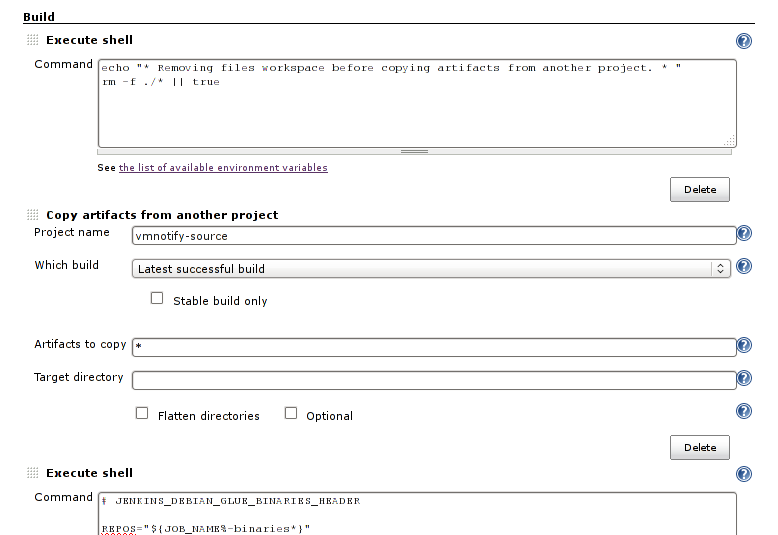
> For example I'm cleaning up in a first shell build step, then copy artifacts
> from another project and finally have another shell build step which executes
> the real[tm] stuff:
>   http://michael-prokop.at/screeni/gkrellShoot_11-11-30_225905.png
> Now in the "Execute shell slicer" option of the Configuration Slicing Plugin
> I see and can edit only the first shell build step (which does the clean up
> in the example above), whereas the more important stuff happens in the build
> step that's not available in "Execute shell slicer".
> If there's any chance that could be improved you'd make my day. :)

--
This message is automatically generated by JIRA.
If you think it was sent incorrectly, please contact your JIRA administrators:
https://issues.jenkins-ci.org/secure/ContactAdministrators!default.jspa
For more information on JIRA, see: http://www.atlassian.com/software/jira