<https://lh4.googleusercontent.com/-HUyg_IzrJ7Y/UsMckOrUdpI/AAAAAAAAAAc/l4059E7qL5U/s1600/java_plugin.png>
Hm... I cannot run your screen cast.
The error msg is:

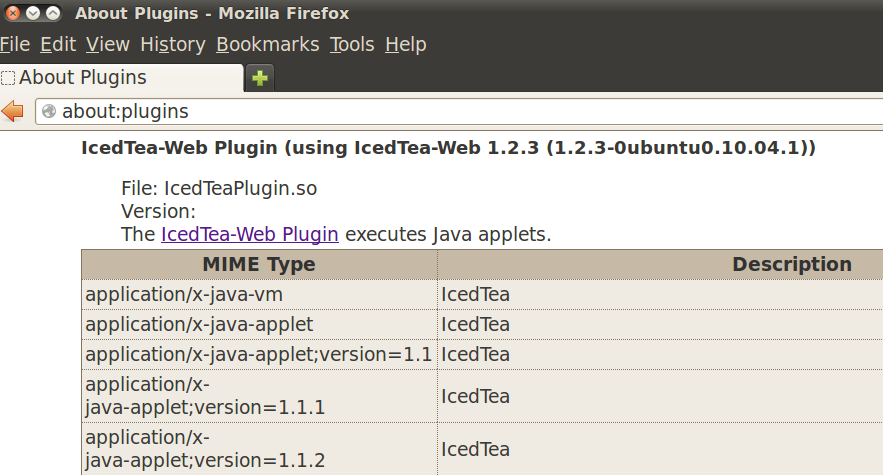
Java Plugin Needed
You need the java plugin <http://java.com> to watch this screencast.


However, I have java plugin installed and configured.

*% java -version*
java version "1.6.0_27"
OpenJDK Runtime Environment (IcedTea6 1.12.6) (6b27-1.12.6-1ubuntu0.10.04.4)
OpenJDK 64-Bit Server VM (build 20.0-b12, mixed mode)

*% update-alternatives --display java*
java - auto mode
 link currently points to /usr/lib/jvm/java-6-openjdk/jre/bin/java
/usr/lib/jvm/java-6-openjdk/jre/bin/java - priority 1061
 slave java.1.gz: /usr/lib/jvm/java-6-openjdk/jre/man/man1/java.1.gz
Current `best' version is /usr/lib/jvm/java-6-openjdk/jre/bin/java.

Please also refer to the attached screen shot.

What am I missing here?

Again, thank you so much, mark.


On Tuesday, December 31, 2013 12:19:05 PM UTC-5, Mark Waite wrote:
>
> http://bit.ly/jenkins-in-five-minutes is a 5 minute screencast I created
> a few years ago.  That screencast shows how test results are typically
> presented in Jenkins.  Sorry for the boring introductory material in the
> first minute or two...
>
> There are a number of locations on the web which define the JUnit format,
> but I think you may be happier if you find a perl module which will write
> JUnit format for you, without requiring that you understand JUnit format.
>
> For example,
> http://damien.krotkine.com/2009/11/25/perl-tests-in-hudson-via-junit.html
> describes
> alternatives for Perl test reporting in a way that Jenkins can use.
>
>
> http://stackoverflow.com/questions/4095680/how-can-i-run-perl-tests-and-merge-the-results-with-junit-reports-in-ant
>  may
> also be helpful.
>
> Both of those have the benefit that you don't need to learn the JUnit
> output format.  The format is not hard to write, but why not reuse someone
> else's implementation...
>
> Mark Waite
>
>
> On Tue, Dec 31, 2013 at 9:55 AM, Charley Yen <[email protected]<javascript:>
> > wrote:
>
>> Hi Mark,
>>
>> I should be the one to apologize for not having made myself clear.
>>
>> What is the JUnit format? Could you show me an example?
>>
>> Yes, I can write my tool to produce any formats to feed jenkins. My
>> problem is I don't know WHAT format my tool should produce. I need a sample
>> data file to show me the format, either CSV or XML.
>>
>> BTW, I don't know much about Java and/or JUnit. I just want to have
>> jenkins plot a pie chart after EACH run of my tool which is implemented in
>> perl.
>>
>> Please show me a sample data file. for instance, would the following
>> formats work?
>>
>> CSV:
>> pass,fail,skip
>> 90%,2%,8%
>>
>> XML:
>> <pass>90%</pass>
>> <fail>2%</fail>
>> <skip>8%</skip>
>>
>> If they work, what configurations do I need to do in "Post-build
>> Actions"? Please show me the screen shots.
>>
>> For the links ou gave me, I wish I could see the configure page.
>>
>> Again, thank you so much, mark, for your time, effort, and help!
>>
>> On Tuesday, December 31, 2013 11:28:56 AM UTC-5, Mark Waite wrote:
>>
>>> I'm sorry, but I still don't understand what you're hoping to gain from
>>> a pie based representation of the data.  What is in a pie based
>>> representation that is not already available in the Jenkins test results
>>> history graph on the right hand side?  That existing graph shows percent
>>> passed, percent failed, and also shows the history of those values across
>>> builds.  It also already includes a number of nice navigation features
>>> (show failures only, show failures and successes, click to open a specific
>>> job, etc.)
>>>
>>> Since you control the format which you are writing from your test tool,
>>> you could as easily write JUnit format as any other format.  If you write
>>> JUnit format, then Jenkins will show the history of the test pass / fail
>>> percentages and will allow you to select any one of the tests to see more
>>> information about that test run, including which specific tests failed.
>>>  You would have the percentage pass / fail information you want for the
>>> most recent test run, plus a historical view of past test runs.  You also
>>> gain the benefit that other tools and plugins which can read JUnit format
>>> test results may be able to help you even further.
>>>
>>> That section of the Jenkins Cookbook is describing the plot plugin.  If
>>> you're still determined that you must have a pie chart, then you could
>>> refer to the source code of the Plot plugin to reverse engineer the data
>>> formats it will consume.  https://github.com/jenkinsci/plot-plugin is
>>> the source code, I believe.
>>>
>>> Mark Waite
>>>
>>>
>>> On Tue, Dec 31, 2013 at 8:25 AM, Charley Yen <[email protected]> wrote:
>>>
>>>> Thank you, Mark.
>>>>
>>>> I visited the link you gave me. But I don't see any charts/plots there.
>>>> Maybe I misunderstood you?
>>>>
>>>> My tests are not JUnit tests.
>>>>
>>>> Here is what we do at work:
>>>>
>>>> I developed a cmdline test tool in perl. This tool tests whether our
>>>> nightly builds (in perforce, mainly c codes at kernel level) can be
>>>> installed on 100+ Linux hosts. So it is merely a smoke test.
>>>>
>>>> My tool can compile a report in html format which lists pass/fail/skip
>>>> on every host with links to the detailed log files.
>>>>
>>>> I have configured my test tool run through Jenkins. What I am trying to
>>>> do now is as follows:
>>>>
>>>> Besides publish the html report, it would be nice to draw a pie chart
>>>> to show the results visually, such as 90% pass (in green), 2% fail (in
>>>> red)
>>>> and 8% skipped (in yellow).
>>>>
>>>> But I don't know --
>>>> 1) How to format the data for Jenkins to use? CSV of XML? Please show
>>>> me smaple files.
>>>> 2) What plugin to use? I guess it might be either plot plugin or
>>>> dashboard view plugin?
>>>> 3) How to configure my jenkins to read the data file? Please show me
>>>> what-to-do/how-to-do step by step with screen shots. All I know is that
>>>> this has to be done in "Post-build Actions" stage.
>>>>
>>>> In addition, I have read this book: "Jenkins Continous Integration
>>>> Cookbook" by Alan Mark Berg:
>>>> http://s1.downloadmienphi.net/file/downloadfile7/171/1380449.pdf
>>>> The book has an example and I could make it work on my jenkins.
>>>>
>>>> However, the book also says (pp. 91):
>>>>
>>>> "There are currently two other data formats that you can use: XML and
>>>> CSV. However, until the online help clearly explains the structures used,
>>>> I
>>>> would recommend staying with the properties format."
>>>>
>>>> That's exactly what I need, I guess. :(
>>>>
>>>> Again, thank you, Mark. Your help is highly appreciated. Have a
>>>> wonderful 2014.
>>>>
>>>> Charley
>>>>
>>>>
>>>>
>>>>
>>>> On Monday, December 30, 2013 2:58:09 PM UTC-5, Mark Waite wrote:
>>>>
>>>>> Jenkins has built-in support to read the results of JUnit tests from
>>>>> JUnit XML result files, and displays those results.  Many tools are able
>>>>> to
>>>>> write JUnit XML test result files (Java unit test libraries, C++ unit
>>>>> test
>>>>> libraries, Ruby unit test libraries, Python unit test libraries, etc.)
>>>>> If
>>>>> you can write your results in an XML format that is compatible with JUnit
>>>>> XML, then Jenkins will display the results without any plugins.
>>>>>
>>>>> I don't know what you're hoping to gain from a pie chart presentation
>>>>> of the test results.  If you truly require a pie chart, you may need to
>>>>> investigate one of the charting plugins.  I'd suggest first that you look
>>>>> at the existing Jenkins test results displays.  They probably already
>>>>> meet
>>>>> your needs.
>>>>>
>>>>> An example of the Jenkins unit test results is visible at:
>>>>>
>>>>> https://buildhive.cloudbees.com/job/MarkEWaite/job/git-plugi
>>>>> n/59/testReport/
>>>>>
>>>>> Thanks,
>>>>> Mark Waite
>>>>>
>>>>>
>>>>> On Fri, Dec 27, 2013 at 8:39 AM, Charley Yen <[email protected]>wrote:
>>>>>
>>>>>>
>>>>>>
>>>>>> <http://stackoverflow.com/questions/20787761/need-help-guidance-on-jenkins-plot-plugin-setup-and-configure#>
>>>>>>
>>>>>>
>>>>>> I am new to Jenkins and need some help to configure it so that it can
>>>>>> display my test results in pie chart.
>>>>>>
>>>>>> It's my first time being here and still getting to know this group so
>>>>>> if someone has already asked the same or similar question before, my
>>>>>> apology. I actually did a search. But still, I could have missed the
>>>>>> previous posts.
>>>>>>
>>>>>> I have a tool to run a smoke test which is to install a piece of
>>>>>> software on multiple hosts. And my tool can keep track the number of
>>>>>> passed/failed/skipped installations. I want to display the test
>>>>>> statistics
>>>>>> in a pie chart on jenkins. What plug-ins am I supposed to use? What kind
>>>>>> of
>>>>>> data file am I supposed to provide? Please show me step by step with
>>>>>> data
>>>>>> file format and the screen shots.I guess I should generate either csv or
>>>>>> xml files. But I don't know what the exact formats in either file. And I
>>>>>> don't know how to configure my jenkins to read this file. I don't even
>>>>>> know
>>>>>> what plugin I should use, plot plugin or dashboard plugin or something
>>>>>> else?
>>>>>>
>>>>>> I hope I have made myself clear and your help is highly appreciated.
>>>>>>
>>>>>> --
>>>>>> You received this message because you are subscribed to the Google
>>>>>> Groups "Jenkins Users" group.
>>>>>> To unsubscribe from this group and stop receiving emails from it,
>>>>>> send an email to [email protected].
>>>>>>
>>>>>> For more options, visit https://groups.google.com/groups/opt_out.
>>>>>>
>>>>>
>>>>>  --
>>>> You received this message because you are subscribed to the Google
>>>> Groups "Jenkins Users" group.
>>>> To unsubscribe from this group and stop receiving emails from it, send
>>>> an email to [email protected].
>>>> For more options, visit https://groups.google.com/groups/opt_out.
>>>>
>>>
>>>  --
>> You received this message because you are subscribed to the Google Groups
>> "Jenkins Users" group.
>> To unsubscribe from this group and stop receiving emails from it, send an
>> email to [email protected] <javascript:>.
>> For more options, visit https://groups.google.com/groups/opt_out.
>>
>
>

--
You received this message because you are subscribed to the Google Groups
"Jenkins Users" group.
To unsubscribe from this group and stop receiving emails from it, send an email
to [email protected].
For more options, visit https://groups.google.com/groups/opt_out.