Hi,

I have been trying to use the Execute Windows Batch Command  step (as I use
Windows) in order to trigger a new chrome window from Jenkins. From what I
knew, if a something could be triggered from the command line, it would
work the same way from Jenkins. The command that I put in the command
window (which works at the command prompt) is the following:
Enter code here..."c:\program files
(x86)\google\chrome\application\chrome.exe" --new-window
"http://localhost:8080:/debug?port=5858";
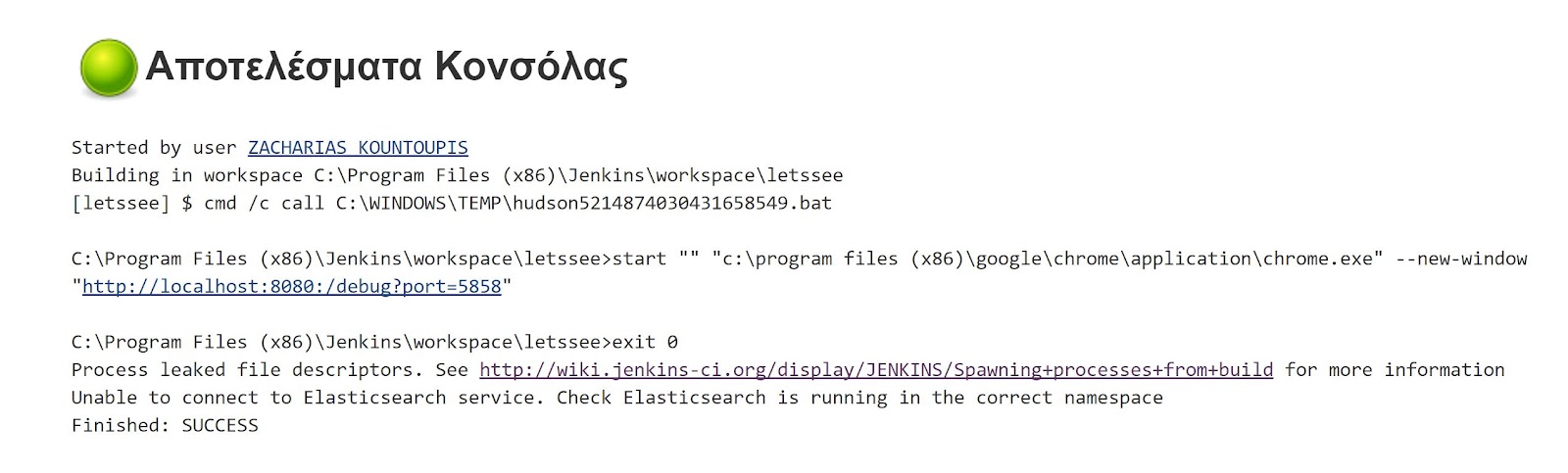
When i build the job, it builds successfully, but the result on the control
output is the following:

<https://lh3.googleusercontent.com/-uAtYAcImSbg/WVOdl6qUNtI/AAAAAAAABbI/IwkI6eha4v4lWKnlzLMoO_tLHEMLoC8hgCLcBGAs/s1600/Capture100.JPG>


Chrome is not triggered and I get this result. I have no idea what the
message regarding the Elasticsearch service means. Any ideas on how this
issue can be resolved? Thank you in advance for your time!


--
You received this message because you are subscribed to the Google Groups
"Jenkins Users" group.
To unsubscribe from this group and stop receiving emails from it, send an email
to [email protected].
To view this discussion on the web visit
https://groups.google.com/d/msgid/jenkinsci-users/44cb8c31-eaf2-4afb-9332-409c23a1e6c8%40googlegroups.com.
For more options, visit https://groups.google.com/d/optout.