Mouse wheel -- right, Rolf. That is a change. That was toned down because it
was just way too difficult to control (in my opinion), but we can revert
that if you think what we have now is just too slow. Let's talk about that.
Since I don't have a mouse wheel, I'm probably not the one to ask, but the
problem, as I recall, is that other actions are sometimes sent to Jmol as a
mouse-wheel action, and that "super zooming" that was set up for that was
way too much.
Major thanks to Eric for helping me get electron density going. I'm not sure
why exactly, but Eric doesn't have the latest Jmol development (unreleased)
version up there. Maybe I didn't get that uploaded properly. This version:

http://www.umass.edu/molvis/tests/jmol_edm_test4/?JMOLJAR=http://chemapps.stolaf.edu/jmol/docs/examples-11/JmolAppletSigned.jar

which should be in
http://chemapps.stolaf.edu/jmol/docs/examples-11/Jmol-11.zip, does not have
any of the problems Eric refers to there. Also, as far as I can tell, slab
has been and still is working just fine.

slab 60
slab on

Again, using JVXL files (which are now XML) greatly improves the download
performance -- obviously you are not going to show map files that are 65Mb
on the web!

Eric, another thing you might try is the FRONTONLY option for the
isosurface. Warren Delano told me that that's better for mesh

In addition, you might want to experiment with

set navigationMode on

with controls by mouse or keyboard arrows, and possibly

navigation on

(though that takes some practice, because the keyboard arrows are
ACCELERATORS, like banking an aircraft. (In an aircraft, the controls are
used to establish the bank - i.e. accelerate -- then centered during the
bank to maintain it.) The spacebar key stops the navigation until another
key is pressed.

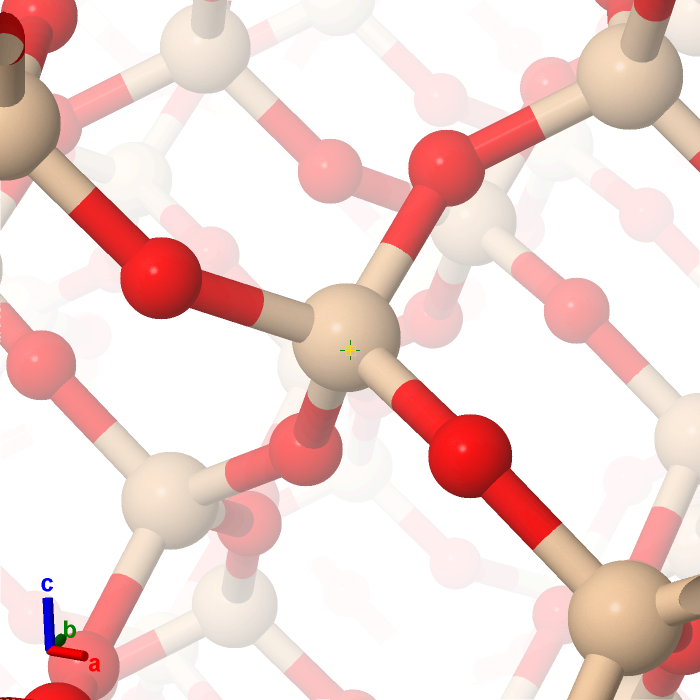
This is an alternative to slab and instead of looking at the molecule
through a microscope with slabbing to "fake" being there, this setting
actually brings you into the molecule and lets you traverse it. No slabbing
necessary.

An example of this is given in the example
http://chemapps.stolaf.edu/jmol/docs/examples-11/quartz-action.png, which
will "play" in Jmol with

http://chemapps.stolaf.edu/jmol/docs/examples-11/simple.htm?load%20quartz-action.png

which also demonstrates periodic boundary condition navigation through a
crystal and also a very new zshade mode that allows you to adjust the power
of the shading so that it is nonlinear. It was an effect we needed for the
upcoming Epcot Center exhibit, "Touch a Molecule".

Bob

On Tue, Jan 19, 2010 at 4:50 AM, Rolf Huehne <[email protected]> wrote:

> On 01/18/2010 09:03 PM, Eric Martz wrote:
> > I have made a little demonstration of visualization electron density maps
> in Jmol, showing off some of Bob's recent innovations.
> > http://www.umass.edu/molvis/tests/jmol_edm_test4/
> >
> > This new capability of Jmol is just fantastic!
> >
> I agree!
>
> While checking out the demonstration I noticed a change in mouse
> behaviour between version 11.9.20_dev and 11.6.8 (which we are currently
> using within Jena3D (http://jena3d.fli-leibniz.de):
>
> If I zoom the example structure '3hyd' after providing a 'reset' command
> using the Jmol script console with the mouse wheel it takes about 14
> full strokes until the atoms in the middle fill out the whole applet.
> If I do the same with version 11.6.8 only about 3 full strokes are
> necessary. (http://www.imb-jena.de/cgi-bin/3d_mapping.pl?CODE=3hyd)
>
> To exclude any differences in the initial Jmol settings between Eric's
> site and Jena3D I also tested it with the new version within Jena3D with
> the same result.
> (
> http://www.imb-jena.de/cgi-bin/3d_mapping.pl?CODE=3hyd&APPLET=signed&JMOLJAR=http://chemapps.stolaf.edu/jmol/docs/examples-11/JmolAppletSigned0.jar
> )
>
> Was this change in mouse behaviour intentional or accidental?
> Do others also observe a similar change on other systems?
> (Test system: openSUSE 11.2 x86_64, Java 1.6.0_17, Firefox 3.5.6)
>
> If it was intentional I think it is too fine-grained as a default. You
> might say that there is additionally the new zoom function at the right
> edge of the applet and the zoom with Shift-mouse_move, both zooming much
> less fine-grained. And it might be a good idea to have some differences
> here to provide different levels of control. But even with this idea I
> still think it is currently too fine-grained.
> What do you think about this?
>
> Regards,
> Rolf
>
>
> ------------------------------------------------------------------------------
> Throughout its 18-year history, RSA Conference consistently attracts the
> world's best and brightest in the field, creating opportunities for
> Conference
> attendees to learn about information security's most important issues
> through
> interactions with peers, luminaries and emerging and established companies.
> http://p.sf.net/sfu/rsaconf-dev2dev
> _______________________________________________
> Jmol-users mailing list
> [email protected]
> https://lists.sourceforge.net/lists/listinfo/jmol-users
>


--
Robert M. Hanson
Professor of Chemistry
St. Olaf College
1520 St. Olaf Ave.
Northfield, MN 55057
http://www.stolaf.edu/people/hansonr
phone: 507-786-3107


If nature does not answer first what we want,
it is better to take what answer we get.

-- Josiah Willard Gibbs, Lecture XXX, Monday, February 5, 1900
------------------------------------------------------------------------------
Throughout its 18-year history, RSA Conference consistently attracts the
world's best and brightest in the field, creating opportunities for Conference
attendees to learn about information security's most important issues through
interactions with peers, luminaries and emerging and established companies.
http://p.sf.net/sfu/rsaconf-dev2dev
_______________________________________________
Jmol-users mailing list
[email protected]
https://lists.sourceforge.net/lists/listinfo/jmol-users