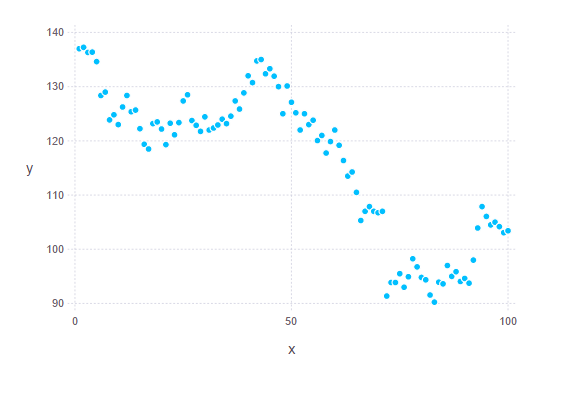
The first plot does a bunch of compilation. Second time you evaluate it
will be much quicker.
On Sat, Mar 21, 2015 at 7:28 PM, Charles Brauer <[email protected]>
wrote:

> I was able to get ODBC to work, but I had to give up Juno.  I
> installed Julia-0.3.6 and ran the following script:
>
> using DataFrames
> using ODBC
> using Gadfly
>
> conn = ODBC.connect("bigsur")
> df = query("Select * from IBM")
> names(df)
> closes = df[6]
>
> p = plot(x = collect(1:100), y = closes[1:100])
>
>
> This script produced the pplot:
>
>
> <https://lh3.googleusercontent.com/-fsCLimIPfhQ/VQ23cmefjiI/AAAAAAAAACo/G0XfX_gvZk0/s1600/Julia_plot.png>
>
> I am rather discouraged by the amount of time it took to create the plot.
> It was very slow!
>
> Charles
>
> On Friday, March 20, 2015 at 8:50:00 PM UTC-7, Jacob Quinn wrote:
>>
>> You might try using the `ODBC.advancedconnect()` function. It will
>> typically pop up with a window to put the info in.
>>
>> On Fri, Mar 20, 2015 at 6:13 PM, Charles Brauer <[email protected]>
>> wrote:
>>
>>> Hello,
>>>
>>> I'm a new user trying to run Julia under the Juno IDE.
>>> My environment is Windows 8.1 (x64) and Microsoft SQL Server 2014.
>>> On the SQL Server side, I setup the ODBC driver as follows.
>>>
>>>
>>> <https://lh5.googleusercontent.com/-ZNJawNMaC9Y/VQy0KtmKgXI/AAAAAAAAACI/2Lv8RNgyHhY/s1600/Setup%2Bodbc.png>
>>>
>>> When I clicked the *Test Data Source* button it said my configuration
>>> was OK.
>>>
>>> Now comes the fun part.  In Juno I get a default error when I try to
>>> connect.
>>>
>>>
>>> <https://lh6.googleusercontent.com/-Gh_aCB7qDMg/VQy1GTfQleI/AAAAAAAAACU/Yl_j314O1nU/s1600/juno%2Bodbc%2Berror.png>
>>>
>>> I don't understand why this does not work.
>>>
>>> I tried adding a *usr *and *pwd*, but that did not help.  Anyway, I
>>> should not have to give a *usr *and *pwd *since I configured the ODBC
>>> drive to be *Windows Authentication*.
>>>
>>> Please help.  Any suggestions will be greatly appreciated.
>>>
>>> Charles
>>>
>>> ]
>>>
>>>
>>>
>>>
>>>
>>