But why has something changed (just by updating) without me changing
anything?
I'd like to keep the preview line plus the font is already set to small...
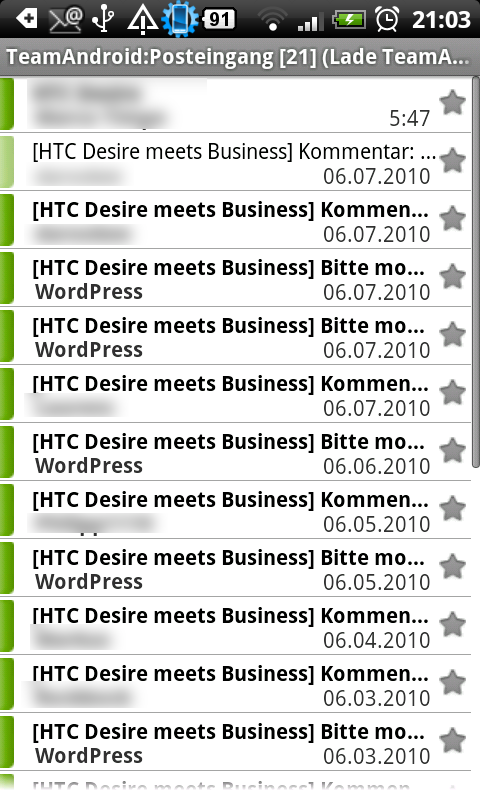
I'm not sure, but I think the problem is the star. It used to be next to
the date but now is below the date, taking up vertical space...
This screenshot illustrates what I mean:
http://www.teamandroid.de/wp-content/uploads/k-9.png

Jan

Am Mittwoch, 29. Januar 2014 00:36:57 UTC+1 schrieb Dennis Rockwell:
>
> On 01/28/2014 09:06 AM, Jan Niggemann wrote:
> > Hi all,
> >
> > I got an update and K-9 is now at 4.803 on my Galaxy Nexus (Stock 4.3
> > ROM).
> > Since the update, all entires in message lists take up more vertical
> > space than before.
> >
> > Does anybody have an idea why? Can I get the beloved concise look back?
>
> You can eliminate the preview lines, and shrink the font used; that's
> about it.
>
> Dennis
>

--
--
You received this message because you are subscribed to the K-9 Mail Users List.
To post to this group, send email to [email protected]
To unsubscribe, email [email protected]
To report an issue with K-9 Mail, visit
http://code.google.com/p/k9mail/issues/list
For more options, visit this group at http://groups.google.com/group/k-9-mail

---
You received this message because you are subscribed to the Google Groups "K-9
Mail" group.
To unsubscribe from this group and stop receiving emails from it, send an email
to [email protected].
For more options, visit https://groups.google.com/groups/opt_out.