https://bugs.kde.org/show_bug.cgi?id=513407
Bug ID: 513407
Summary: Hide file details under preview pane
Classification: Applications
Product: dolphin
Version First 25.04.3
Reported In:
Platform: Other
OS: Linux
Status: REPORTED
Severity: normal
Priority: NOR
Component: panels: information
Assignee: [email protected]
Reporter: [email protected]
CC: [email protected]
Target Milestone: ---
Created attachment 187670
--> https://bugs.kde.org/attachment.cgi?id=187670&action=edit
Screenshot of empty details pane
This over from
https://discuss.kde.org/t/dolphin-remove-file-details-from-preview-pane-to-enlarge-display/42612
SUMMARY
The preview pane includes a configurable array of file details shown underneath
the preview, which uses up screen area. Sometimes it may be desirable to
maximise the preview of e.g. a PDF to improve readability.
It is possible to individually de-select the details shown. However, the pane
does not actually resize when doing so, and continues to use up the same amount
of screen area:
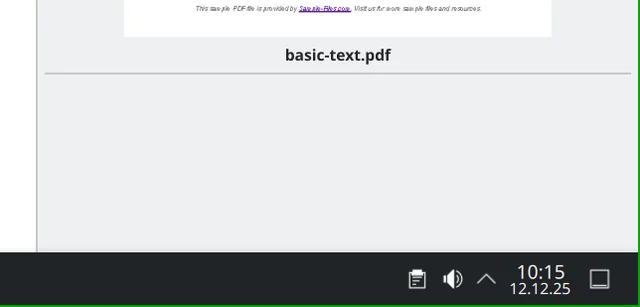
However, instead of fixing this (which may still be worth it), it would be
better to provide the ability to just quickly hide the details, e.g. by folding
it down.
STEPS TO REPRODUCE
1. Enable preview pane
2. Select a PDF or another file
3. Right mouse-click into preview pane, "configure", de-select all entries
OBSERVED RESULT
The details pane empties but remains the same size.
EXPECTED RESULT
I'd expect it to shrink. I'd even expect there to be a button to minimise it
without having to de-select a dozen checkboxes that I might need to re-select
later.
SOFTWARE/OS VERSIONS
Linux/KDE Plasma: Debian 13
KDE Plasma Version: 6.3.6
KDE Frameworks Version: ?
Qt Version: ?
--
You are receiving this mail because:
You are watching all bug changes.

