https://bugs.kde.org/show_bug.cgi?id=361668
            Bug ID: 361668
           Summary: Layer thumbnails have all white background and wrongly
                    represents layer content
           Product: krita
           Version: 3.0 Alpha
          Platform: Compiled Sources
                OS: Linux
            Status: UNCONFIRMED
          Severity: normal
          Priority: NOR
         Component: Layer Stack
          Assignee: [email protected]
          Reporter: [email protected]

Created attachment 98355
  --> https://bugs.kde.org/attachment.cgi?id=98355&action=edit
[ ^ screenshot of the bug ]

Hi, one of the confusing change I saw in 3.0alpha* is the representation of the
alpha/transparency in the thumbnails inside the layer stack: they are always
full white.

   On 2.9.x it was transparent, the user could see the color of the theme of
the background of the layer-stack ( eg.
https://krita.org/wp-content/uploads/2016/02/krita_shiftr_layerselect.gif , no
border or white background behind the flowers's thumbnails in layer-stack).
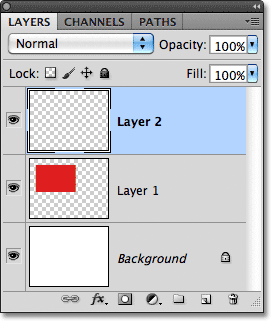
  Photoshop use another strategy here: to represent a little checkerboard on
the preview thumbnail ( eg.
http://pe-images.s3.amazonaws.com/basics/layers/new/new-layer-2.gif ).
Also, the thumbnail is always a square, and when it's not, a big large white
bottom border is added.
In the screenshot I attach here, you can see a lot of issue:
*  "Black cat" layer represented with a white background when it's full
transparency.
* "White cat" layer being totally invisible due to the white on white
rendering.
* "Background" layer with a big white padding on the bottom when it's a full
red layer.

* krita 3.0 Alpha (git ba25e96)

--
You are receiving this mail because:
You are watching all bug changes.