Wow, thanks for replying Yuri.  I didn't expect that.  Erm, as for your answer,
I really like having multiple desktops (although it would be very useful to be
able to name them).  What I don't like is that, sometimes when try to I scroll
up and down (because I think I'm in an editor or whatever), the desktop flips
to another one.  Worse, if the mouse on the next desktop is no longer hovering
over space, it won't scroll back to the original desktop until either the mouse
is moved or I use the widget.  It's incredibly infuriating when it happens.
All I want to be able to do is disable the switching of desktops via the scroll
wheel.  That has another function.
I did find, what I thought, was a solution here:
http://www.linuxforums.org/forum/desktop-x-windows/162705-kde-stop-mouse-wheel-switching-desktops.html,
 but unfortunately it doesn?t work for me.  Perhaps it?s because I?m accessing
Unix via Exceed on Demand.


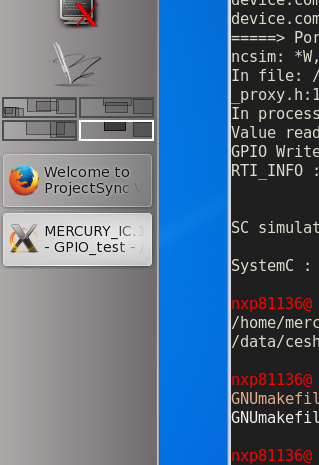
Incidentally, since I?m on the subject, the widget ends up way too small when
the panel is set to the side of the screen (see below).  It would be better if
the desktops were shown one above the other.


[cid:image001.png at 01D0300D.0F052D50]


Thanks again for your reply.


Kind regards,


Ian Lang


-----Original Message-----
From: Yuri Chornoivan [mailto:[email protected]]
Sent: Dienstag, 13. Januar 2015 20:02
To: kde-doc-english at kde.org; Ian Lang
Subject: Re: [kde-doc-english] Exactly what I want to do - disable the stupid
thing - but where?


???????? Tue, 13 Jan 2015 16:45:26 +0200, Ian Lang <ian.lang at
nxp.com<mailto:ian.lang at nxp.com>>:


> Multiple Desktops

> KDE offers you the possibility to have several virtual desktops. In

> this tab you can configure the number of desktops as well as their names.

> Just use the slider to adjust the number of desktops. You can assign

> names to the desktops by entering text into the text fields below.

> If you enable Mouse wheel over desktop switches desktop then scrolling

> the wheel over an empty space on the desktop will change to the next

> virtual desktop numerically, in the direction you scrolled (either up

> or down).


Hi,


In the same configuration dialog (right click on the pager widget -> Configure
Pager -> Virtual Desktops page).


1. Make the number of virtual desktops equal to 1.


2. Remove pager widget from the panel.


Hope this helps.


Best regards,

Yuri
-------------- next part --------------
An HTML attachment was scrubbed...
URL:
<http://mail.kde.org/pipermail/kde-doc-english/attachments/20150114/8787a0d8/attachment-0001.html>
-------------- next part --------------
A non-text attachment was scrubbed...
Name: image001.png
Type: image/png
Size: 72731 bytes
Desc: image001.png
URL:
<http://mail.kde.org/pipermail/kde-doc-english/attachments/20150114/8787a0d8/attachment-0001.png>