Hi,

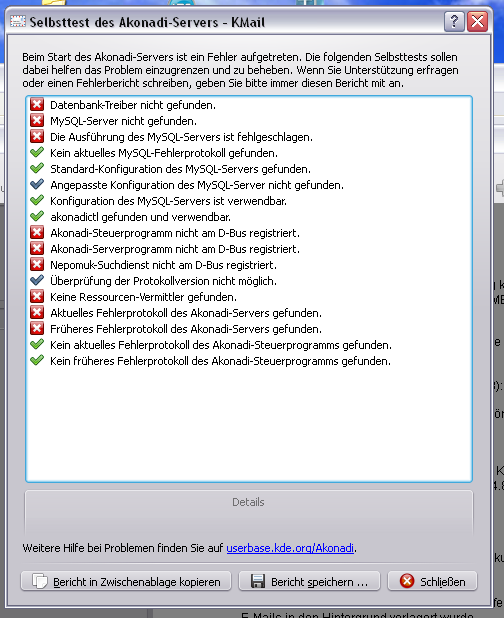
after installing the new release, the start of kmail failes with this:
http://666kb.com/i/c100x06ik73g7wmd8.png screenshot
The failurelog is attached.

How2 make kmail work?

--
regards
Reinhard

--- ein Ritter vom Nie [Monty Python] ---
Akonadi Server Self-Test Report
===============================

Test 1:  ERROR
--------

Database driver not found.
Details: The QtSQL driver 'QMYSQL' is required by your current Akonadi server
configuration.
The following drivers are installed: QSQLITE3, QSQLITE, QODBC3, QODBC.
Make sure the required driver is installed.

File content of 'C:/Dokumente und
Einstellungen/reinhard_irmer/.config/akonadi/akonadiserverrc':
[QMYSQL]
Name=akonadi
Host=
Options=
StartServer=true
User=
Password=
ServerPath=C:/Programme/kde470/bin/mysqld.exe

[%General]
Driver=QMYSQL
SizeThreshold=4096
ExternalPayload=false

[Debug]
Tracer=null


Test 2:  ERROR
--------

MySQL server not found.
Details: You have currently configured Akonadi to use the MySQL server
'C:/Programme/kde470/bin/mysqld.exe'.
Make sure you have the MySQL server installed, set the correct path and ensure
you have the necessary read and execution rights on the server executable. The
server executable is typically called 'mysqld'; its location varies depending
on the distribution.

Test 3:  ERROR
--------

Executing the MySQL server failed.
Details: Executing the MySQL server 'C:/Programme/kde470/bin/mysqld.exe' failed
with the following error message: ''

Test 4:  SUCCESS
--------

No current MySQL error log found.
Details: The MySQL server did not report any errors during this startup. The
log can be found in 'C:/Dokumente und
Einstellungen/reinhard_irmer/.local/share/akonadi/db_data\mysql.err'.

Test 5:  SUCCESS
--------

MySQL server default configuration found.
Details: The default configuration for the MySQL server was found and is
readable at <a
href='C:/Programme/kde480/share/config/akonadi/mysql-global.conf'>C:/Programme/kde480/share/config/akonadi/mysql-global.conf</a>.

File content of 'C:/Programme/kde480/share/config/akonadi/mysql-global.conf':
#
# Global Akonadi MySQL server settings,
# These settings can be adjusted using $HOME/.config/akonadi/mysql-local.conf
#
# Based on advice by Kris Köhntopp <[email protected]>
#
[mysqld]

# strict query parsing/interpretation
# TODO: make Akonadi work with those settings enabled
#
sql_mode=strict_trans_tables,strict_all_tables,strict_error_for_division_by_zero,no_auto_create_user,no_auto_value_on_zero,no_engine_substitution,no_zero_date,no_zero_in_date,only_full_group_by,pipes_as_concat
# sql_mode=strict_trans_tables

# DEBUGGING:
# log all queries, useful for debugging but generates an enormous amount of data
# log=mysql.full
# log queries slower than n seconds, log file name relative to datadir (for
debugging only)
# log_slow_queries=mysql.slow
# long_query_time=1
# log queries not using indices, debug only, disable for production use
# log_queries_not_using_indexes=1
#
# mesure database size and adjust innodb_buffer_pool_size
# SELECT sum(data_length) as bla, sum(index_length) as blub FROM
information_schema.tables WHERE table_schema not in ("mysql",
"information_schema");

# NOTES:
# Keep Innob_log_waits and keep Innodb_buffer_pool_wait_free small (see show
global status like "inno%", show global variables)

#expire_logs_days=3

#sync_bin_log=0

# Use UTF-8 encoding for tables
character_set_server=utf8
collation_server=utf8_general_ci

# use InnoDB for transactions and better crash recovery
default_storage_engine=innodb

# memory pool InnoDB uses to store data dictionary information and other
internal data structures (default:1M)
innodb_additional_mem_pool_size=1M

# memory buffer InnoDB uses to cache data and indexes of its tables
(default:128M)
# Larger values means less I/O
innodb_buffer_pool_size=80M

# Create a .ibd file for each table (default:0)
innodb_file_per_table=1

# Write out the log buffer to the log file at each commit (default:1)
innodb_flush_log_at_trx_commit=2

# Buffer size used to write to the log files on disk (default:1M for builtin,
8M for plugin)
# larger values means less I/O
innodb_log_buffer_size=1M

# Size of each log file in a log group (default:5M) larger means less I/O but
more time for recovery.
innodb_log_file_size=64M

# # error log file name, relative to datadir (default:hostname.err)
log_error=mysql.err

# print warnings and connection errors (default:1)
log_warnings=2

# Convert table named to lowercase
lower_case_table_names=1

# Maximum size of one packet or any generated/intermediate string. (default:1M)
max_allowed_packet=32M

# Maximum simultaneous connections allowed (default:100)
max_connections=256

# The two options below make no sense with prepared statements and/or
transactions
# (make sense when having the same query multiple times)

# Memory allocated for caching query results (default:0 (disabled))
query_cache_size=0

# Do not cache results (default:1)
query_cache_type=0

# Do not use the privileges mechanisms
skip_grant_tables

# Do not listen for TCP/IP connections at all
skip_networking

# The number of open tables for all threads. (default:64)
table_cache=200

# How many threads the server should cache for reuse (default:0)
thread_cache_size=3

# wait 365d before dropping the DB connection (default:8h)
wait_timeout=31536000

[client]
default-character-set=utf8


Test 6:  SKIP
--------

MySQL server custom configuration not available.
Details: The custom configuration for the MySQL server was not found but is
optional.

Test 7:  SUCCESS
--------

MySQL server configuration is usable.
Details: The MySQL server configuration was found at <a href='C:/Dokumente und
Einstellungen/reinhard_irmer/.local/share/akonadi/mysql.conf'>C:/Dokumente und
Einstellungen/reinhard_irmer/.local/share/akonadi/mysql.conf</a> and is
readable.

File content of 'C:/Dokumente und
Einstellungen/reinhard_irmer/.local/share/akonadi/mysql.conf':
#
# Global Akonadi MySQL server settings,
# These settings can be adjusted using $HOME/.config/akonadi/mysql-local.conf
#
# Based on advice by Kris Köhntopp <[email protected]>
#
[mysqld]

# strict query parsing/interpretation
# TODO: make Akonadi work with those settings enabled
#
sql_mode=strict_trans_tables,strict_all_tables,strict_error_for_division_by_zero,no_auto_create_user,no_auto_value_on_zero,no_engine_substitution,no_zero_date,no_zero_in_date,only_full_group_by,pipes_as_concat
# sql_mode=strict_trans_tables

# DEBUGGING:
# log all queries, useful for debugging but generates an enormous amount of data
# log=mysql.full
# log queries slower than n seconds, log file name relative to datadir (for
debugging only)
# log_slow_queries=mysql.slow
# long_query_time=1
# log queries not using indices, debug only, disable for production use
# log_queries_not_using_indexes=1
#
# mesure database size and adjust innodb_buffer_pool_size
# SELECT sum(data_length) as bla, sum(index_length) as blub FROM
information_schema.tables WHERE table_schema not in ("mysql",
"information_schema");

# NOTES:
# Keep Innob_log_waits and keep Innodb_buffer_pool_wait_free small (see show
global status like "inno%", show global variables)

#expire_logs_days=3

#sync_bin_log=0

# Use UTF-8 encoding for tables
character_set_server=utf8
collation_server=utf8_general_ci

# use InnoDB for transactions and better crash recovery
default_storage_engine=innodb

# memory pool InnoDB uses to store data dictionary information and other
internal data structures (default:1M)
innodb_additional_mem_pool_size=1M

# memory buffer InnoDB uses to cache data and indexes of its tables
(default:128M)
# Larger values means less I/O
innodb_buffer_pool_size=80M

# Create a .ibd file for each table (default:0)
innodb_file_per_table=1

# Write out the log buffer to the log file at each commit (default:1)
innodb_flush_log_at_trx_commit=2

# Buffer size used to write to the log files on disk (default:1M for builtin,
8M for plugin)
# larger values means less I/O
innodb_log_buffer_size=1M

# Size of each log file in a log group (default:5M) larger means less I/O but
more time for recovery.
innodb_log_file_size=64M

# # error log file name, relative to datadir (default:hostname.err)
log_error=mysql.err

# print warnings and connection errors (default:1)
log_warnings=2

# Convert table named to lowercase
lower_case_table_names=1

# Maximum size of one packet or any generated/intermediate string. (default:1M)
max_allowed_packet=32M

# Maximum simultaneous connections allowed (default:100)
max_connections=256

# The two options below make no sense with prepared statements and/or
transactions
# (make sense when having the same query multiple times)

# Memory allocated for caching query results (default:0 (disabled))
query_cache_size=0

# Do not cache results (default:1)
query_cache_type=0

# Do not use the privileges mechanisms
skip_grant_tables

# Do not listen for TCP/IP connections at all
skip_networking

# The number of open tables for all threads. (default:64)
table_cache=200

# How many threads the server should cache for reuse (default:0)
thread_cache_size=3

# wait 365d before dropping the DB connection (default:8h)
wait_timeout=31536000

[client]
default-character-set=utf8


Test 8:  SUCCESS
--------

akonadictl found and usable
Details: The program 'C:/Programme/kde480/bin/akonadictl.EXE' to control the
Akonadi server was found and could be executed successfully.
Result:
Akonadi 1.7.0


Test 9:  ERROR
--------

Akonadi control process not registered at D-Bus.
Details: The Akonadi control process is not registered at D-Bus which typically
means it was not started or encountered a fatal error during startup.

Test 10:  ERROR
--------

Akonadi server process not registered at D-Bus.
Details: The Akonadi server process is not registered at D-Bus which typically
means it was not started or encountered a fatal error during startup.

Test 11:  ERROR
--------

Nepomuk search service not registered at D-Bus.
Details: The Nepomuk search service is not registered at D-Bus which typically
means it was not started or encountered a fatal error during startup.

Test 12:  SKIP
--------

Protocol version check not possible.
Details: Without a connection to the server it is not possible to check if the
protocol version meets the requirements.

Test 13:  ERROR
--------

No resource agents found.
Details: No resource agents have been found, Akonadi is not usable without at
least one. This usually means that no resource agents are installed or that
there is a setup problem. The following paths have been searched:
'C:/Programme/kde480/share/akonadi/agents'. The XDG_DATA_DIRS environment
variable is set to ''; make sure this includes all paths where Akonadi agents
are installed.

Directory listing of 'C:/Programme/kde480/share/akonadi/agents':
akonadinepomukfeederagent.desktop
akonotesresource.desktop
birthdaysresource.desktop
calendarsearchagent.desktop
contactsresource.desktop
davgroupwareresource.desktop
icalresource.desktop
imapresource.desktop
invitationsagent.desktop
kabcresource.desktop
kalarmdirresource.desktop
kalarmresource.desktop
kcalresource.desktop
kdeaccountsresource.desktop
knutresource.desktop
kolabproxyresource.desktop
localbookmarksresource.desktop
maildirresource.desktop
maildispatcheragent.desktop
mailfilteragent.desktop
mboxresource.desktop
microblog.desktop
mixedmaildirresource.desktop
mtdummyresource.desktop
nepomuktagresource.desktop
nntpresource.desktop
notesresource.desktop
openxchangeresource.desktop
pop3resource.desktop
vcarddirresource.desktop
vcardresource.desktop

Environment variable XDG_DATA_DIRS is set to ''

Test 14:  ERROR
--------

Current Akonadi server error log found.
Details: The Akonadi server reported errors during its current startup. The log
can be found in <a href='C:/Dokumente und
Einstellungen/reinhard_irmer/.local/share/akonadi\akonadiserver.error'>C:/Dokumente
 und Einstellungen/reinhard_irmer/.local/share/akonadi\akonadiserver.error</a>..

File content of 'C:/Dokumente und
Einstellungen/reinhard_irmer/.local/share/akonadi\akonadiserver.error':
Could not start database server!
executable: ""
arguments: ("--defaults-file=C:/Dokumente und
Einstellungen/reinhard_irmer/.local/share/akonadi/mysql.conf",
"--datadir=C:/Dokumente und
Einstellungen/reinhard_irmer/.local/share/akonadi/db_data/", "--shared-memory")
process error: "Process failed to start: No such file or directory"


Test 15:  ERROR
--------

Previous Akonadi server error log found.
Details: The Akonadi server reported errors during its previous startup. The
log can be found in <a href='C:/Dokumente und
Einstellungen/reinhard_irmer/.local/share/akonadi\akonadiserver.error.old'>C:/Dokumente
 und
Einstellungen/reinhard_irmer/.local/share/akonadi\akonadiserver.error.old</a>.

File content of 'C:/Dokumente und
Einstellungen/reinhard_irmer/.local/share/akonadi\akonadiserver.error.old':
Could not start database server!
executable: ""
arguments: ("--defaults-file=C:/Dokumente und
Einstellungen/reinhard_irmer/.local/share/akonadi/mysql.conf",
"--datadir=C:/Dokumente und
Einstellungen/reinhard_irmer/.local/share/akonadi/db_data/", "--shared-memory")
process error: "Process failed to start: No such file or directory"


Test 16:  SUCCESS
--------

No current Akonadi control error log found.
Details: The Akonadi control process did not report any errors during its
current startup.

Test 17:  SUCCESS
--------

No previous Akonadi control error log found.
Details: The Akonadi control process did not report any errors during its
previous startup.
_______________________________________________
Kde-windows mailing list
[email protected]
https://mail.kde.org/mailman/listinfo/kde-windows