reinhard wrote:
> Hi,
>
> just did some more testing and noticed that also image clips (see the link
> below) with transparent background can't be placed on top of all. It just
> interact with the track below, which is indeed a wanted behaviour ;) .......
>
> www.groovision.de/kdenlive/includedintotransition.jpg
> (I hope this screensot can clarify the situation)
>
> .... but a common requirement is to show a title, image, .... on top of all
> (e.g. like credits, logo, ...)
>
> So, perhaps this might be classified as a real problem and should be solved
> before the upcomming release IMHO ...
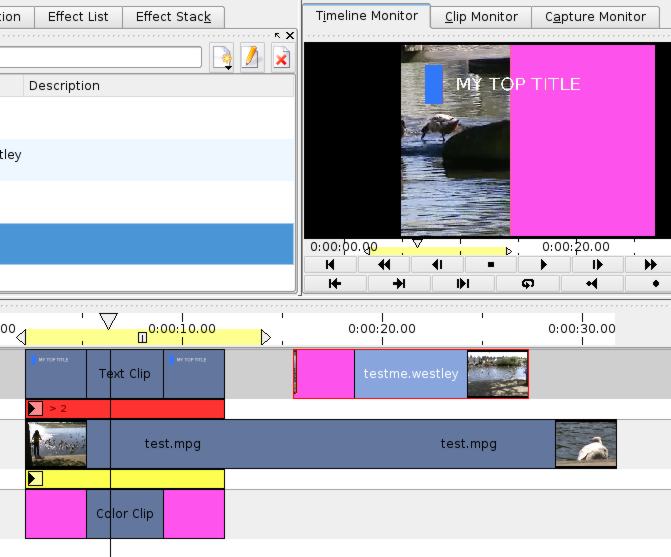
Transitions will for sure require some work, as they currently are quite
hard to understand unless you know how the video frameworks is designed.

You can solve your problem by adding a wipe transition to the title or
image clip that should be on top of the tracks. Just leave the start and
end centered, so that it will not move, and change the transition target
track (in the combobox labelled "Perform transition with") so that it is
applied on the lowest track.

I attached a screenshot so that you can understand better. I know it is
not very intuitive, but at least you can do it. I will not change this
before 0.4 release.

regards
jb


-------------- next part --------------
A non-text attachment was scrubbed...
Name: transitions.jpg
Type: image/jpeg
Size: 47407 bytes
Desc: not available
URL:
<http://mail.kde.org/pipermail/kdenlive/attachments/20061127/3f2e8fa8/attachment.jpg>