I've tried both switching to Ubuntu on wayland and I installed kernel
5.3-rc3 and there hasn't been any change.
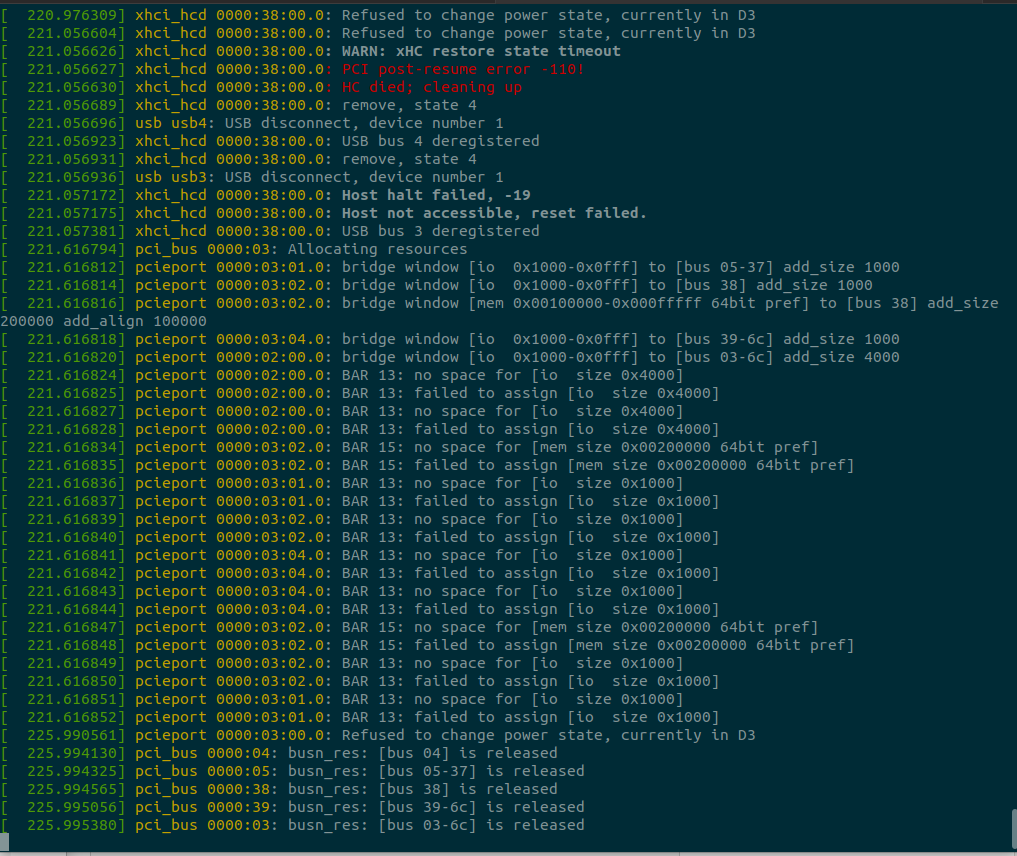
I'm not sure what I'm supposed to be seeing in the terminal window when I
run dmesg -w but here is a screenshot of part of the output. Nothing gets
added to the output when the flickering happens if that is what you wanted
me to look at.
On Wed, Aug 7, 2019 at 8:10 PM Daniel van Vugt <
[email protected]> wrote:

> Thanks. The videos seem to show this is a problem with aligning the
> entire display image. So it's not traditional "tearing", but I totally
> agree that "tearing" and "flickering" is the best description.
>
> Please try logging in to "Ubuntu on Wayland" and tell us if that avoids
> the problem.
>
> Please also try installing a newer kernel such as:
>
>   https://kernel.ubuntu.com/~kernel-ppa/mainline/v5.3-rc3/
>
> If the problem still continues then please open a Terminal window and
> run:
>
>   dmesg -w
>
> Now do you see any new messages appearing in that window when the
> flickering happens?
>
>
> ** Package changed: xserver-xorg-video-intel (Ubuntu) => linux (Ubuntu)
>
> --
> You received this bug notification because you are subscribed to the bug
> report.
> https://bugs.launchpad.net/bugs/1839253
>
> Title:
>   Excessive screen tearing and flickering
>
> Status in linux package in Ubuntu:
>   Incomplete
>
> Bug description:
>   I am experiencing a large amount of screen tearing flickering and
>   artifacting. I've tried the common fix that is suggested on
>   askubuntu.com which is editing the file /etc/X11/xorg.conf.d/20-intel-
>   graphics.conf and this has not changed anything.
>
>   ProblemType: Bug
>   DistroRelease: Ubuntu 19.04
>   Package: xorg 1:7.7+19ubuntu12
>   ProcVersionSignature: Ubuntu 5.0.0-23.24-generic 5.0.15
>   Uname: Linux 5.0.0-23-generic x86_64
>   ApportVersion: 2.20.10-0ubuntu27.1
>   Architecture: amd64
>   BootLog: Error: [Errno 13] Permission denied: '/var/log/boot.log'
>   CompositorRunning: None
>   CurrentDesktop: ubuntu:GNOME
>   Date: Wed Aug  7 02:06:01 2019
>   DistUpgraded: Fresh install
>   DistroCodename: disco
>   DistroVariant: ubuntu
>   ExtraDebuggingInterest: Yes
>   GraphicsCard:
>    Intel Corporation UHD Graphics 620 [8086:5917] (rev 07) (prog-if 00
> [VGA controller])
>      Subsystem: ASUSTeK Computer Inc. UHD Graphics 620 [1043:10a1]
>   InstallationDate: Installed on 2019-08-06 (1 days ago)
>   InstallationMedia: Ubuntu 19.04 "Disco Dingo" - Release amd64 (20190416)
>   Lsusb:
>    Bus 002 Device 001: ID 1d6b:0003 Linux Foundation 3.0 root hub
>    Bus 001 Device 004: ID 27c6:5201
>    Bus 001 Device 003: ID 8087:0a2b Intel Corp.
>    Bus 001 Device 002: ID 13d3:56b9 IMC Networks
>    Bus 001 Device 001: ID 1d6b:0002 Linux Foundation 2.0 root hub
>   MachineType: ASUSTeK COMPUTER INC. ZenBook S UX391UA
>   ProcEnviron:
>    TERM=xterm-256color
>    PATH=(custom, no user)
>    XDG_RUNTIME_DIR=<set>
>    LANG=en_US.UTF-8
>    SHELL=/bin/bash
>   ProcKernelCmdLine: BOOT_IMAGE=/boot/vmlinuz-5.0.0-23-generic
> root=UUID=6c2ff7ef-a93b-47fe-ae85-a60f10a4201f ro quiet splash vt.handoff=1
>   SourcePackage: xorg
>   UpgradeStatus: No upgrade log present (probably fresh install)
>   dmi.bios.date: 05/18/2018
>   dmi.bios.vendor: American Megatrends Inc.
>   dmi.bios.version: UX391UA.204
>   dmi.board.asset.tag: ATN12345678901234567
>   dmi.board.name: UX391UA
>   dmi.board.vendor: ASUSTeK COMPUTER INC.
>   dmi.board.version: 1.0
>   dmi.chassis.asset.tag: No Asset Tag
>   dmi.chassis.type: 10
>   dmi.chassis.vendor: ASUSTeK COMPUTER INC.
>   dmi.chassis.version: 1.0
>   dmi.modalias:
> dmi:bvnAmericanMegatrendsInc.:bvrUX391UA.204:bd05/18/2018:svnASUSTeKCOMPUTERINC.:pnZenBookSUX391UA:pvr1.0:rvnASUSTeKCOMPUTERINC.:rnUX391UA:rvr1.0:cvnASUSTeKCOMPUTERINC.:ct10:cvr1.0:
>   dmi.product.family: ZenBook S
>   dmi.product.name: ZenBook S UX391UA
>   dmi.product.version: 1.0
>   dmi.sys.vendor: ASUSTeK COMPUTER INC.
>   version.compiz: compiz N/A
>   version.libdrm2: libdrm2 2.4.97-1ubuntu1
>   version.libgl1-mesa-dri: libgl1-mesa-dri 19.0.2-1ubuntu1.1
>   version.libgl1-mesa-glx: libgl1-mesa-glx N/A
>   version.xserver-xorg-core: xserver-xorg-core 2:1.20.4-1ubuntu3
>   version.xserver-xorg-input-evdev: xserver-xorg-input-evdev N/A
>   version.xserver-xorg-video-ati: xserver-xorg-video-ati 1:19.0.1-0ubuntu1
>   version.xserver-xorg-video-intel: xserver-xorg-video-intel
> 2:2.99.917+git20180925-2
>   version.xserver-xorg-video-nouveau: xserver-xorg-video-nouveau 1:1.0.16-1
>
> To manage notifications about this bug go to:
> https://bugs.launchpad.net/ubuntu/+source/linux/+bug/1839253/+subscriptions
>


** Attachment added: "dmesg.png"
   https://bugs.launchpad.net/bugs/1839253/+attachment/5281846/+files/dmesg.png

--
You received this bug notification because you are a member of Kernel
Packages, which is subscribed to linux in Ubuntu.
https://bugs.launchpad.net/bugs/1839253

Title:
  Excessive screen tearing and flickering

Status in linux package in Ubuntu:
  Incomplete

Bug description:
  I am experiencing a large amount of screen tearing flickering and
  artifacting. I've tried the common fix that is suggested on
  askubuntu.com which is editing the file /etc/X11/xorg.conf.d/20-intel-
  graphics.conf and this has not changed anything.

  ProblemType: Bug
  DistroRelease: Ubuntu 19.04
  Package: xorg 1:7.7+19ubuntu12
  ProcVersionSignature: Ubuntu 5.0.0-23.24-generic 5.0.15
  Uname: Linux 5.0.0-23-generic x86_64
  ApportVersion: 2.20.10-0ubuntu27.1
  Architecture: amd64
  BootLog: Error: [Errno 13] Permission denied: '/var/log/boot.log'
  CompositorRunning: None
  CurrentDesktop: ubuntu:GNOME
  Date: Wed Aug  7 02:06:01 2019
  DistUpgraded: Fresh install
  DistroCodename: disco
  DistroVariant: ubuntu
  ExtraDebuggingInterest: Yes
  GraphicsCard:
   Intel Corporation UHD Graphics 620 [8086:5917] (rev 07) (prog-if 00 [VGA
controller])
     Subsystem: ASUSTeK Computer Inc. UHD Graphics 620 [1043:10a1]
  InstallationDate: Installed on 2019-08-06 (1 days ago)
  InstallationMedia: Ubuntu 19.04 "Disco Dingo" - Release amd64 (20190416)
  Lsusb:
   Bus 002 Device 001: ID 1d6b:0003 Linux Foundation 3.0 root hub
   Bus 001 Device 004: ID 27c6:5201
   Bus 001 Device 003: ID 8087:0a2b Intel Corp.
   Bus 001 Device 002: ID 13d3:56b9 IMC Networks
   Bus 001 Device 001: ID 1d6b:0002 Linux Foundation 2.0 root hub
  MachineType: ASUSTeK COMPUTER INC. ZenBook S UX391UA
  ProcEnviron:
   TERM=xterm-256color
   PATH=(custom, no user)
   XDG_RUNTIME_DIR=<set>
   LANG=en_US.UTF-8
   SHELL=/bin/bash
  ProcKernelCmdLine: BOOT_IMAGE=/boot/vmlinuz-5.0.0-23-generic
root=UUID=6c2ff7ef-a93b-47fe-ae85-a60f10a4201f ro quiet splash vt.handoff=1
  SourcePackage: xorg
  UpgradeStatus: No upgrade log present (probably fresh install)
  dmi.bios.date: 05/18/2018
  dmi.bios.vendor: American Megatrends Inc.
  dmi.bios.version: UX391UA.204
  dmi.board.asset.tag: ATN12345678901234567
  dmi.board.name: UX391UA
  dmi.board.vendor: ASUSTeK COMPUTER INC.
  dmi.board.version: 1.0
  dmi.chassis.asset.tag: No Asset Tag
  dmi.chassis.type: 10
  dmi.chassis.vendor: ASUSTeK COMPUTER INC.
  dmi.chassis.version: 1.0
  dmi.modalias:
dmi:bvnAmericanMegatrendsInc.:bvrUX391UA.204:bd05/18/2018:svnASUSTeKCOMPUTERINC.:pnZenBookSUX391UA:pvr1.0:rvnASUSTeKCOMPUTERINC.:rnUX391UA:rvr1.0:cvnASUSTeKCOMPUTERINC.:ct10:cvr1.0:
  dmi.product.family: ZenBook S
  dmi.product.name: ZenBook S UX391UA
  dmi.product.version: 1.0
  dmi.sys.vendor: ASUSTeK COMPUTER INC.
  version.compiz: compiz N/A
  version.libdrm2: libdrm2 2.4.97-1ubuntu1
  version.libgl1-mesa-dri: libgl1-mesa-dri 19.0.2-1ubuntu1.1
  version.libgl1-mesa-glx: libgl1-mesa-glx N/A
  version.xserver-xorg-core: xserver-xorg-core 2:1.20.4-1ubuntu3
  version.xserver-xorg-input-evdev: xserver-xorg-input-evdev N/A
  version.xserver-xorg-video-ati: xserver-xorg-video-ati 1:19.0.1-0ubuntu1
  version.xserver-xorg-video-intel: xserver-xorg-video-intel
2:2.99.917+git20180925-2
  version.xserver-xorg-video-nouveau: xserver-xorg-video-nouveau 1:1.0.16-1

To manage notifications about this bug go to:
https://bugs.launchpad.net/ubuntu/+source/linux/+bug/1839253/+subscriptions

--
Mailing list: https://launchpad.net/~kernel-packages
Post to     : [email protected]
Unsubscribe : https://launchpad.net/~kernel-packages
More help   : https://help.launchpad.net/ListHelp