*** This bug is a duplicate of bug 2028165 ***
    https://bugs.launchpad.net/bugs/2028165
Public bug reported:

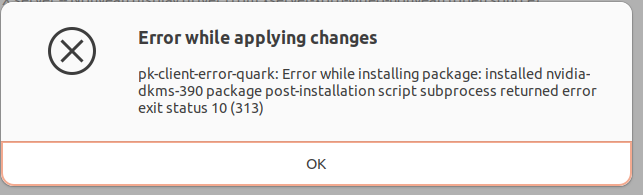
Error while applying changes
   pk-client-error-quark: Error while installing package: installed
nvidia-dkms-390 package post-installation script subprocess returned error exit
status 10(313)

lsb_release -rd
Description:    Ubuntu 22.04.4 LTS
Release:        22.04

$XDG_SESSION_TYPE
wayland: command not found

This is result from trying "additional drivers"option in "Software &
Updates"

(Obviously, after using Ubuntu since 10.04, my copy paste terminal chops
reveal me to still be a noob.)

ProblemType: Package
DistroRelease: Ubuntu 22.04
Package: nvidia-dkms-390 390.157-0ubuntu0.22.04.2
ProcVersionSignature: Ubuntu 6.5.0-18.18~22.04.1-generic 6.5.8
Uname: Linux 6.5.0-18-generic x86_64
ApportVersion: 2.20.11-0ubuntu82.5
Architecture: amd64
CasperMD5CheckResult: pass
Date: Sun Feb 18 13:20:58 2024
ErrorMessage: installed nvidia-dkms-390 package post-installation script
subprocess returned error exit status 10
InstallationDate: Installed on 2024-02-18 (0 days ago)
InstallationMedia: Ubuntu 22.04.1 LTS "Jammy Jellyfish" - Release amd64
(20220809.1)
Python3Details: /usr/bin/python3.10, Python 3.10.12, python3-minimal,
3.10.6-1~22.04
PythonDetails: N/A
RelatedPackageVersions:
 dpkg 1.21.1ubuntu2.2
 apt  2.4.11
SourcePackage: nvidia-graphics-drivers-390
Title: package nvidia-dkms-390 390.157-0ubuntu0.22.04.2 failed to
install/upgrade: installed nvidia-dkms-390 package post-installation script
subprocess returned error exit status 10
UpgradeStatus: No upgrade log present (probably fresh install)

** Affects: nvidia-graphics-drivers-390 (Ubuntu)
     Importance: Undecided
         Status: New


** Tags: amd64 apport-package jammy need-duplicate-check

** Attachment added: "Screenshot from 2024-02-18 13-27-58.png"

https://bugs.launchpad.net/bugs/2054234/+attachment/5747069/+files/Screenshot%20from%202024-02-18%2013-27-58.png

--
You received this bug notification because you are a member of Kernel
Packages, which is subscribed to nvidia-graphics-drivers-390 in Ubuntu.
https://bugs.launchpad.net/bugs/2054234

Title:
  package nvidia-dkms-390 390.157-0ubuntu0.22.04.2 failed to
  install/upgrade: installed nvidia-dkms-390 package post-installation
  script subprocess returned error exit status 10

Status in nvidia-graphics-drivers-390 package in Ubuntu:
  New

Bug description:
  Error while applying changes
     pk-client-error-quark: Error while installing package: installed
nvidia-dkms-390 package post-installation script subprocess returned error exit
status 10(313)

  lsb_release -rd
  Description:  Ubuntu 22.04.4 LTS
  Release:      22.04

  $XDG_SESSION_TYPE
  wayland: command not found

  This is result from trying "additional drivers"option in "Software &
  Updates"

  (Obviously, after using Ubuntu since 10.04, my copy paste terminal
  chops reveal me to still be a noob.)

  ProblemType: Package
  DistroRelease: Ubuntu 22.04
  Package: nvidia-dkms-390 390.157-0ubuntu0.22.04.2
  ProcVersionSignature: Ubuntu 6.5.0-18.18~22.04.1-generic 6.5.8
  Uname: Linux 6.5.0-18-generic x86_64
  ApportVersion: 2.20.11-0ubuntu82.5
  Architecture: amd64
  CasperMD5CheckResult: pass
  Date: Sun Feb 18 13:20:58 2024
  ErrorMessage: installed nvidia-dkms-390 package post-installation script
subprocess returned error exit status 10
  InstallationDate: Installed on 2024-02-18 (0 days ago)
  InstallationMedia: Ubuntu 22.04.1 LTS "Jammy Jellyfish" - Release amd64
(20220809.1)
  Python3Details: /usr/bin/python3.10, Python 3.10.12, python3-minimal,
3.10.6-1~22.04
  PythonDetails: N/A
  RelatedPackageVersions:
   dpkg 1.21.1ubuntu2.2
   apt  2.4.11
  SourcePackage: nvidia-graphics-drivers-390
  Title: package nvidia-dkms-390 390.157-0ubuntu0.22.04.2 failed to
install/upgrade: installed nvidia-dkms-390 package post-installation script
subprocess returned error exit status 10
  UpgradeStatus: No upgrade log present (probably fresh install)

To manage notifications about this bug go to:
https://bugs.launchpad.net/ubuntu/+source/nvidia-graphics-drivers-390/+bug/2054234/+subscriptions


--
Mailing list: https://launchpad.net/~kernel-packages
Post to     : [email protected]
Unsubscribe : https://launchpad.net/~kernel-packages
More help   : https://help.launchpad.net/ListHelp