On 07/giu/2014, at 22:46, Jean-Paul Louis <[email protected]> wrote:

Mac Keyboard has both HOME and END, you were probably referring to
compact/notebook one that requires the fn key.
Apple doesn’t hates no “button", just optimize the keyboard for common use and
documents how to use them.
I can assure as PC notebook user that Fn key exists also on PC notebooks with
weird acer/hp/ibm keyboards.

This is the normal Apple keyboard :
http://store.apple.com/us/product/MB110LL

This is the compact Apple keyboard:
http://store.apple.com/us/product/MC184H

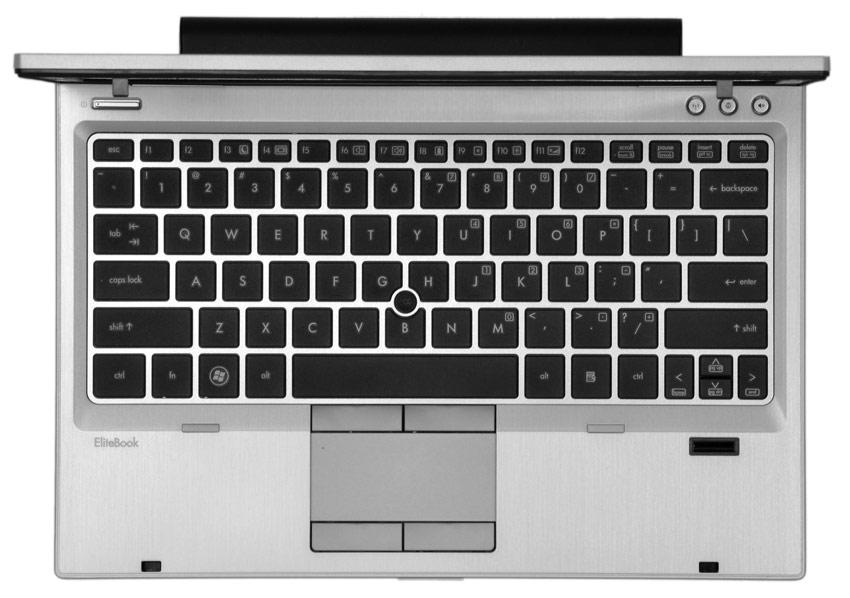
HP and other vendors uses on notebooks the same Apple solution for HOME/END
(but i still hate how they design “enter” key).
http://www.digitaltrends.com/wp-content/uploads/2011/12/hp-elitebook-2560p-silver-keyboard.jpg

No alarm, no issue, no bug, just normal design.

—
Marco


> BZR 4932 fixed the problem.
> I was not fully awake when I was asking for “Home” and “End” keys.
> Apple hates those, but accepted a replacement:
>
> Home = Function Key (Fn) + Left Arrow
> End = Function Key (Fn) + Right Arrow
>
> Sorry for complaining too much.
>
> Jean-Paul
> AC9GH
>
>> Hello Marco,
>>
>> I found a bug in pl_editor. As you can see below, there are two hot keys for
>> Move Item.
>> I’m sure it is a typo, as I would hate to have the Delete key assigned to
>> move item, unless it was meant to move to the trash.
>> Also the Zoom Auto use the Home key which is missing on Apple keyboards (at
>> least I could not find it), but I am still a newbie at OS X. Same thing with
>> the End key (Mouse Left DClick).
>> I am going to read OS X for dummies to figure out where are the Home and End
>> keys.
>>
>> Jean-Paul
>> AC9GH
>>
>> <PastedGraphic-6.png>
>


_______________________________________________
Mailing list: https://launchpad.net/~kicad-developers
Post to     : [email protected]
Unsubscribe : https://launchpad.net/~kicad-developers
More help   : https://help.launchpad.net/ListHelp