Hi Oli,

I have that similar situation all the time with small projects as well. Last
time I have lots of pull-up / pull down 10K resistors..
then in the middle of the project I  need a specific 12K5 bias-resistor. Then I
changed all 10K to 12K5 :S
I think the hardware developers call it "BOM optimisation".
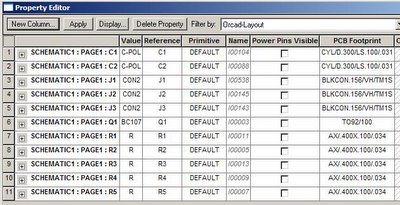
I remember one commercial EDA software (Orcad) was a matrix built in that you
can edit directly:
http://photos1.blogger.com/blogger/7801/377/400/OrCAD-tut7.jpg

Although, a bit related and I am not sure, if KiCad is already support some
kind of "link between same value components". I feel last time that if I have
additional fields it will change that field all over the same component values
(Is is already an implemented feature?)

As a work around I am labelling the values of non critical parts as "?K" (ex:
for one resistor that is biasing a LED) and only change it in the end for the
best part I found in my design..

Mario Luzeiro
________________________________________
From: Kicad-developers
[[email protected]] on behalf of Oli
[[email protected]]
Sent: 20 August 2014 02:33
To: [email protected]
Subject: [Kicad-developers] Feature request: Extended BOM (Part, Footprint,
etc.) management

Hello!

This is my first post to this mailing list and I wasn't following recent
development in other posts so I don't know if something similar is
already in planning.

Last autumn my problem was, that I had a quite big project with multiple
sub-schematas and stuff and wanted it to be manufactured externally.
Fabs always want a nice fabs for the parts to use and sometimes it's
better/cheaper to use similar parts.
For example you need 4 SM0603/2uF capacitors and one SM0402/4uF
capacitor you may want to use 5 of either because it doesn't really
matter. Now it's really hard to find the parts you want to change, you
have to generate a BOM find the part-number, search it in the schemata
change the uF value, then export the new netlist, search the part again
in the CvPcb and edit the footprint for each part.
Also if you want to change some other field it would be much easier to
just edit it in a spreadsheet application like excel or so.

Because of that I hacked together some (very ugly!) python scripts with
my own (even uglier!!) eeschema-parser (Kicad_schema_parser.py).

Now the process for editing fields looks like this :

Generate_BOM_from_N-Schematas.py
- ./Generate_BOM_from_N-Schematas.py MyTopSchema.sch
- this generates a MyTopSchema_BOM.csv file from MyTopSchema.sch and all
   it's sub-schematas
  - it only exports fields specified in the field_names-variable of the
    parts class-instance in Generate_BOM_from_N-Schematas.py
        parts=Parts(
                field_names=[
                        "Value",
                        "Footprint",
                        "Type",
                        "Voltage Rating",
                        "Manufacturer",
                        "Part Number",
                        "Comments"
                ]
        )
  - if a field isn't specified for a part it will be empty in the csv
  - the rows are sorted by 'Chip Name', then by field_names
    ("Value",Footprint",etc..)
  - the fields 'Chip Name', Count and References will always be
    generated (and exported)
   - Count is only informative, the count of space separated references
     in the References row
   - References are grouped if they have exactly the same field-values
     (which is not so good if not even 'Value' is specified)
I think you can also add new columns but I'm not quite sure
- Now I edit the csv, fill in footprints/manufacturers/etc. where
   applicable

After editing the BOM i save it again in the same csv-file (also same
format!)

Add_user_fields_to_components.py
  - /Add_user_fields_to_components.py -BOM=MyTopSchema_BOM.csv
    MyTopSchema.sch
  - this changes the fields specified in the third line of
    MyTopSchema_BOM.csv
   - if a field is empty it is deleted
   - if a field is not specified on row 3 it's left unchanged, maybe :)

Reopen MyTopSchema.sch with eeschema.
  Export the netlist
Run CvPcb, save and close CvPcb

Update_Footprints_in_CMP.py MyTopSchema.sch
  - ./Update_Footprints_in_CMP.py MyTopSchema.sch change
  - this changes the footprints in MyTopSchema.cmp according to the
    footprint field

Run Pcbnew
  Import netlist with change/replace footprints and so..

Fertig!

Would it be hard to implement something similar directly in Kicad?
I think the first thing to change is the BOM-export form. Or maybe it
would be better if there was a project based user-field-manager or so..


Cheers,
Oli


PS:
   Most of the scripts have 'help-notices' if you run them without
   arguments. If your interested in the scripts, I could clean them up
   for you. If you want to try them out make backups first!

_______________________________________________
Mailing list: https://launchpad.net/~kicad-developers
Post to     : [email protected]
Unsubscribe : https://launchpad.net/~kicad-developers
More help   : https://help.launchpad.net/ListHelp