Something could possibly be done, but we are getting off topic here.
Den 06/07/2015 20.35 skrev "Joel Holdsworth" <[email protected]>:
>
> Sure I'm not saying it's always the right choice. In PulseView it makes
sense because there never will be very many complex menus- and we've had a
concerted effort to try and make sure things are exposed directly on the
canvas.
>
> In the case of KiCad I'm more pointing out that having both a menu and a
toolbar may be redundant and result in reducing the amount of precious
canvas space. Therefore, could that redundancy be minimised by combining
the two somehow?
>
> Joel
>
>
> On 06/07/15 12:31, Nick Østergaard wrote:
>>
>> Arrwww, I hate those "burger" concept menus for the menuline, they
>> just make it hard to navigate. But anyway, I think such UI discussions
>> are better of after the release. FWIW.
>>
>> 2015-07-06 20:20 GMT+02:00 Joel Holdsworth <[email protected]>:
>>>
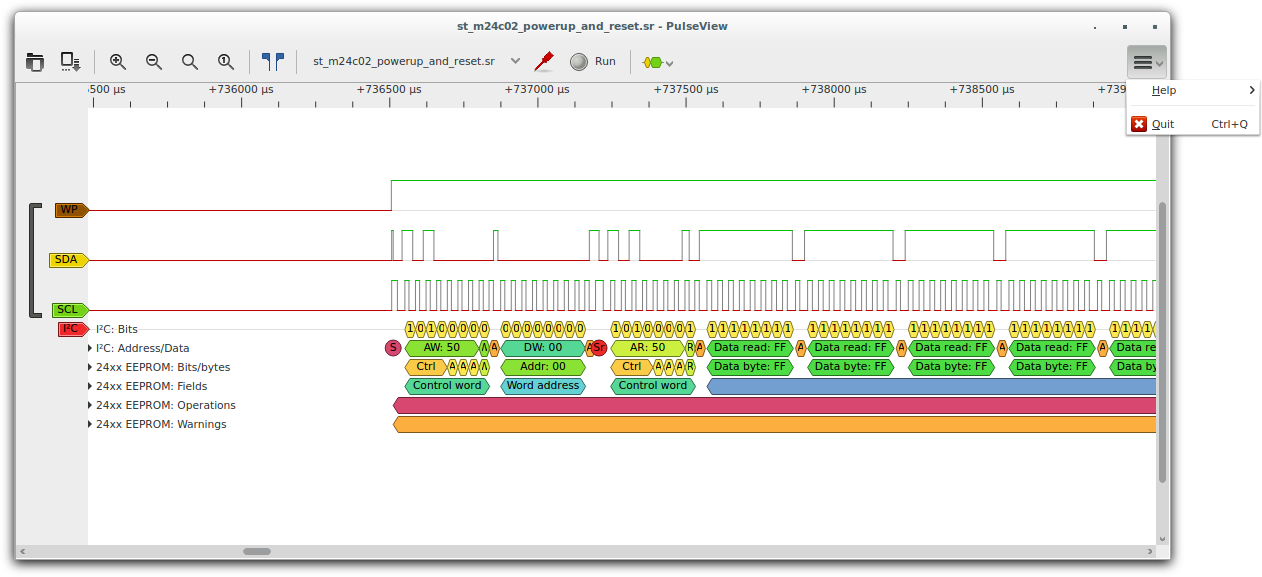
>>> In PulseView I found this problem - redundancy between the toolbar and
menu
>>> bar. So I combined the two to save space into a toolbar with a burger
menu
>>> on the right:
>>>
>>>
https://airwebreathe.org.uk/lib/exe/fetch.php?cache=&media=pulseview:posterity:20150101-burger-menu.png
>>>
>>> I've also removed the status bar. The goal of all this is to eliminate
as
>>> many bars as possible which makes the UI keep the canvas space as large
as
>>> possible for actual work.
>>>
>>> Joel
>>>
>>>
>>>
>>> On 06/07/15 12:03, Nick Østergaard wrote:
>>>
>>> This is solely my personal opinion: I don't think another "auxillary
>>> feature"-button (read less important for the layout) in the main
toolbar is
>>> of much use. It is easier to access with the hotkeys, but so are almost
>>> everything else... We should revise what the goal of the toolbars is.
Do we
>>> really need every action in the toolbars? To me it is a lot of clutter.
I
>>> would like for someone else to comment on this.   I am sort of not for
>>> neither against merging this, I would just like to point this out.
>>>
>>> Den 06/07/2015 18.31 skrev "easyw" <[email protected]>:
>>>>
>>>> attached there is a minimal patch to add
>>>> "Show board in 3D viewer" button in pcbnew mainToolBar
>>>> ... a useful button :)
>>>>
>>>> Maurice
>>>>
>>>> _______________________________________________
>>>> Mailing list: https://launchpad.net/~kicad-developers
>>>> Post to     : [email protected]
>>>> Unsubscribe : https://launchpad.net/~kicad-developers
>>>> More help   : https://help.launchpad.net/ListHelp
>>>>
>>>
>>> _______________________________________________
>>> Mailing list: https://launchpad.net/~kicad-developers
>>> Post to     : [email protected]
>>> Unsubscribe : https://launchpad.net/~kicad-developers
>>> More help   : https://help.launchpad.net/ListHelp
>>>
>>>
>>>
>>> _______________________________________________
>>> Mailing list: https://launchpad.net/~kicad-developers
>>> Post to     : [email protected]
>>> Unsubscribe : https://launchpad.net/~kicad-developers
>>> More help   : https://help.launchpad.net/ListHelp
>>>
>>
>
>
_______________________________________________
Mailing list: https://launchpad.net/~kicad-developers
Post to     : [email protected]
Unsubscribe : https://launchpad.net/~kicad-developers
More help   : https://help.launchpad.net/ListHelp