https://bugs.koha-community.org/bugzilla3/show_bug.cgi?id=34076
--- Comment #5 from Jonathan Druart <[email protected]> ---
I have pushed a branch at
https://gitlab.com/joubu/Koha/-/commits/cypress-studio

The git log is a bit dirty but at least shows how I reached the current state.
Note that this first try (POC) adds code to the Koha repo, but ideally we will
certainly want it into its own repo.


The idea is to use cypress-studio |1] to let users without development skills
generate steps to reach the DOM element to screenshot (either the whole screen
or a specific div). However we will then need developers to polish the
generated code.
So far the remote branch only generates 4 screenshots: prefsearch,
searchbar-admin, prevcheckout and allowstafftosetvisibilityforguarantor (they
are the names of the images in the manual).

On the remote branch you can see "auto" and "manual" commits for those
examples. The "auto" are auto-generated by cypress-studio. The "manual" is what
needs to be done to make the tests run several times (either restore the state
or init it before we run the tests).
Eg. for prevcheckout we need to set the syspref to its original value (hardno)
or it will already be "hardyes" and the test will fail to set it to "hardyes"
The "manual" step also contain the screenshot part.

Test plan:
0.a Checkout the remote branch
% git remote add joubu https://gitlab.com/joubu/Koha/
% git fetch joubu
% git checkout -b cypress-studio joubu/cypress-studio

0.b start ktd up

1. Generate the necessary built files:
1.a In your host: # will generate node_modules
  % yarn install
1.b Inside ktd:   # should not be needed, but it is needed if ktd was up before
you checked out the branch
  % yarn build
1.c Generate the template for other languages, inside ktd:
  % cd misc/translator/
  % perl translate install fr-FR
  % perl translate install fr-CA
  % perl translate install es-ES
Go to Koha, enable the 3 languages (search for the "language" syspref)

2. Run a docker container with the newest version of cypress (Koha is using 9
we want 12)
Go to your Koha src directory and run (on your host then):
% docker run -it \
  -v $PWD:/e2e \
  -v /tmp/.X11-unix:/tmp/.X11-unix \
  -w /e2e \
  -e DISPLAY \
  --entrypoint cypress \
  --network koha_kohanet \
  cypress/included:12.14.0 open --project .
If you get "No protocol specified" then run (still on the host)
% xhost local:root
And try again the 'docker run' command.
It should open the cypress UI in a new window.
Click "Continue" and you should see: https://snipboard.io/5KawXe.jpg
Click "E2E Testing" (that should be with a green 'Configured').
Select the browser you want to try https://snipboard.io/Aynf64.jpg and click
"Start E2E Testing in..."
It will open a new window with the browser. It will list the different test
files (found in t/cypress/integration): https://snipboard.io/Lk19cR.jpg

3. Run the tests
Click on Manual/0-language-ui.ts https://snipboard.io/Bd3v4A.jpg
The test should be green
Click on "Specs" top left to open the side menu
Click on 1-sysprefs.ts https://snipboard.io/4iIs2j.jpg
Click on the next 2 tests.
Are they all green? They should.

4. Admire the screenshots
Go to t/cypress/screenshots/ you should see 4 screenshots
en_prefsearch.png
en_searchbar-admin.png
en_prevcheckout.png
en_allowstafftosetvisibilityforguarantor.png

5. Generate translated screenshots
Close the Cypress UI (or ctrl-c in the console where you launched it), and now
pass --env KOHA_LANG=fr-FR (to use the French template)
docker run -it \
  -v $PWD:/e2e \
  -v /tmp/.X11-unix:/tmp/.X11-unix \
  -w /e2e \
  -e DISPLAY \
  --entrypoint cypress \
  --network koha_kohanet \
  cypress/included:12.14.0 open --env KOHA_LANG=fr-FR --project .
And retry 3.
Now you should notice 4 new screenshots, prefixed with "fr-FR_" instead of
"en_". They should be showing the French interface.

6. Create a new (easy) test!
Here we are!
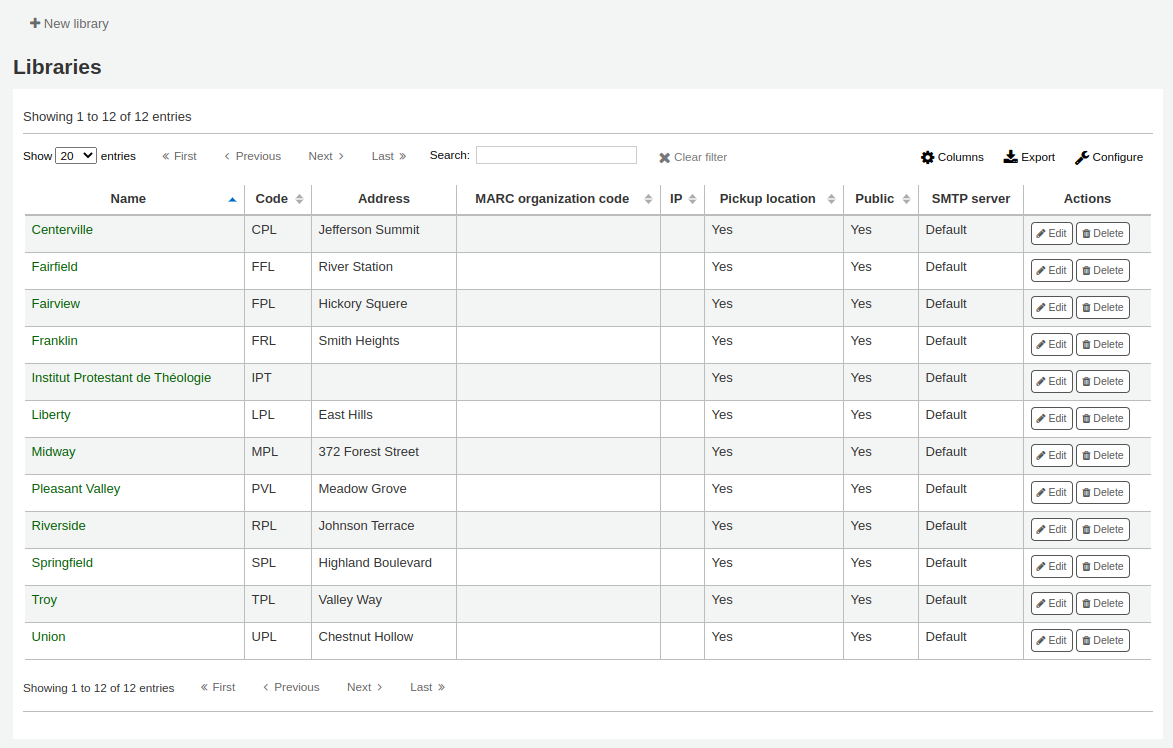
Let's start with an easy one, librarylist:
https://koha-community.org/manual/23.05/en/html/_images/librarylist.png
So it would be another file, as it's a "library" thing create the following
file: `t/cypress/integration/Manual/4-library.ts`
With the following content:
```
describe("Libraries", function () {
    beforeEach(() => {
        cy.login();
        cy.set_cookie_lang();
    });

    it("librarylist", function () {
        assert(true);
    });
});
```
Go to the cypress UI (you can use a translated interface or the default/English
one) and notice that it detected the new file, click on it. The beforeEach part
is only there to login and set the language cookie before each test is run.
The "it" block is doing nothing (apart from running a test that will always
pass), but it's where we want our steps to be.
https://snipboard.io/B4YCrK.jpg
Hover your mouse over the "Libraries" line and notice the magic wand icon "Add
new test". Tests rerun and you can interact with the UI!
Go to Administation > Libraries. Now the goal is to find the correct element we
want to screenshot. We want the "New library" button and the library list.
Right click and locate the 'main' element (between the button and the
"Libraries" title for instance).
Click "Add assertion > be visible". Try to make as little "noise" as possible!
Every interaction (mouse or keyboard) with the UI will be recorded! However,
use the computer like it is your first time: do not use keyboard shortcuts,
click on the input before you type, type slowly to make sure everything is
recorded, click on the submit button instead of pressing enter, etc.
You can remove the unnecessary steps by clicking the "times-circle" icon next
to the step.

When you are ready click "Save commands", enter a title: "librarylist".
Now edit t/cypress/integration/Manual/4-library.ts

You should see a new test added, something like:
    /* ==== Test Created with Cypress Studio ==== */
    it('librarylist', function() {
        /* ==== Generated with Cypress Studio ==== */
        cy.get(':nth-child(2) > .biglinks-list > :nth-child(6) >
.icon_general').click();
        cy.get(':nth-child(1) > :nth-child(4) > :nth-child(1) > a').click();
        cy.get('main').should('be.visible');
        /* ==== End Cypress Studio ==== */
    });
Remove the first librarylist 'it' (this is not ideal but I didn't manage to
find an easy way to not do it for now).

Commit! % git commit -a -m"auto librarylist"
Edit it again replace the line
        cy.get('main').should('be.visible');
With
        cy.get('main').should('be.visible').screenshot("librarylist");
Save.
Look at the screenshot!
Hey! It was not an easy one (I didn't know I promise!)
The screenshot does not show the libraries, because they are fetched in ajax,
after the page is loaded.

So edit again and add a "wait_for_ajax" call (that is doing what its named says
it does):
(I removed the comment lines)
```
    it('librarylist', function() {
        cy.get(':nth-child(2) > .biglinks-list > :nth-child(6) >
.icon_general').click();
        cy.get(':nth-child(1) > :nth-child(4) > :nth-child(1) > a').click();
        cy.wait_for_ajax();
        cy.get('main').should('be.visible').screenshot("librarylist");
    });
```
Save, look at the screenshot!
Now it is showing the library list!
Commit! `git commit -a -m"manual librarylist"

Do not be afraid, this will be the work for a developer if you are not
confident enough with modifying the test file.

You can try a really easy one by yourself:
https://koha-community.org/manual/23.05/en/html/_images/newlibrary.png
There is no trick here!
The generated code should be something like:
    it('newlibrary', function() {
        /* ==== Generated with Cypress Studio ==== */
        cy.get(':nth-child(2) > .biglinks-list > :nth-child(6) >
.icon_general').click();
        cy.get(':nth-child(1) > :nth-child(4) > :nth-child(1) > a').click();
        cy.get('#newbranch').click();
        cy.get('#Aform > :nth-child(1)').should('be.visible');
        /* ==== End Cypress Studio ==== */
    });

7. Let's create a new complex test!
Yes I know, the previous one was not easy finally, but it was not data
dependent.
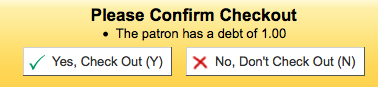
patrondebt -
https://koha-community.org/manual/23.05/en/html/_images/patrondebt.png
We need to turn on AllowFineOverride, create a manual fine for a patron, and
try to check them an item out.
So click on "2-checkouts", "Checkouts", magic hand, and use the UI. Try to
avoid any unnecessary actions! Try to do it perfectly the first time.
Save the commands, run the test: it will fail. Why? Because the pref is now on,
and you are trying to turn it on! However you could try your test after a
reset_all (with a fresh DB). They should pass in this case, or it means
something went wrong when you recorded the tests.
No worries, once again it can be the work of a developer to adjust the tests.

You should have something like that in 2-checkouts.ts
   /* ==== Test Created with Cypress Studio ==== */
    it('patrondebt', function() {
        /* ==== Generated with Cypress Studio ==== */
        cy.get(':nth-child(2) > .biglinks-list > :nth-child(6) > .icon_general
> .fa').click();
        cy.get('fieldset > [type="text"]').type("AllowFineOverride");
        cy.get('.btn').click();
        cy.get('#pref_AllowFineOverride').select('1');
        cy.get('.save-all').click();
        cy.get('#toplevelmenu > :nth-child(2) > a').click();
        cy.get('#search_patron_filter').clear();
        cy.get('#search_patron_filter').type('edna');
        cy.get('.action > .btn').click();
        cy.get('#menu > ul > :nth-child(3) > a').click();
        cy.get('.manualinvoice > a').click();
        cy.get('#amount').type('42');
        cy.get('[value="save"]').click();
        cy.get('#menu > ul > :nth-child(1) > a').click();
        cy.get('#barcode').clear();
        cy.get('#barcode').type('3999900000001');
        cy.get('#circ_circulation_issue > .btn').click();
        cy.get('#circ_needsconfirmation').should('be.visible');
        /* ==== End Cypress Studio ==== */
    });

We want to modify this code to define the conditions to make it always pass:
set the syspref to 0 and delete the fines we created for the patron.
See the comment in the code below:
    it.only('patrondebt', function() {
        cy.set_syspref("AllowFineOverride", "0"); // We set the syspref
AllowFineOverride to 0
        cy.query( // We remove the accountlines for the patron we are going to
use (edna)
            "DELETE FROM accountlines WHERE borrowernumber=5"
        );
        cy.get(':nth-child(2) > .biglinks-list > :nth-child(6) > .icon_general
> .fa').click();
        cy.get('fieldset > [type="text"]').type("AllowFineOverride");
        cy.get('.btn').click();
        cy.get('#pref_AllowFineOverride').select('1');
        cy.get('.save-all').click();
        cy.get('#toplevelmenu > :nth-child(2) > a').click();
        cy.get('#search_patron_filter').clear();
        cy.get('#search_patron_filter').type('edna');
        cy.get('.action > .btn').click();
        cy.get('#menu > ul > :nth-child(3) > a').click();
        cy.get('.manualinvoice > a').click();
        cy.get('#amount').clear();
        cy.get('#amount').type('42');
        cy.get('[value="save"]').click();
        cy.get("#menu > ul > :nth-child(1) > a").click();
        cy.get("#barcode").clear();
        cy.get("#barcode").type("3999900000001");
        cy.get("#circ_circulation_issue > .btn").click();

cy.get('#circ_needsconfirmation').should('be.visible').screenshot("patrondebt");
// We add the screenshot call!
    });

Look at the screenshot!
Run the tests again, they are still passing and the screenshot is still the
same! All work as expected.

8. Read the doc! (to be polite)
See [1]

Summary:
We could try cypress-studio and see how non-dev people are happy with it. But
the code generated will be, in my opinion, unmaintainable (ie. not robust).
See the "Move to commands" commit, where we actually want to replace the
generated code with something more readable and robust.
I personally think that the structure of the test files is quite easy to
understand, and with a bit more of command (like set_syspref, checkin,
checkout) we could make things easier to write, way more easier than using
cypress studio, but... I am a developer, this is certainly biased...

There are several things to discuss here. Who is onboard? How the syntax read
to non-tech people?
Where do we move the code? When are the screenshots generated? How do we
interact with the koha-manual project? Which data are we using? Should we
always use the same patron, the same biblio, the same item?

I will be happy to help and work on this. Send me your feedback! :)

Note: The librarylist, newlibrary and patrondebt tests are available on a
separate remote branch: cypress-studio-more (still in my gitlab repo)

[1] https://docs.cypress.io/guides/references/cypress-studio

--
You are receiving this mail because:
You are watching all bug changes.
_______________________________________________
Koha-bugs mailing list
[email protected]
https://lists.koha-community.org/cgi-bin/mailman/listinfo/koha-bugs
website : http://www.koha-community.org/
git : http://git.koha-community.org/
bugs : http://bugs.koha-community.org/