https://bugs.documentfoundation.org/show_bug.cgi?id=165507
--- Comment #4 from Eyal Rozenberg <[email protected]> ---
(In reply to Jonathan Clark from comment #3)
> - We should make Start the default alignment. LTR-only users won't notice a
> difference, but it's conceptually pure and a nice improvement for RTL and
> mixed cases.

I agree. But - this is not a trivial pill for people to swallow. Very few
office suite users have heard of "Start alignment", or the distinction of
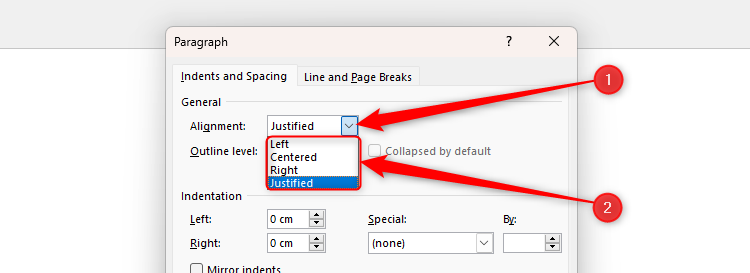
"Start" from "Left". After all, we've never mentioned that before, and with MS
Workd:

https://static0.howtogeekimages.com/wordpress/wp-content/uploads/2025/04/the-alignment-drop-down-menu-in-microsoft-word-s-paragraph-dialog-box.png

it's also Left-Right-Center-Justify. Probably any number of other apps which
support text alignment (e.g. Inkscape, gimp etc.)

So even though I'm still 100% sure we should do this, there is at least the
question of how exactly; and whether we should take any measures to facilitate
the transition of concepts for users. It might be that the answer is "no", of
course. But - who can we ask? We should definitely have a design meeting agenda
item about this, but those are just 3-5 people typically, and two of them will
probably be us.

Maybe a reddit thread? Mastodon poll/open question? And what about places where
MS Office people congregate online?

--------------------------------------------------


Now let's talk about the toolbar buttons, which already metonimize the
difficulty of this conceptual transition.

> - I think we should keep the four-button cluster as-is, but quietly make the
> Left and Right buttons apply Start and End alignment, instead. This should
> work in a smart, context-sensitive way; so, for example, clicking on the
> Right button would apply End alignment if the paragraph is LTR, but Start if
> RTL. Activation states should work in a similar smart way, and also show as
> activated if the absolute Left/Right values are used.

Some clarification/elaboration questions (to you and to everyone) about this
option, including some I've asked in the opening question:

* If we press the now-left-align button, then switch the direction, the active
button will switch to the new-right-button?
* Will the tooltips say 'Align Start' and 'Align End'? And change labels when
we switch directions?
* What will we see when the user chooses 'Align Left', e.g. via Format >
Paragraph... or when opening a file which has that setting? i.e. will one of
the 4 buttons be pressed? Two? None?
* What buttons will the UNO commands for Align-Left and Align-Right have? Same
look but without the switch on direction switch? Or something to distinguish
them from Align-Start and Align-End even when static?

--
You are receiving this mail because:
You are the assignee for the bug.