https://bugs.freedesktop.org/show_bug.cgi?id=75627
          Priority: medium
            Bug ID: 75627
          Assignee: [email protected]
           Summary: General number format change leads to
                    inconsistent/lost formatting
          Severity: major
    Classification: Unclassified
                OS: All
          Reporter: [email protected]
          Hardware: Other
            Status: UNCONFIRMED
           Version: 4.1.0.4 release
         Component: Spreadsheet
           Product: LibreOffice

Description:
Cells with formulas referencing other cells that have special number formats
(like currency) will attempt to inherit those number formats too.  LibreOffice
4.1 changed the behavior for the “General” number format when used with formula
format code inheritance.  Unfortunately, "clear direct formating" or changing
format back to "General" on these formula cells causes inconsistent behavior.
The format code does, indeed, change back to "General," and the cell format
does change, as you would expect.  But when you save and reload the
spreadsheet, the formula cells will revert to mimicking their referenced cells.

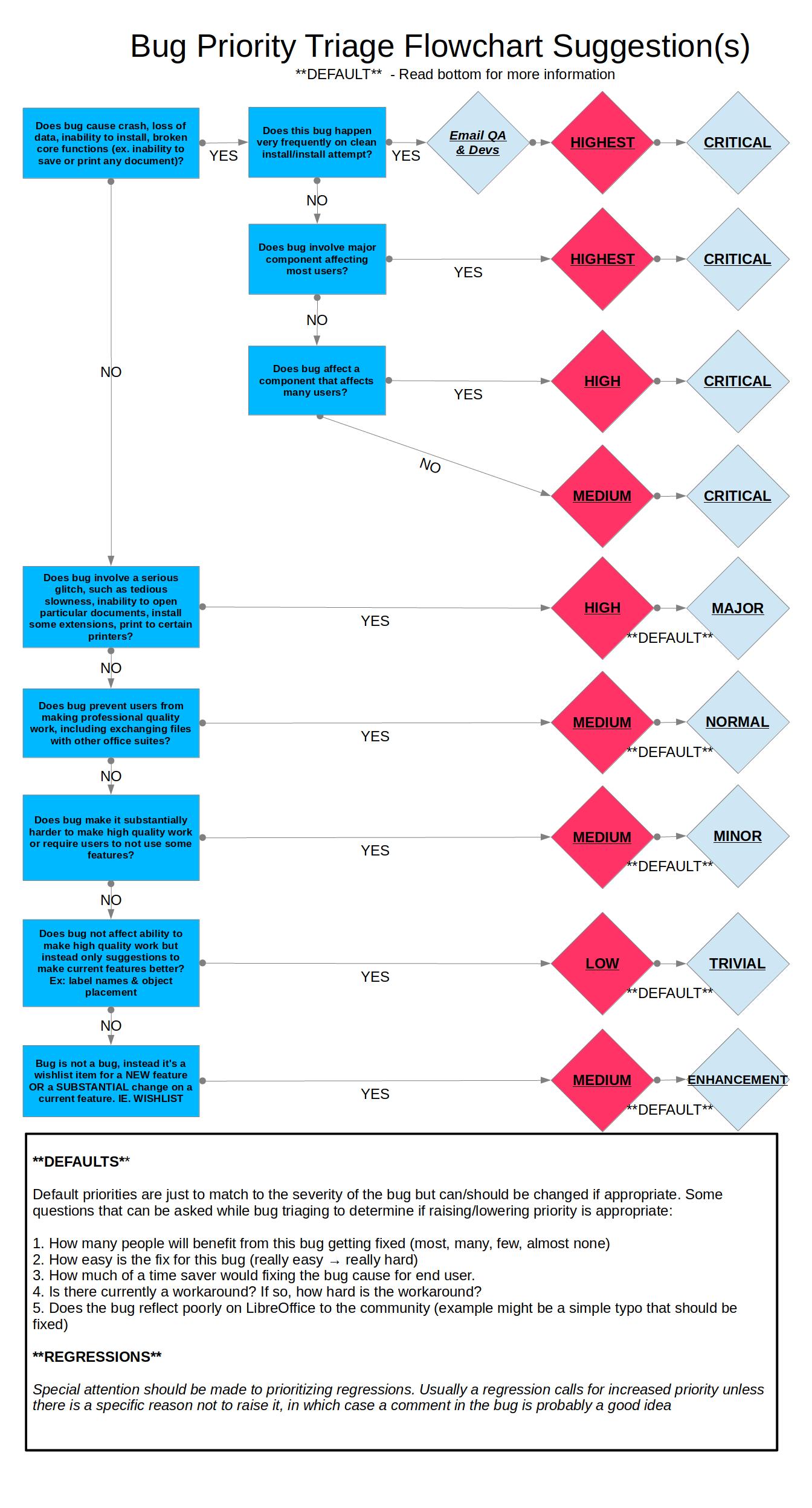
According to the bug priority flowchart, I could argue that it does cause a
loss of data in a component that affects many users.  This would categorize it
as Critical-High.  It is also a regression, so that too would justify a higher
priority.  Since it's rather easy to work around, I'll set to Major High.

https://wiki.documentfoundation.org/images/0/06/Prioritizing_Bugs_Flowchart.jpg

I've tested a number of versions under different versions of Linux and MS
Windows.  This regression appears to have been introduced in version 4.1.0.

Tested Affected Inconsistent Versions:
LO 4.1.0.4 using 32bit Fedora 17
LO 4.1.4.2 using 64bit RHEL6
LO 4.2.1.1 using 32bit Fedora 17
LO 4.1.4.2 using 32bit Windows 7

Tested Versions with previous (consistent) behavior:
OO 3.2.1 using 64bit RHEL6
LO 3.5.7.2 using 32bit Fedora 17
LO 4.0.6.2 using 32bit Fedora 17

Steps to reproduce:
1. Open new spreadsheet
2. In cell A1, insert a dollar amount ($100)
3. In cell B1, insert a formula pointing to A1 (=A1)
4. Note that B1 changed format to match A1 (should be currency)
5. Right click B1 and clear formatting
6. Note that B1 changed format from currency to a standard number format (100)
7. Save document
8. File -> Reload

Expected:
However your formatting looks when you save a document is how it should look
when you load it.  B1 should still have a standard number format “100” if that
is how you saved it.

Actual:
B1 has changed format back to currency, ignoring our last formatting change to
clear direct formatting.  It looks very different than how we saved it.

I have also included an example spreadsheet.  Simply clear formatting on column
B, save, and reload the document to see the error.

Notes:
This behavior seems rather complicated.  I might be assuming too much about LO
Dev's intentions, but it seems that LO changed the behavior of the
“number-general” number format in version 4.1.  Prior versions of OO/LO seem to
use the “number-general” format as an “undefined format.”  In our example, when
you viewed B1's formatting, it wouldn't actually change from “number-general”
to “currency” as it does now.  It would remain number-general, but just APPEAR
to be formatted as currency.  Since there was no actual change of formats, only
appearance, the change would be immediate and remain consistent between saves.
Everything was at least everything was consistent, but rather confusing.

In LO 4.1+, if you check the formula cells(B column) in the example, they are
no longer formatted as number-general.  They have now actually changed format
code to mimic the cells they reference.

It also seems that LO devs attempted to change the behavior for
“number-general” to actually be a defined number format.  When you clear
formatting it now changes back to a normal number (integer).  But the devs
forgot to change the behavior for when you load the saved document.  When the
document is loaded, LO still processes “number-general” as undefined and
applies the referenced cell's format.

I agree with LO's decision to change this behavior.  If I have currency cells,
I would expect that formatting them back to number-general would format them
the way they would appear if I just typed that value into a blank cell.
Unfortunately, it's currently half implemented and leads to some horrible
quality-of-work cases.  One of my users recently sent a spreadsheet to another
user and an entire derived column changed formats to currency.

Work Around:
An easy work-around is to change your formula's number format to a SPECIFIC
number format code.  For instance, change it to “0” instead of “General”.

Unfortunately, I think it will be rather complicated to fix this bug without
breaking compatibility with other LO/OO versions/possibly MS formats.  But it
is something that needs to be addressed.

--
You are receiving this mail because:
You are the assignee for the bug.
_______________________________________________
Libreoffice-bugs mailing list
[email protected]
http://lists.freedesktop.org/mailman/listinfo/libreoffice-bugs