https://bugs.freedesktop.org/show_bug.cgi?id=88231
            Bug ID: 88231
           Summary: Impossible to type accent symbol (Unicode 0x301 or
                    decimal 0769)
           Product: LibreOffice
           Version: 4.3.5.2 release
          Hardware: Other
                OS: All
            Status: UNCONFIRMED
          Severity: normal
          Priority: medium
         Component: Writer
          Assignee: [email protected]
          Reporter: [email protected]

Created attachment 112002
  --> https://bugs.freedesktop.org/attachment.cgi?id=112002&action=edit
buggy dile

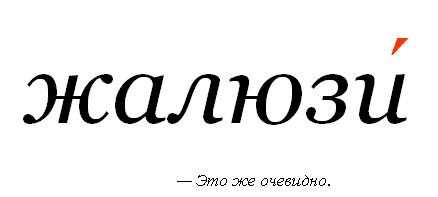
Accent symbol - common in russian language symbol to differ words with the same
writings, but different pronouciation.
LO reads accent symbol repfectly, if you type it in MS Word. By typing in LO is
problematic.
1. Windows only method ALT+deicaml offset. ALT+0769 doesnt type anything
2. Inserting symbol via GUI. I choose U+301 and instead of symbol with upper
coma I see ligature with two upper comas.
3. I see no way to disable ligatures. How to disable autoligature insert?

Also if you open this odt in MS Word - everything will look fine.

Pic showing how accent symbol looks (here it is red, normally black)
http://img0.liveinternet.ru/images/attach/c/1//62/900/62900084_8ddc6dbe1218.jpg

--
You are receiving this mail because:
You are the assignee for the bug.
_______________________________________________
Libreoffice-bugs mailing list
[email protected]
http://lists.freedesktop.org/mailman/listinfo/libreoffice-bugs