https://bugs.documentfoundation.org/show_bug.cgi?id=147639
            Bug ID: 147639
           Summary: Incorrect zoom (except for menubar) on enabling
                    fractional scaling on KDE Wayland
           Product: LibreOffice
           Version: 7.3.0.3 release
          Hardware: All
                OS: Linux (All)
            Status: UNCONFIRMED
          Severity: normal
          Priority: medium
         Component: Writer
          Assignee: [email protected]
          Reporter: [email protected]

Description:
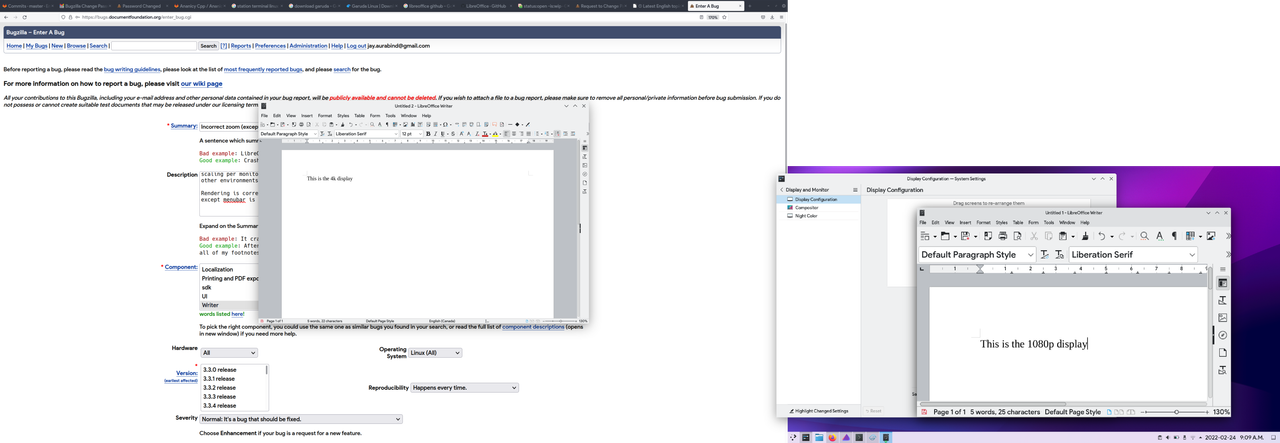
I have a 1080p laptop screen connected to an external 4k display. I am running
the 4k display at 125% zoom through KDE settings in Wayland mode. Fractional
scaling per monitor is only available on Wayland for KDE, so I havent tested
other environments. I'm using KDE on Arch Linux.

Rendering is correct on the 4k display. But on the laptop screen, everything
except menubar is rendered extremely large.

https://i.postimg.cc/j55HSQGL/scaling-libreoffice.png

Steps to Reproduce:
1. Set fractional scaling on Wayland KDE, and open libreoffice

Actual Results:
can observe scaling on unscaled display

Expected Results:
No scaling zoom on unscaled display


Reproducible: Always


User Profile Reset: No


OpenGL enabled: Yes

Additional Info:
[Information automatically included from LibreOffice]
Locale: en-US
Module: TextDocument
[Information guessed from browser]
OS: Linux (All)
OS is 64bit: yes

Version: 7.3.0.3 / LibreOffice Community
Build ID: 30(Build:3)
CPU threads: 16; OS: Linux 5.16; UI render: default; VCL: kf5 (cairo+wayland)
Locale: en-CA (en_CA.UTF-8); UI: en-US
7.3.0-5
Calc: threaded

--
You are receiving this mail because:
You are the assignee for the bug.