https://bugs.documentfoundation.org/show_bug.cgi?id=153099
            Bug ID: 153099
           Summary: LibreOffice (Writer) shows a dot (.) to indicate a
                    decimal point, when it should be a comma (,) instead.
           Product: LibreOffice
           Version: 7.4.4.2 release
          Hardware: All
                OS: Windows (All)
            Status: UNCONFIRMED
          Severity: trivial
          Priority: medium
         Component: Writer
          Assignee: [email protected]
          Reporter: [email protected]

Description:
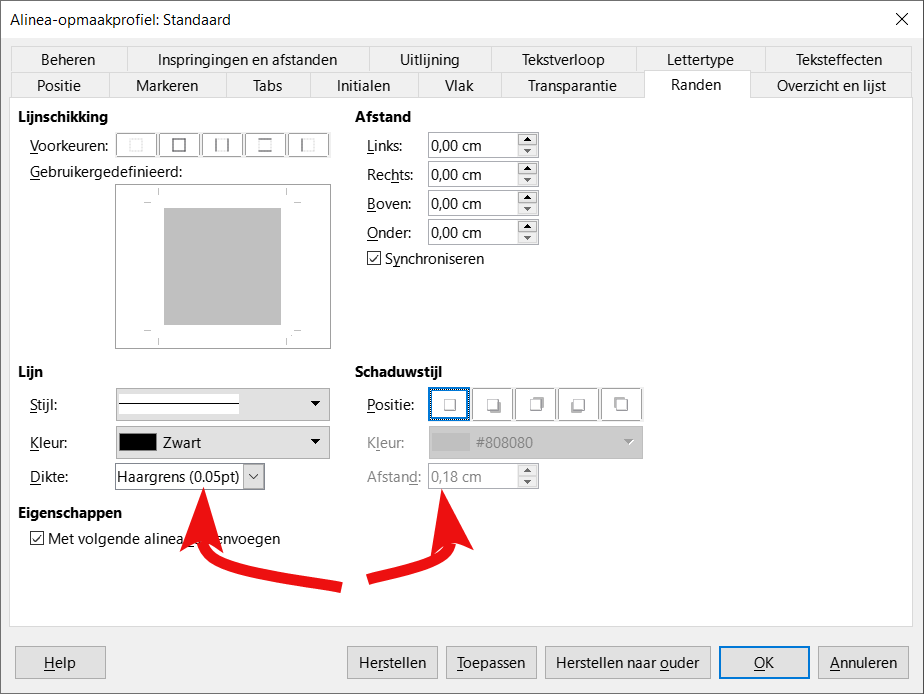
https://i.vgy.me/1rav2m.png
Image^^

When you press alt+p and go to "edges" ("randen" in Dutch), the program
sometimes shows a comma as decimal seprator and sometimes a dot. It should
always be a comma considering the fact I have my language set to Dutch, which
is a language that uses commas as decimal separators, unlike English.

Note: This issue might also appear in more places than just the alt+p menu.

Steps to Reproduce:
This only appears in the Dutch translation of LibreOffice!! Go to description
for an image.
1. Open Writer (this might also appear in different programs, like Impress, and
this might also appear in other sections of the UI. I haven't checked that.)
2. Press alt+p.
3. Go to "edges" ("randen" in Dutch)

Actual Results:
The decimal separator is a dot (.)

Expected Results:
The decimal separator should've been a comma (,)


Reproducible: Always


User Profile Reset: No

Additional Info:
Version: 7.4.4.2 (x64) / LibreOffice Community
Build ID: 85569322deea74ec9134968a29af2df5663baa21
CPU threads: 8; OS: Windows 10.0 Build 19044; UI render: Skia/Raster; VCL: win
Locale: nl-NL (nl_NL); UI: nl-NL
Calc: threaded

--
You are receiving this mail because:
You are the assignee for the bug.