On Mon, Jul 26, 2010 at 1:50 AM,  <[email protected]> wrote:
> Adding a log2() and a multiplication doesn't seem like much of a
> pain compared to the rest.
Yes, but orthogonal to getting what I'd already completed out... And
also, I figured there'd be discussion about the confusion in scales on
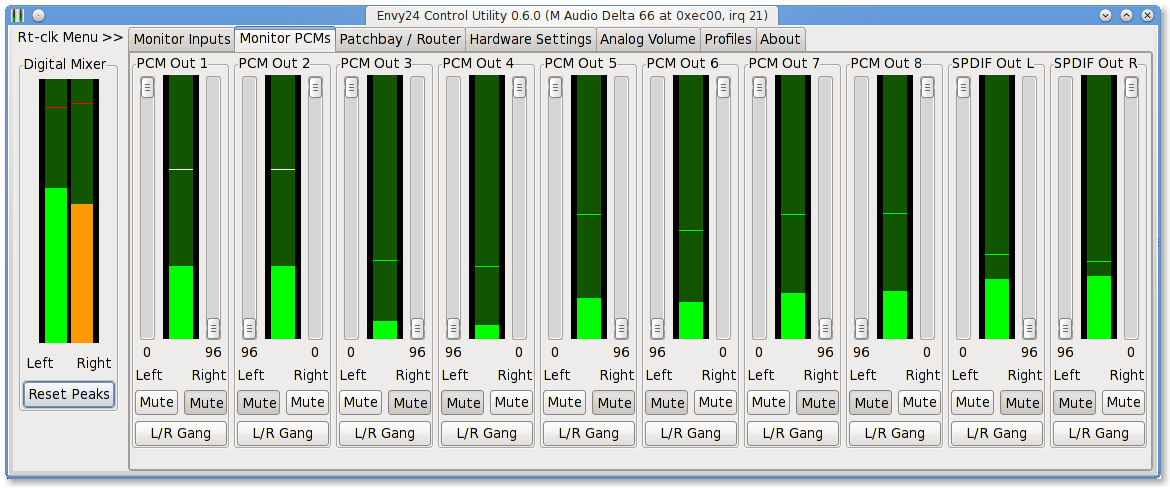
"Monitor Inputs" and "Monitor PCM" panels, such as:

> Anyway, the current scale is completely wrong so I wonder why it
> was added, and it's not the one you need either - you don't have
> enough data to indicate down to -120.

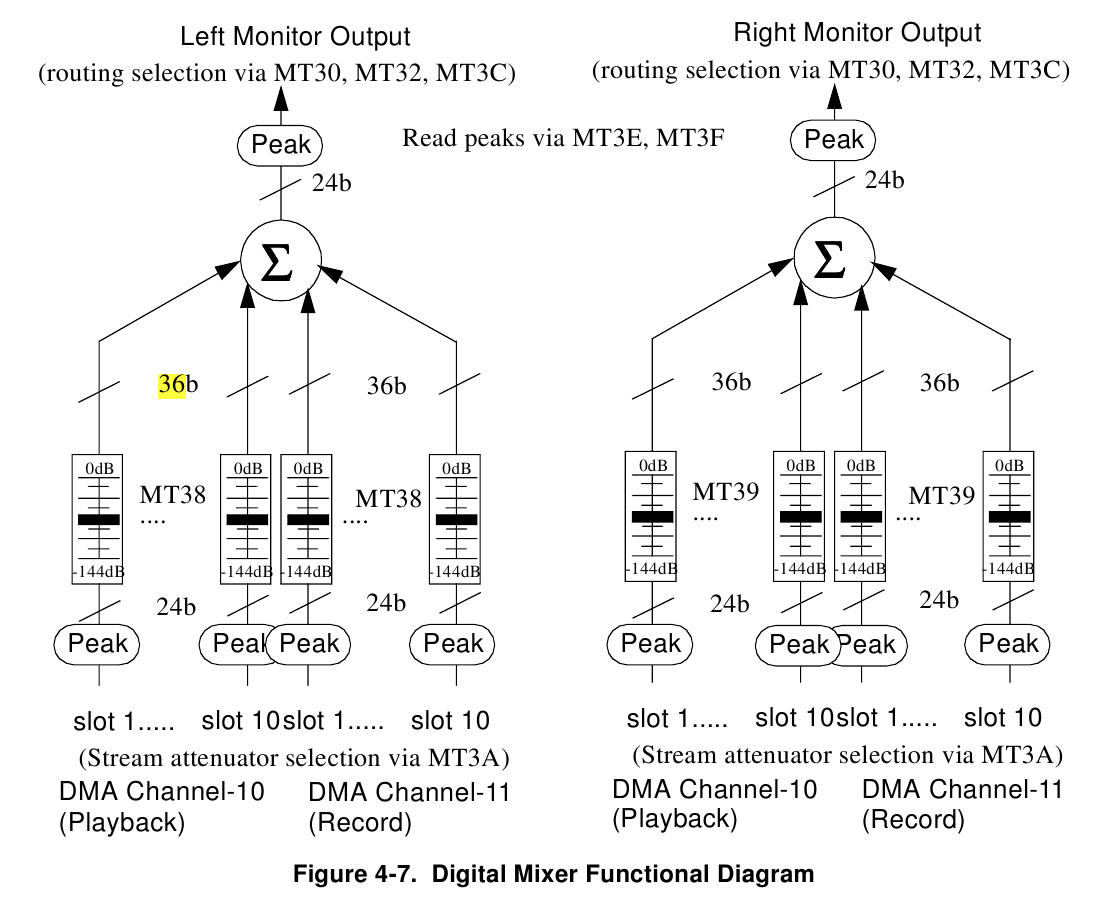
This is a confusing aspect of adding a scale to the existing GUI
panels for the mixer -- the scale-legend, organized in L/R  pairs as
far away as possible from the meter, which does not share the same
scaling, nor logarithmic shape. These legends are for the 0 to -144dB
24 bit attenuator feeding each input of the digital summing of the
ice1712's digital mixer. See
http://nielsmayer.com/envy24control/envy24mixer-architecture.png .

The 0.00 to -48.1 dBFS readout value from the peak meter is displayed
centered under each meter for each input channel. Underneath, to the
left and right, are the readouts for the L/R attenuation into the
ice1712's digital mixer.

> The range should be down to
> -40 or so. Even that will take steps in the lower range that are
> larger than one pixel.
>
>> Note that the original meters essentially used the same value-to-pixel
>> mapping for the peak meters -- they just didn't tell you that
>> half-scale was -6dB.
>
> Nor do the current ones.

The peak readout in dB centered under each meter follows the
peak-levels in the meters. When they read "OdBFS" in red, you'll see
the peak meter red at the top, and when they're at "-2.00" you'll see
a different colored line indicating the peak.... That is supposed to
given an indication of the "scale" which was implicit/hidden and
somewhat misleading in the 0.6.0 version's meters -- since they too
were linear, and only could represent 256 levels offered by the
hardware peak metering. The difference now is different meters, which
should significantly lower X resource usage, as well as maintaining
and displaying a peak-level for ~20 channels of audio.

If I could have started from a blank slate, it would have been
completely different. On the digital mixer, I'd put them all in one
panel and save a slider-per-channel, replacing it with a pan-pot, like
http://sourceforge.net/projects/kenvy24/ . I'd also have chosen Qt
because I'm just trendy like that.

> I just don't believe that GTK can't create a slider without these
> detents (which don't work well either). It would be utterly broken.
> Try using such a fader for any real audio work.

If someone has a solution for this, let me know. Otherwise I will add
it to the list of things to look into.

> Attached.

Thanks. That was helpful. Hmmm, you could pack some 32 channels of
audio into a single computer with 4 EWS88MT's, eh? Does the
interconnect cable that it has for digital syncing between cards
internally work in linux as well?

> I mean the ones in the analog levels. You can't assume what a channel
> is used for, just make them all the same.

I'll either do that, or make "--stereo" an option for grouping in
"Analog Volume" (note that the L/R groupings in the "monitor PCM" and
"monitor input" panels will still exist since they feed a stereo
mixer).

And then another option "--noscale" to get rid of the scale
markings/detent on the sliders (leaving the dB peak level readouts and
slider level dB readouts).

---------------------------

ALSO:: A response I forgot to send regarding some of your previous comments:

On Fri, Jul 16, 2010 at 4:16 PM,  <[email protected]> wrote:
>> Diagram: http://nielsmayer.com/npm/envy24mixer-architecture.png
>> Note the way it truncates in the mixer: the more inputs you "mix" at
>> once, the fewer bits each input source gets,
>
> It has to be, as the sum is limited. No signal can use the full
> range if another signal is present at the same time. The mixer
> permits 0 dB gain, so if you do have a single signal it can pass
> through untouched.

I was thinking of a scenario where the final mix out of the mixer
could have it's levels (optionally) dithered for the final output to
24, and where the "least-amplitude-point" and "maximum amplitude
point" of the 36 bit final mix signal could be linearly mapped to the
output 24. I guess this means you're splitting the difference on whose
losing the bits -- so that the parts mixed quieter don't lose more
resolution than their louder, peak-setting, counterparts. Another way
to describe it is instead of turning down the input gains to prevent
output clipping (which sort of compromises your mix as you may need to
start re-levelling every input), you can have the input levels be that
of their desired position in the mix, and then use a linear mapping to
convert that maximum to the 24bit maximum point, mapping&scaling all
other values "below" it into that 24 bit range. I guess this would
most easily be accomplished in floating-point -- although that
wouldn't give direct control over where the bit loss occurs. Do
hardware mixers exist that work like "floating point" in a DAW with
"unlimited" ability to sum without clipping, while not losing or
fuzzing any bits going into and out of floating-point?
(Obviously, they can't be unlimited w/ a finite bit width, but 64 bits
of integer is certainly enough to represent a lot of summed HD
channels).

Another way to look at this mixing conundrum: Should the kick-drum
with mostly bass-components get more bits than the trail-off sizzle on
the high-hat, or the the reflections of the attack off the room? It's
certainly not the way human hearing perceives loudnesses, so it's
probably not the most ultimate means of faithful audio reproduction.

On the other hand, why not just use a 64 bit digital mixer/summing and
output a 64bit "frame" from the digital mixer via PCI bus, and then do
whatever bus-compression or other mappings, both linear- and non- in
the computer, in software.). Who makes that chip?

>> ultimately the
>> envy24 seems oriented towards producing a 16 bit, and not 24 bit
>> master (which makes sense given that the chip is well over a decade
> old and HD audio production for "prosumer" was rare):
>
> I see no reason at all to arrive at that conclusion. The card
> as a whole is limited by the performance of the converters, and
> nothing else.

Please note I wasn't arriving at that conclusion on the whole set of
cards that use this soundchip. Only w/r/t its internal digital mixer
which is often not the way these cards are used normally anyways.
Therefore my comment related only to the "Monitor PCMs" and "Monitor
Inputs"  part of the envy24control. That mixer doesn't give you
control over dithering and appears to just give straight truncation as
an option. And for all intents and purposes, whether this bit is
dithered is pretty irrelevant. Of course if you record the 24 bits out
of the digital mixer, and then master for CD/internet by dithering to
16, then you probably get the use-case this chipset sought to solve.

However, the digital mixer part of the card, apart from headphone
"zero latency monitoring" of inputs, isn't isn't what you'd use
through jack, you'd use the "system" inputs and outputs directly. And
those would be mixed using whatever form of mixing bus used by the
DAW, e.g. floating point or 64 bit integers or ...

What I need to investigate is whether perhaps I prefer the sound of
truncation :-) -- I have the occasional feeling that the sound of
mixing in the envy24's digital mixer is "clearer" than through the
soundcard->alsa->jack->app->jack->alsa->soundcard route. I need to try
out "Dither: none" in qjackctl next time just to make the comparison
fair, given that I now know what is happening in the envy24 digital
mixer and better understand where the sliders in
http://nielsmayer.com/npm/Screenshot-Efficient-Meters-Envy24Control.png
 map  to in  http://nielsmayer.com/npm/envy24mixer-architecture.png
(and that the "96" marking is truly incorrect, it should be "-144dB"
per the architecture diagram...)

-- Niels
http://nielsmayer.com
_______________________________________________
Linux-audio-dev mailing list
[email protected]
http://lists.linuxaudio.org/listinfo/linux-audio-dev