On 2/02/2010 12:28 PM, Alex Mandel wrote:
Juan Lucas Domínguez Rubio wrote:
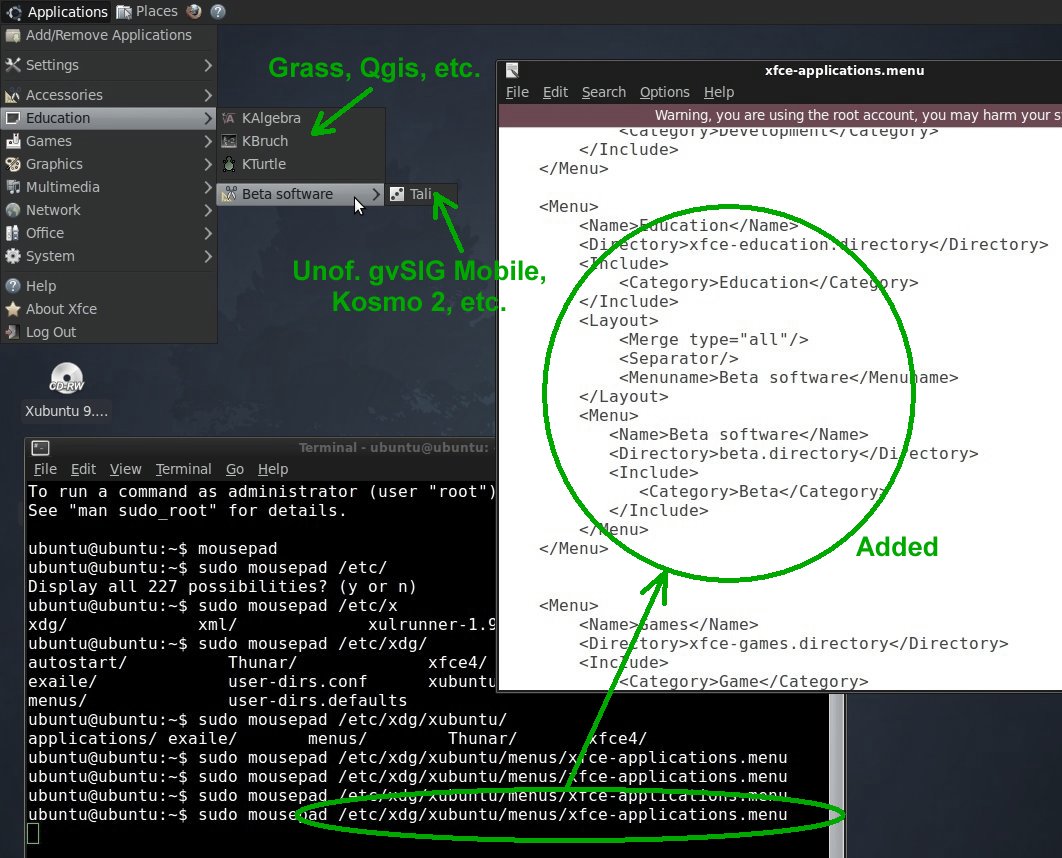
Hello. Please have a look at this screenshot:
http://gvsigmobileonopenmoko.files.wordpress.com/2010/02/edit_menu.jpg

That's a Xubuntu 9.10 live CD with the applications menu slightly modified by
adding some 10 lines to a certain XML file:

/etc/xdg/xubuntu/menus/xfce-applications.menu

I guess your Xubuntu 9.10 also has that XML in the same place. This additional
line:

Categories: Beta;

has to be then written in the *.desktop files that are considered beta
software, as I have done with that application called Tali.

If you are interested in this modification, I think I can help you write the
script to do it automatically.

Regards,
Juan Lucas
By all means please feel free to write a script that would do that.
Either post it or add it as an optional section in the install_desktop.sh

I think we passed on it last time because we didn't have enough time to
work out a script to do the process. I did however research the solution
and came to the same conclusion as you.

Thanks,
Alex
Yes Thanks Juan,
Adding Menus as you suggest would be great. Please go ahead and create it.
I suggest that we should set up a new category (on the same level as
Education) called "Geospatial"
So we would have:
Geospatial/gvsig
Geospatial/geoserver

Geospatial/beta/gvsig-mobile
Once you have worked out how it should be done, could you please also
update the build wiki so that others can follow your steps.
http://wiki.osgeo.org/wiki/GISVM_Build
--
Cameron Shorter
Geospatial Solutions Manager
Tel: +61 (0)2 8570 5050
Mob: +61 (0)419 142 254

Think Globally, Fix Locally
Geospatial Solutions enhanced with Open Standards and Open Source
http://www.lisasoft.com

_______________________________________________
Live-demo mailing list
[email protected]
http://lists.osgeo.org/mailman/listinfo/live-demo