On Tue, Apr 8, 2014 at 10:55 PM, Enrico Granata <[email protected]> wrote:
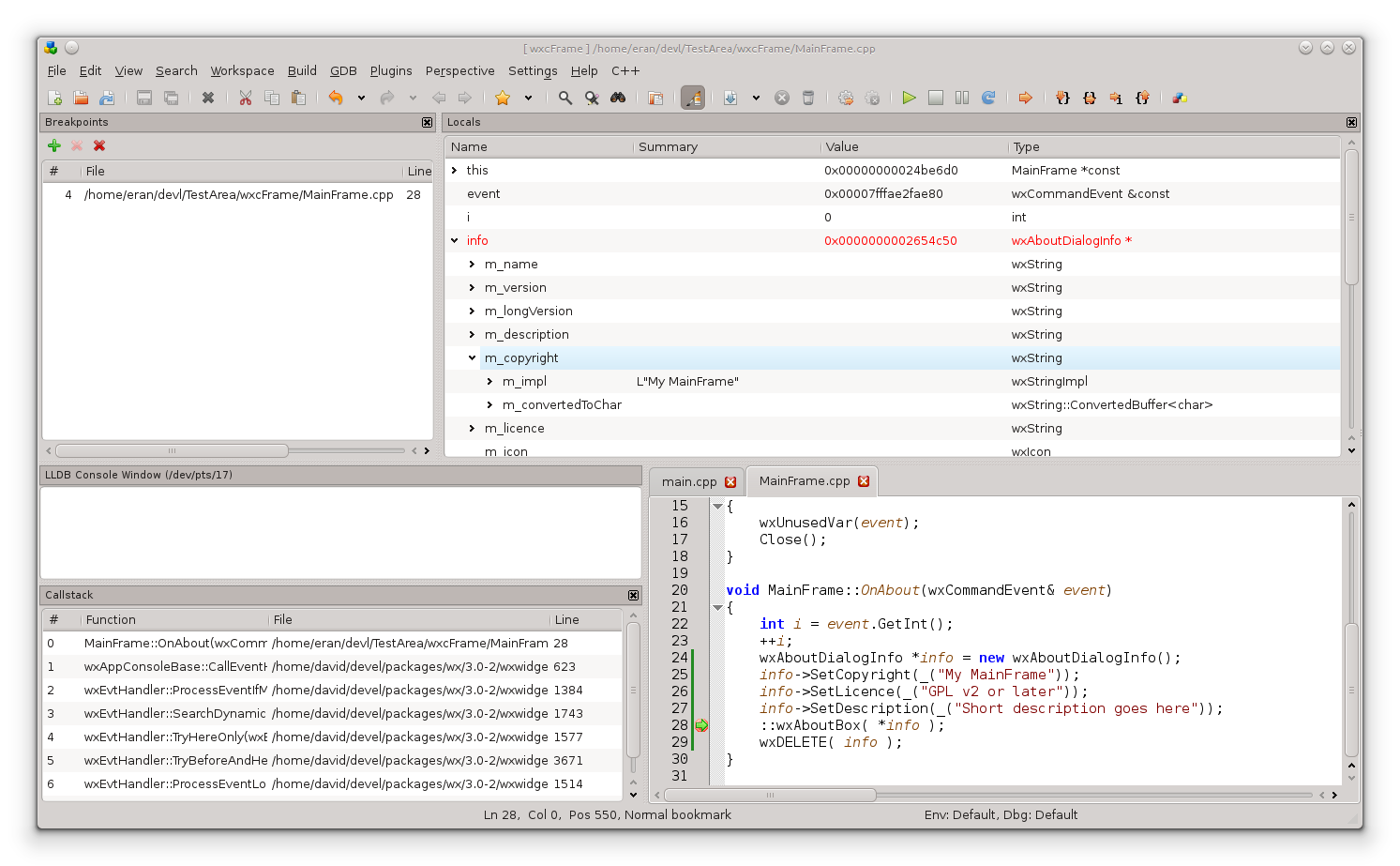
> On Apr 8, 2014, at 12:35 PM, Eran Ifrah <[email protected]> wrote: > > Thanks for the tip. It works fine for 'string' types > But for simple types (e.g. 'int') GetSummary() returns an empty string.. :/ > > So I ended up writing this little method: > http://pastebin.com/pj0znv9j > > > IIUC your logic, you’re saying - for pointers to “char-like things”, get > the summary, for anything else just get the value > That doesn’t seem right. You are going to hide the summary for classes and > structs doing this, and not get anything to display since these don’t have > a value > > Why are you trying to coalesce value and summary instead of keeping them > as two separate notions and then making print-time decisions? > In the LLDB source, there is a ValueObjectPrinter.cpp which implements the > printing that you see with the frame variable command, for instance > That might be a useful starting point for you to look at if you’re aiming > to provide “smart” printouts of data > > The reason I did this, was that GetSummary() returns empty string in all cases except for strings, so this was an attempt to merge both columns into a single column ("Value") For testing purposes, I updated my UI to include 2 separate columns "Summary" and "Value" As you can see in the attached screenshot, the "Summary" is always empty, except for 'string' types ( I don't see any summary for classes and structs ) http://codelite.org/images/empty-summary.png > Which seems to work fine for me (ofcourse, I will know more when I upload > the pre-release to my testers) > > Thanks > > > > On Tue, Apr 8, 2014 at 9:04 PM, <[email protected]> wrote: > >> That is what the Summary is for. The Summary, if it exists, is the >> preferred "interpreted" presentation of the data held by the SBValue. So >> for a char *, the Value is the pointer value, but the Summary is the >> c-string contents. >> >> Jim >> >> On Apr 8, 2014, at 10:57 AM, Eran Ifrah <[email protected]> wrote: >> >> > Hello Enrico / All, >> > >> > I debugged it and it seems like a bug in my code. >> > To get the frame locals (function args and locals) I was using this >> call: >> > >> > frame.GetBlock().GetVariables() >> > >> > While I should have simply call to frame.GetVariables() >> > Which fixes the problem. >> > >> > However, I am facing another issue: >> > It seems like the function "const char* SBValue::GetValue()" returns >> the pointer address as string instead of the actual content >> > >> > Any quick way to get the data as an actual c-str? >> > >> > For example: >> > >> > int main(int argc, char** argv) { >> > return 0; >> > } >> > >> > My lldb UI for the "locals" view looks like this (best viewed in >> monospace font ;)) : >> > >> > >> -------------------------------------------------------------------------------- >> > name | type | value >> > >> -------------------------------------------------------------------------------- >> > argc | int | 1 >> > argv | const char** | 0xfffffab123 (some random address) >> > | | | >> > +-*argv | const char* | 0xfffffab124 (some other address) >> > | | | >> > +- **argv| char | '/' >> > >> > In the code, I can identify that *argv is of type >> lldb::eBasicType*Char, however, I can't find a way to extract the string >> itself (it should be "/home/eran/test/TestLLDB") >> > >> > Any hints? >> > >> > Thanks! >> > >> > >> > >> > >> > On Mon, Apr 7, 2014 at 5:31 AM, Eran Ifrah <[email protected]> >> wrote: >> > Thanks, will debug this and see where it fails >> > >> > Eran >> > >> > >> > On Mon, Apr 7, 2014 at 1:43 AM, Enrico Granata <[email protected]> >> wrote: >> > Yeah the const char* definitely should have a value. >> > I am guessing the variable is in scope all right. Does it have a >> summary if you ask for that? >> > Does the same API call work if you stop directly within LLDB and use >> the Python API? >> > More context (e.g. a repro case) would also help - or maybe if you can >> step through the LLDB code and see where we fail. If these are just frame >> locals I expect the relevant code to be in ValueObject.cpp GetValueAsCString >> > >> > Sent from the iPhone of >> > Enrico Granata <egranata@🍎.com> >> > >> > On Apr 6, 2014, at 12:26 PM, Eran Ifrah <[email protected]> wrote: >> > >> >> One of the local variables was 'const char*' so I would expect it to >> have a value and others were of type of 'wxString' >> >> In the UI I expanded all the way to the _M_data which is of type >> 'wchar_t*' - and still nothing >> >> >> >> Eran >> >> >> >> >> >> >> >> On Sun, Apr 6, 2014 at 9:13 PM, Enrico Granata <[email protected]> >> wrote: >> >> What is the data type of your variables? >> >> >> >> If they are aggregate types (structs, classes, ...) they won't have a >> value. >> >> >> >> Only basic types (int, float, char, ..., you get the idea - and >> pointers) have a value. >> >> >> >> For other types, they might have a summary, or they might have >> children, but definitely no value. >> >> >> >> Sent from the iPhone of >> >> Enrico Granata <egranata@🍎.com> >> >> >> >> On Apr 6, 2014, at 7:02 AM, Eran Ifrah <[email protected]> wrote: >> >> >> >>> Hello all, >> >>> >> >>> I am at a phase where I want to display the current frame local >> variables whenever the debugger "stops" >> >>> I was able to get a list of the selected frame's variables in the >> following manner: >> >>> >> >>> lldb::SBFrame frame = >> m_target.GetProcess().GetSelectedThread().GetSelectedFrame(); >> >>> ... >> >>> lldb::SBValueList args = frame.GetBlock().GetVariables(m_target, >> true, true, false); >> >>> for(size_t i=0; i<args.GetSize(); ++i) { >> >>> lldb::SBValue value = args.GetValueAtIndex(i); >> >>> if ( value.IsValid() ) { >> >>> LLDBLocalVariable::Ptr_t var( new >> LLDBLocalVariable(value) ); >> >>> locals.push_back( var ); >> >>> } >> >>> } >> >>> >> >>> Now, LLDBLocalVariable is a thin wrapper class for UI purposes. >> >>> What it does is basically copies values from lldb::SBValue: >> >>> >> >>> LLDBLocalVariable::LLDBLocalVariable(lldb::SBValue value) { >> >>> SetName( value.GetName() ); >> >>> SetType( value.GetTypeName() ); >> >>> SetValue( value.GetValue() ); // always returns null >> >>> ... // code that handles children of value >> >>> } >> >>> >> >>> value.GetName() and value.GetTypeName() are working as expected (i.e. >> I get the correct type name and its name) >> >>> However, I can't get the value as "string". I was naive enough to >> think that const char* SBValue::GetValue() will do the trick... but this >> always returns NULL. >> >>> >> >>> Any suggestions on what am I doing wrong? an example on how to >> extract the variable's value in string format will be really appreciated >> >>> >> >>> Thanks, >> >>> >> >>> P.S. >> >>> This is Linux 13.10 / 64 bit >> >>> Self compiled lldb >> >>> >> >>> -- >> >>> Eran Ifrah >> >>> Author of codelite, a cross platform open source C/C++ IDE: >> http://www.codelite.org >> >>> wxCrafter, a wxWidgets RAD: http://wxcrafter.codelite.org >> >>> _______________________________________________ >> >>> lldb-dev mailing list >> >>> [email protected] >> >>> http://lists.cs.uiuc.edu/mailman/listinfo/lldb-dev >> >> >> >> >> >> >> >> -- >> >> Eran Ifrah >> >> Author of codelite, a cross platform open source C/C++ IDE: >> http://www.codelite.org >> >> wxCrafter, a wxWidgets RAD: http://wxcrafter.codelite.org >> > >> > >> > >> > -- >> > Eran Ifrah >> > Author of codelite, a cross platform open source C/C++ IDE: >> http://www.codelite.org >> > wxCrafter, a wxWidgets RAD: http://wxcrafter.codelite.org >> > >> > >> > >> > -- >> > Eran Ifrah >> > Author of codelite, a cross platform open source C/C++ IDE: >> http://www.codelite.org >> > wxCrafter, a wxWidgets RAD: http://wxcrafter.codelite.org >> > _______________________________________________ >> > lldb-dev mailing list >> > [email protected] >> > http://lists.cs.uiuc.edu/mailman/listinfo/lldb-dev >> >> > > > -- > Eran Ifrah > Author of codelite, a cross platform open source C/C++ IDE: > http://www.codelite.org > wxCrafter, a wxWidgets RAD: http://wxcrafter.codelite.org > > > *- Enrico* > 📩 egranata@.com ☎️ 27683 > > > > -- Eran Ifrah Author of codelite, a cross platform open source C/C++ IDE: http://www.codelite.org wxCrafter, a wxWidgets RAD: http://wxcrafter.codelite.org
_______________________________________________
lldb-dev mailing list
[email protected]
http://lists.cs.uiuc.edu/mailman/listinfo/lldb-dev