On February 3, 2013 12:08:21 PM Robert Jonsson wrote:
> Hi Guys,
>
> 2013/2/3 Florian Jung <[email protected]>:
> > Geoff Beasley <[email protected]> schrieb:
> >>These are biggies for me with audio objects. Muse really has to have
> >>them to be truely useful. It's very good as it is, but these two things
> >>
> >>would really make Muse important for audio work on Linux.
> >>
> >>I'll just keep mentioning them ;)
> >>
> >>best
> >>
> >>g.
> >>
> > hi geoff,
> > i agree. however, i'm not such an audio guy, can you please explain me or
> > give an example how exactly it shall work? (what's a handle, e.g.?)
> >
> > greetings
> > flo
>
> If I recall correctly there was a conversation about this sometime
> last year also so there should be something in the archives.
>
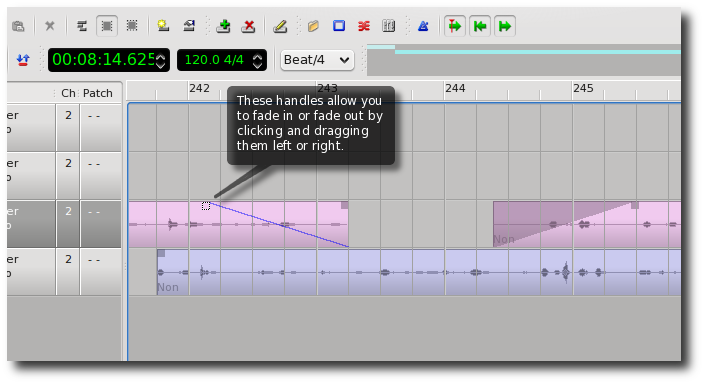
> Googling for "fade handles" and selecting image search gives lots of
> screenshots of how it may look.
> Here's one from Qtractor: http://www.slackermedia.info/qtractor/Q8a.png
> The idea is to give an easy way to fade in and out a wave part.
>
> A variant is the cross fade where the fade would affect two tracks,
> one track would fade in and the other would fade out. (couldn't find a
> screenshot)
> Imagine for instance having recorded the same guitar part twice on two
> different tracks. None of them are perfect but using bits from both
> would give a good result, cross fades would make this easier to
> achieve.
>
> Regards,
> Robert
>
Yes, fading and cross fading are very important, a feature that I use a lot,
 being imperfect and having a lot of takes that I need to inter-mingle.

So I spent several hours yesterday revisiting this topic.

Without rambling on too much... Read all before commenting...

I have in my mind an outline of how to proceed.

Class Part will gain a new std map list called, say, Fades.

A Fade item can be either a fade in or a fade out.
Fades are a percentage or factor, applied to the volume graph,
 not an absolute volume level
Ideally we should allow fading to a specific percentage, but failing
 that fades will be from 100% volume to 0% volume.

By default, fade times will have a user adjustable standard time,
 a fraction of a second, but if desired they can stretch the time out
 for longer periods.
Having a default fade time saves users from having to always
 adjust the time manually for every fade they add.

It is important to allow these operations for overlapping parts
 on the *same* track, as I often have.

So how will it work?

The user can add fade in and fade out items separately.
In addition, by placing the play head at a desired point,
 and selecting *two* parts - even on the *same* track -
 then clicking a button "Cross-fade", then MusE will
 automatically create *both* a fade in and a fade out item for
 the two selected parts respectively, at the chosen position.

Also, by utilizing the range cursors, MusE could automatically
 create a fade in and a fade out item on one single part,
 meaning a fade in or fade out 'region' between the chosen range.

I feel it is extremely important that fading *not* be made part
 of the Track Volume automation graphs.
That is, fading should be a completely separate percentage
 *applied* to the existing volume graph, but certainly not
 made part of the graph itself.
This makes it easy to keep your existing automation graphs
 without adding clumsy cluttering fade points to them,
 which is the current rather tedious method.

Drawing the fades will be fun. Got some ideas there.
I imagine we'll do the ol' dark shading thing to represent them.
I also imagine that the *appearance* of the waves themselves
 will be gradually tapered to follow the envelope of the fade.
So the user will see what the true wave looks like, being tapered.
Although we may want to provide some kind of switch for that,
 since users may want to see the complete wave at all times,
 not tapered.
Tapering the waves also allows the user to see better two
 overlapping waves cross-faded on the same track.
If we taper the waves, we could even taper the rectangular
 shape of the part - parts might no longer be rectangular!
I've seen this in some apps. Ah well, eye candy...

Since midi parts derive from class Part, putting this new
 'Fades' map into the class Part means we can also apply fades
 to *midi* parts !
Again, all without disturbing the actual automation graphs.

So, the only tricky thing is:
Graphically selecting, moving, and manipulating these fade items.
We'd likely need a new tool mode icon similar to the automation
 tool mode, so users can manipulate these fade items.
And we have all the challenges associated with selecting, moving etc.
 that we currently have with audio automation graphs.
Which is as we all know not an easy thing to tackle.

Well just some ideas to chew on.
Later.
Tim.

------------------------------------------------------------------------------
Everyone hates slow websites. So do we.
Make your web apps faster with AppDynamics
Download AppDynamics Lite for free today:
http://p.sf.net/sfu/appdyn_d2d_jan
_______________________________________________
Lmuse-developer mailing list
[email protected]
https://lists.sourceforge.net/lists/listinfo/lmuse-developer