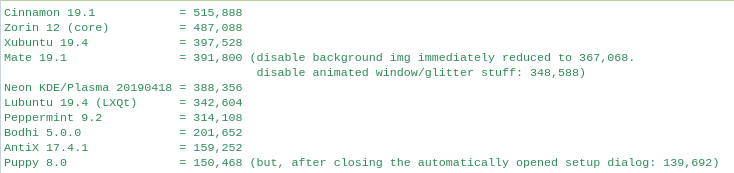
After upgrading to 19.4, which finally moved me to the LXQt form of
Lubuntu, I thought now would be a good time to re-visit other distros. See
if something else beckons me. (I did this about 3 years ago.).
I was struck by how similar (in appearance at least) Peppermint 9.2 is to
Lubuntu LXDE. I'm also liking Mint MATE better than I did when I last
looked at it (about 3 years ago). In terms of full-blown (not intended to
be lightweight) desktop, I liked Neon KDE/Plasma. It didn't feel that
heavy, and the memory wasn't that much.

Anyway, as I was giving distros a quick exploration, I would open the
terminal and run "free". This is what I got for memor used:

=======================================
Cinnamon 19.1 = 515,888 Zorin 12 (core) = 487,088 Xubuntu 19.4 = 397,528
Mate 19.1 = 391,800 (disable background img immediately reduced to 367,068.
disable animated window/glitter stuff: 348,588) Neon KDE/Plasma 20190418 =
388,356 Lubuntu 19.4 (LXQt) = 342,604 Peppermint 9.2 = 314,108 Bodhi 5.0.0
= 201,652 AntiX 17.4.1 = 159,252 Puppy 8.0 = 150,468 (but, after closing
the automatically opened setup dialog: 139,692)
=======================================

[In case that's garbled, I uploaded a screenshot here:
https://i.postimg.cc/kgTDr34j/distros.png ]

Those may not be great comparisons. In most cases I had to open menus to
reach the terminal. (That might increase memory use by the time "free" is
run.). Other times the terminal was on the panel bar.

Also, some distros like Mate were very quick to release memory (after
disabling background image or Compiz effects). Others seemed to leave the
memory allocated until required by something else (which could be better in
actual operation). So, a more valid comparison would require installing
each distro, making config changes (screen image, effects, etc.) then
reboot. (Even better if each installation had a memory usage widget
installed on the desktop so it could be seen without any interaction which
might change the memory used.).

If there is a way to see guest memory use from outside Qemu, I have all the
.iso files and could do that. (I couldn't find a way. I saw some things
saying it's not possible because KVM is a black box).

Mark
--
Lubuntu-users mailing list
[email protected]
Modify settings or unsubscribe at:
https://lists.ubuntu.com/mailman/listinfo/lubuntu-users