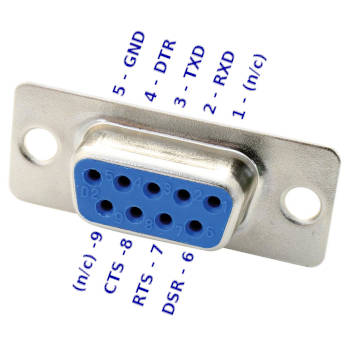
OK! I think there might be a problem with my PC cable.

With a standard 25 pin to 9 pin adapter and a gender changer on my M100
cable, I'm getting some output, but there may be some other issues with
the drive or cable.
I will paste my results below.

--------------------------------------------------------------------------------
`ready' without a disk:
--------------------------------------------------------------------------------

% VERBOSE=9 ./pdd.sh ready
get_tpdd_port()
Using port "/dev/ttyUSB0"
open_com()
set_stty()
speed 19200 baud; rows 0; columns 0; line = 0;
intr = ^C; quit = ^\; erase = ^?; kill = ^U; eof = ^D; eol = <undef>;
eol2 = <undef>; swtch = <undef>; start = ^Q; stop = ^S;
susp = ^Z; rprnt = ^R; werase = ^W; lnext = ^V; discard = ^O; min = 1;
time = 1;
-parenb -parodd -cmspar cs8 hupcl -cstopb cread clocal crtscts
-ignbrk -brkint -ignpar -parmrk -inpck -istrip -inlcr -igncr -icrnl
-ixon -ixoff -iuclc -ixany -imaxbel -iutf8
-opost -olcuc -ocrnl onlcr -onocr -onlret -ofill -ofdel nl0 cr0 tab0 bs0
vt0 ff0
-isig -icanon iexten -echo echoe echok -echonl -noflsh -xcase -tostop
-echoprt echoctl echoke -flusho -extproc
do_cmd(ready)
_init()
fonzie_smack()
tpdd_drain()
tpdd_check()
tpdd_write(4D 31 0D)
tpdd_drain()
tpdd_check()
pdd2_unk23()
ocmd_send_req(23)
calc_cksum(23 00):DC
ocmd_send_req: fmt="23" len="00" dat="" chk="DC"
tpdd_write(5A 5A 23 00 DC)
ocmd_read_ret(100)
ocmd_read_ret: reading 2 bytes (fmt & len)
tpdd_read(2 100)
tpdd_wait(100)
tpdd_check()
tpdd_check()
Detected TPDD1
ocmd_ready()
ocmd_send_req(07)
calc_cksum(07 00):F8
ocmd_send_req: fmt="07" len="00" dat="" chk="F8"
tpdd_write(5A 5A 07 00 F8)
ocmd_read_ret()
ocmd_read_ret: reading 2 bytes (fmt & len)
tpdd_read(2)
tpdd_wait()
tpdd_check()
tpdd_wait: :0
tpdd_read: l=2 12 01
ocmd_read_ret: reading 2 bytes (data & checksum)
tpdd_read(2)
tpdd_wait()
tpdd_check()
tpdd_wait: :0
tpdd_read: l=2 71 7B
ocmd_read_ret: fmt=12 len=01 dat=(71) chk=7B
verify_checksum(12 01 71 7B)
calc_cksum(12 01 71):7B
verify_checksum: given:7B calc:7B
ocmd_check_err()
ocmd_check_err: ret_fmt=12 ret_len=01 ret_dat=(71) read_err="0"
ocmd_check_err: 71:Disk Not Inserted or Disk Change Error
Not Ready

ready: Disk Not Inserted or Disk Change Error

--------------------------------------------------------------------------------
ready with a disk in:
--------------------------------------------------------------------------------

% VERBOSE=9 ./pdd.sh ready
get_tpdd_port()
Using port "/dev/ttyUSB0"
open_com()
set_stty()
speed 19200 baud; rows 0; columns 0; line = 0;
intr = ^C; quit = ^\; erase = ^?; kill = ^U; eof = ^D; eol = <undef>;
eol2 = <undef>; swtch = <undef>; start = ^Q; stop = ^S;
susp = ^Z; rprnt = ^R; werase = ^W; lnext = ^V; discard = ^O; min = 1;
time = 1;
-parenb -parodd -cmspar cs8 hupcl -cstopb cread clocal crtscts
-ignbrk -brkint -ignpar -parmrk -inpck -istrip -inlcr -igncr -icrnl
-ixon -ixoff -iuclc -ixany -imaxbel -iutf8
-opost -olcuc -ocrnl onlcr -onocr -onlret -ofill -ofdel nl0 cr0 tab0 bs0
vt0 ff0
-isig -icanon iexten -echo echoe echok -echonl -noflsh -xcase -tostop
-echoprt echoctl echoke -flusho -extproc
do_cmd(ready)
_init()
fonzie_smack()
tpdd_drain()
tpdd_check()
tpdd_write(4D 31 0D)
tpdd_drain()
tpdd_check()
pdd2_unk23()
ocmd_send_req(23)
calc_cksum(23 00):DC
ocmd_send_req: fmt="23" len="00" dat="" chk="DC"
tpdd_write(5A 5A 23 00 DC)
ocmd_read_ret(100)
ocmd_read_ret: reading 2 bytes (fmt & len)
tpdd_read(2 100)
tpdd_wait(100)
tpdd_check()
tpdd_check()
Detected TPDD1
ocmd_ready()
ocmd_send_req(07)
calc_cksum(07 00):F8
ocmd_send_req: fmt="07" len="00" dat="" chk="F8"
tpdd_write(5A 5A 07 00 F8)
ocmd_read_ret()
ocmd_read_ret: reading 2 bytes (fmt & len)
tpdd_read(2)
tpdd_wait()
tpdd_check()
tpdd_wait: :0
tpdd_read: l=2 12 01
ocmd_read_ret: reading 2 bytes (data & checksum)
tpdd_read(2)
tpdd_wait()
tpdd_check()
tpdd_wait: :0
tpdd_read: l=2 00 EC
ocmd_read_ret: fmt=12 len=01 dat=(00) chk=EC
verify_checksum(12 01 00 EC)
calc_cksum(12 01 00):EC
verify_checksum: given:EC calc:EC
ocmd_check_err()
ocmd_check_err: ret_fmt=12 ret_len=01 ret_dat=(00) read_err="0"
ocmd_check_err: 00:OK
Ready

--------------------------------------------------------------------------------
`ls' without a disk:
--------------------------------------------------------------------------------

VERBOSE=9 ./pdd.sh ls
get_tpdd_port()
Using port "/dev/ttyUSB0"
open_com()
set_stty()
speed 19200 baud; rows 0; columns 0; line = 0;
intr = ^C; quit = ^\; erase = ^?; kill = ^U; eof = ^D; eol = <undef>;
eol2 = <undef>; swtch = <undef>; start = ^Q; stop = ^S;
susp = ^Z; rprnt = ^R; werase = ^W; lnext = ^V; discard = ^O; min = 1;
time = 1;
-parenb -parodd -cmspar cs8 hupcl -cstopb cread clocal crtscts
-ignbrk -brkint -ignpar -parmrk -inpck -istrip -inlcr -igncr -icrnl
-ixon -ixoff -iuclc -ixany -imaxbel -iutf8
-opost -olcuc -ocrnl onlcr -onocr -onlret -ofill -ofdel nl0 cr0 tab0 bs0
vt0 ff0
-isig -icanon iexten -echo echoe echok -echonl -noflsh -xcase -tostop
-echoprt echoctl echoke -flusho -extproc
do_cmd(ls)
_init()
fonzie_smack()
tpdd_drain()
tpdd_check()
tpdd_write(4D 31 0D)
tpdd_drain()
tpdd_check()
pdd2_unk23()
ocmd_send_req(23)
calc_cksum(23 00):DC
ocmd_send_req: fmt="23" len="00" dat="" chk="DC"
tpdd_write(5A 5A 23 00 DC)
ocmd_read_ret(100)
ocmd_read_ret: reading 2 bytes (fmt & len)
tpdd_read(2 100)
tpdd_wait(100)
tpdd_check()
tpdd_check()
Detected TPDD1
lcmd_ls()
--------  Directory Listing  --------
ocmd_dirent(  1)
ocmd_dirent: req: filename="" attr=0x00 action=1
ocmd_send_req(00 00 00 00 00 00 00 00 00 00 00 00 00 00 00 00 00 00 00
00 00 00 00 00 00 00 01)
calc_cksum(00 1A 00 00 00 00 00 00 00 00 00 00 00 00 00 00 00 00 00 00
00 00 00 00 00 00 00 01):E4
ocmd_send_req: fmt="00" len="1A" dat="00 00 00 00 00 00 00 00 00 00 00
00 00 00 00 00 00 00 00 00 00 00 00 00 00 01" chk="E4"
tpdd_write(5A 5A 00 1A 00 00 00 00 00 00 00 00 00 00 00 00 00 00 00 00
00 00 00 00 00 00 00 00 00 01 E4)
ocmd_read_ret(10000)
ocmd_read_ret: reading 2 bytes (fmt & len)
tpdd_read(2 10000)
tpdd_wait(10000)
tpdd_check()
tpdd_check()
tpdd_wait: 10000:100
tpdd_read: l=2 12 01
ocmd_read_ret: reading 2 bytes (data & checksum)
tpdd_read(2)
tpdd_wait()
tpdd_check()
tpdd_wait: :0
tpdd_read: l=2 71 7B
ocmd_read_ret: fmt=12 len=01 dat=(71) chk=7B
verify_checksum(12 01 71 7B)
calc_cksum(12 01 71):7B
verify_checksum: given:7B calc:7B
ocmd_check_err()
ocmd_check_err: ret_fmt=12 ret_len=01 ret_dat=(71) read_err="0"
ocmd_check_err: 71:Disk Not Inserted or Disk Change Error
-------------------------------------

ls: Disk Not Inserted or Disk Change Error

--------------------------------------------------------------------------------
`ls' with a disk:
--------------------------------------------------------------------------------

% VERBOSE=9 ./pdd.sh ls
get_tpdd_port()
Using port "/dev/ttyUSB0"
open_com()
set_stty()
speed 19200 baud; rows 0; columns 0; line = 0;
intr = ^C; quit = ^\; erase = ^?; kill = ^U; eof = ^D; eol = <undef>;
eol2 = <undef>; swtch = <undef>; start = ^Q; stop = ^S;
susp = ^Z; rprnt = ^R; werase = ^W; lnext = ^V; discard = ^O; min = 1;
time = 1;
-parenb -parodd -cmspar cs8 hupcl -cstopb cread clocal crtscts
-ignbrk -brkint -ignpar -parmrk -inpck -istrip -inlcr -igncr -icrnl
-ixon -ixoff -iuclc -ixany -imaxbel -iutf8
-opost -olcuc -ocrnl onlcr -onocr -onlret -ofill -ofdel nl0 cr0 tab0 bs0
vt0 ff0
-isig -icanon iexten -echo echoe echok -echonl -noflsh -xcase -tostop
-echoprt echoctl echoke -flusho -extproc
do_cmd(ls)
_init()
fonzie_smack()
tpdd_drain()
tpdd_check()
tpdd_write(4D 31 0D)
tpdd_drain()
tpdd_check()
pdd2_unk23()
ocmd_send_req(23)
calc_cksum(23 00):DC
ocmd_send_req: fmt="23" len="00" dat="" chk="DC"
tpdd_write(5A 5A 23 00 DC)
ocmd_read_ret(100)
ocmd_read_ret: reading 2 bytes (fmt & len)
tpdd_read(2 100)
tpdd_wait(100)
tpdd_check()
tpdd_check()
Detected TPDD1
lcmd_ls()
--------  Directory Listing  --------
ocmd_dirent(  1)
ocmd_dirent: req: filename="" attr=0x00 action=1
ocmd_send_req(00 00 00 00 00 00 00 00 00 00 00 00 00 00 00 00 00 00 00
00 00 00 00 00 00 00 01)
calc_cksum(00 1A 00 00 00 00 00 00 00 00 00 00 00 00 00 00 00 00 00 00
00 00 00 00 00 00 00 01):E4
ocmd_send_req: fmt="00" len="1A" dat="00 00 00 00 00 00 00 00 00 00 00
00 00 00 00 00 00 00 00 00 00 00 00 00 00 01" chk="E4"
tpdd_write(5A 5A 00 1A 00 00 00 00 00 00 00 00 00 00 00 00 00 00 00 00
00 00 00 00 00 00 00 00 00 01 E4)
ocmd_read_ret(10000)
ocmd_read_ret: reading 2 bytes (fmt & len)
tpdd_read(2 10000)
tpdd_wait(10000)
tpdd_check()
tpdd_check()
tpdd_check()
tpdd_check()
tpdd_check()
tpdd_check()
tpdd_check()
tpdd_check()
tpdd_check()
tpdd_check()
tpdd_check()
tpdd_check()
tpdd_check()
tpdd_check()
tpdd_check()
tpdd_check()
tpdd_check()
tpdd_check()
tpdd_check()
tpdd_check()
tpdd_check()
tpdd_check()
tpdd_check()
tpdd_check()
tpdd_wait: 10000:2300
tpdd_read: l=2 12 01
ocmd_read_ret: reading 2 bytes (data & checksum)
tpdd_read(2)
tpdd_wait()
tpdd_check()
tpdd_wait: :0
tpdd_read: l=2 80 6C
ocmd_read_ret: fmt=12 len=01 dat=(80) chk=6C
verify_checksum(12 01 80 6C)
calc_cksum(12 01 80):6C
verify_checksum: given:6C calc:6C
ocmd_check_err()
ocmd_check_err: ret_fmt=12 ret_len=01 ret_dat=(80) read_err="0"
ocmd_check_err: 80:Hardware Fault 0
-------------------------------------

ls: Hardware Fault 0

On Wed, Dec 13, 2023 at 02:54:59PM -0500, Brian K. White wrote:
> I should write up some steps to verify things, both for the cable and for
> pdd.sh. It's one thing to say "do this to make this" but then when it
> doesn't work, then what? Is something broken or did you get a step wrong or
> are the directions wrong?
>
> One thing is with the solder blob in place, you should tell pdd.sh to run at
> 9600, which is not the default. ```$ BAUD=9600 pdd```
> or issue "baud 9600" command after starting pdd. Since it's not the default,
> if you hadn't used the baud command or variable then it wouldn't have worked
> before you removed the solder blob.
>
> With all jumpers open, the drive is at 19200 and the default in pdd.sh is
> 19200 so you're good to go now.
>
> I have a FB100 with the blob still in place. So I can at least confirm that
> with a good cable and drive and usb serial adapter, no disk inserted, door
> opened or closed, "ready" and "ls" do work and the access light only blinks
> for a split second and the motor never starts at all.
>
> Getting no reaction at all sounds like no communication. I have a Purple
> Computing drive that doesn't work, and just looks dead in a normal tpdd
> client, but with pdd.sh I can tell that the controller is up and running
> fine, accepting commands and returning results and communicating just fine,
> and even reading the door-open, disk-inserted, & write-protect sensors,
> merely it can't actually read or write media. On that drive, "ready" and
> "ls" still work, at least in so far as they accept the command and return a
> result, all sensibly. The "ls" just says there was a disk error, but the
> point is the drive responds and SAYS disk error, because communication is
> working.
>
> You could try the verbose setting to see if you can tell if the drive is
> responding at all, not at all, or with unexpected data that pdd.sh doesn't
> understand.
>
> Here is a capture of a short verbose session with a working FB100 with the
> door open and no disk inserted. You will omit the BAUD=9600. I wanted to do
> this on an actual FB100 just to be sure we're both testing the same things,
> and mine still has the solder blob.
>
> What we're looking for is, did the stty command at the beginning seem to
> work? Some other problem like a permissions problem with my gimmicky sleep()
> function that uses a trick with a fifo file to get a sleep function without
> having to execute the external /bin/sleep? Did the drive ever return even a
> single byte of anything? The verbosity shows every byte of traffic in either
> direction, so, even if the data is unrecognized and not handled, you can
> still see that there was data, or not.
>
> bkw@fw:~$
> bkw@fw:~$ BAUD=9600 VERBOSE=9 pdd ready
> get_tpdd_port()
> Using port "/dev/ttyUSB0"
> open_com()
> set_stty()
> speed 9600 baud; rows 0; columns 0; line = 0;
> intr = ^C; quit = ^\; erase = ^?; kill = ^U; eof = ^D; eol = <undef>;
> eol2 = <undef>; swtch = <undef>; start = ^Q; stop = ^S; susp = ^Z; rprnt =
> ^R;
> werase = ^W; lnext = ^V; discard = ^O; min = 1; time = 1;
> -parenb -parodd -cmspar cs8 hupcl -cstopb cread clocal crtscts
> -ignbrk -brkint -ignpar -parmrk -inpck -istrip -inlcr -igncr -icrnl -ixon
> -ixoff
> -iuclc -ixany -imaxbel -iutf8
> -opost -olcuc -ocrnl onlcr -onocr -onlret -ofill -ofdel nl0 cr0 tab0 bs0 vt0
> ff0
> -isig -icanon -iexten -echo echoe echok -echonl -noflsh -xcase -tostop
> -echoprt
> echoctl echoke -flusho -extproc
> do_cmd(ready)
> _init()
> fonzie_smack()
> tpdd_drain()
> tpdd_check()
> tpdd_write(4D 31 0D)
> tpdd_drain()
> tpdd_check()
> pdd2_unk23()
> ocmd_send_req(23)
> calc_cksum(23 00):DC
> ocmd_send_req: fmt="23" len="00" dat="" chk="DC"
> tpdd_write(5A 5A 23 00 DC)
> ocmd_read_ret(100)
> ocmd_read_ret: reading 2 bytes (fmt & len)
> tpdd_read(2 100)
> tpdd_wait(100)
> tpdd_check()
> tpdd_check()
> Detected TPDD1
> ocmd_ready()
> ocmd_send_req(07)
> calc_cksum(07 00):F8
> ocmd_send_req: fmt="07" len="00" dat="" chk="F8"
> tpdd_write(5A 5A 07 00 F8)
> ocmd_read_ret()
> ocmd_read_ret: reading 2 bytes (fmt & len)
> tpdd_read(2)
> tpdd_wait()
> tpdd_check()
> tpdd_wait: :0
> tpdd_read: l=2 12 01
> ocmd_read_ret: reading 2 bytes (data & checksum)
> tpdd_read(2)
> tpdd_wait()
> tpdd_check()
> tpdd_wait: :0
> tpdd_read: l=2 71 7B
> ocmd_read_ret: fmt=12 len=01 dat=(71) chk=7B
> verify_checksum(12 01 71 7B)
> calc_cksum(12 01 71):7B
> verify_checksum: given:7B calc:7B
> ocmd_check_err()
> ocmd_check_err: ret_fmt=12 ret_len=01 ret_dat=(71) read_err="0"
> ocmd_check_err: 71:Disk Not Inserted or Disk Change Error
> Not Ready
>
> ready: Disk Not Inserted or Disk Change Error
> bkw@fw:~$
>
> ----------------------
>
> I'll break down some of that to explain what you're looking at:
>
>
> tpdd_write(5A 5A 23 00 DC)
> ocmd_read_ret(100)
> ocmd_read_ret: reading 2 bytes (fmt & len)
> tpdd_read(2 100)
> tpdd_wait(100)
> tpdd_check()
> tpdd_check()
> Detected TPDD1
>
>
> This looks like we aren't displaying something because we sent 5A 5A 23 00
> DC to the drive, and then just declared "detected tpdd1" without seeing the
> response from the drive. In this case, that is actually how we detect tpdd1
> is by the lack of response to that command.
>
>
> ocmd_ready()
> ocmd_send_req(07)
> calc_cksum(07 00):F8
> ocmd_send_req: fmt="07" len="00" dat="" chk="F8"
> tpdd_write(5A 5A 07 00 F8)
>
> Send the "ready" command,
> which ultimately means send 5A 5A 07 00 F8 to the drive
>
> ocmd_read_ret()
> ocmd_read_ret: reading 2 bytes (fmt & len)
> tpdd_read(2)
> tpdd_wait()
> tpdd_check()
> tpdd_wait: :0
> tpdd_read: l=2 12 01
>
> Read a standard response packet from the drive,
> which ultimately means to start by reading 2 bytes and interpret them to
> tell how many more bytes to read for the rest of the response packet.
>
> And we did get 2 bytes back from the drive, and they were 12 01
>
> And then it goes on to interpret that as packet type 12 payload length 1,
> which means read one more byte for the payload and one more after that for
> the checksum, which gave us the payload error code 71 which was looked up
> from a table of error codes to give us the human readable message for code
> 71.
>
>
> ----------------------------
>
> Some basic physical stuff to check just so you have some baseline to know
> what is normal. A lot of the drives normal correct behavior seems kind of
> dead if you didn't know what to expect. Like how when you turn it on,
> nothing happens. Two lights on the front and neither one lights, the motor
> doesn't spin, etc.
>
> Holding the drive in your hand, you should feel the motor nudge just a bit
> every time you flip the power switch on. It doesn't spin even one rotation,
> just a short vibration for 1/2 second or less. It doesn't matter if the door
> is open or closed. It doesn't matter if there is a disk inserted or not. The
> access light never comes on.
>
> The battery light stays off at all times except it blinks on for a split
> second every time you turn the power off.
>
> ----------------------------------------
>
> Checking some electrical basics right at the drive itself without the cable
> in the equation:
>
> Looking at the rear of the drive, pin 1 is top-right, and pin 2 is bottom
> right.
>
> You should get continuity from pin 1 to the center pin of the power jack.
>
> With the power ON, and a dmm in dc volts mode, black on pin 1, you should
> get 5v on pin 3 and 0v on all other pins.
>
>
> --------------------------------------
>
> verifying the cable (probably should have started with this)
>
> Looking into the drive-end of the cable, with the polarity key up, and
> ignoring the two positions that form the polarity key,
> pin 1 is top-left, pin 2 is bottom-left.
>
>
> Looking into the pc end of the cable, with the long side up, the plug should
> be 9-pin female, pin 1 is top-right, pin 6 is bottom-right.
>
> (Regardless how the cable is constructed between those two ends, whether a
> custom one-piece cable like you made using the WP-2/PC cable directions, or
> using the cable meant for the 100 and adding the special 25f-9f adapter
> linked in the hardware document in the pdd.sh readme. Point being I'm
> testing the end-to-end connection with nothing that might change the pinout
> left out. The only other "adapter" is just the usb-serial adapter which you
> can consider as not an adapter but just a 9-pin male com port.)
>
> https://raw.githubusercontent.com/bkw777/TPDD_Cable/master/DE9F_to_PC.jpg
>
>
> With a dmm in continuity mode, you should get beeps with these, direction of
> black vs red doesn't matter:
>
> drive pin 1 to pc pin 5
> drive pin 2 to pc pin 7
> drive pin 5 to pc pin 4
> drive pin 7 to pc pin 3
>
> With a dmm in diode mode:
>
> black on drive pin 3 to red on pc pin 6: 1.7v  (reversed: ol)
> black on drive pin 4 to red on pc pin 8: 1.7v  (reversed: ol)
> black on drive pin 6 to red on pc pin 2: 1.7v  (reversed: ol)
>
>
> There are no pin-to-pin shorts within the cable at either end. In a normal
> serial cable it's not wrong to have DCD connected to DSR right at the end in
> the plug, which would be pin 1 to pin 6 both on the pc end here, but in this
> case pin 1 on the pc end is not connected to anything and there are no other
> things like that either. Just 7 individual 1:1 connections.
>
> --------------------------------------------------------
>
>
> I just performed all of these with my own working FB100 and cable.
>
> I have used a variety of usb-serial adapters and I think every one I've used
> has worked, but bad usb-serial adapters are definitely a thing, and I used a
> good FTDI cable just now. Gearmo GM-FTDI2-LED-C for the record.
>
> --
> bkw
>
>
>
>
>
>
>
>
>
>
>
>
>
>
> On 12/13/23 01:17, runrin wrote:
> > Hey all
> >
> > I acquired an FB100 recently, popped it open and checked the belt, and
> > it looks brand new.
> >
> > I spent a few hours building some of bwk's TPDD cables tonight and
> > testing it out, but I'm struggling to get the drive working.
> >
> > When I connect the drive to my M100 and use the TS-DOS rom, the drive
> > access light pops up, and then it tells me my disk isn't formatted (it's
> > not). Then when I press "Y" to format, there is no activity on the
> > access light.
> >
> > I tried hooking it up to my Linux box with the WP-2/PC cable and pdd.sh,
> > and I get no response at all from the drive. No access light at all even
> > with an `ls' or `ready' command.
> >
> > I checked the jumpers on the bottom and one was bridged, so I tried
> > desoldering that (since the TPDD manual suggests setting the DIP
> > switches to all off), and it didn't make any difference.
> >
> > Any thoughts what might be going on?
> >
> > Thanks!!
>
> --
> bkw
>