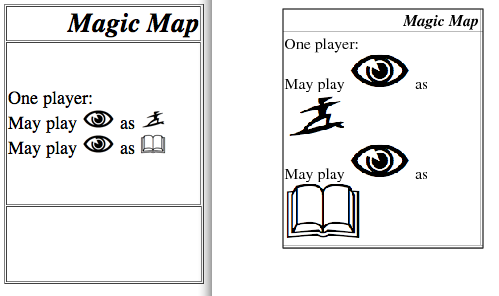
I'm using ImageMagick to turn a bunch of HTML "cards" into images to
make them easier to manipulate. However, I've discovered that whatever
ImageMagick is using to parse the HTML files (Ghostscript, I think) is
ignoring the "height" field in my <img> tags. For an example, compare
the two cards here:
http://www.cs.hmc.edu/~cweisige/stuff/example.png

(The shaded border is just the drop shadow between my browser and my
image viewer; ignore it).

The one on the right is the HTML as rendered by my browser. The one on
the left is the PNG that ImageMagick created. As you can see, the
"tokens" in the PNG are considerably larger than they are in the HTML.
The HTML I used is:

<html><head></head><body>
<table width="200" height="280" cellspacing="1" cellpadding="1" border="1">
<tr height="20">
  <td align=right><font size="5"><i><b>Magic Map</i></b></td></tr>
<tr height="200"><td valign="center">
One player:<br>
May play <img height="20" src="images/percep.png"> as <img height="20"
src="images/run.png"><br>
May play <img height="20" src="images/percep.png"> as <img height="20"
src="images/know.png"><br>
</td>
</tr>
<tr>
  <td align=right colspan="2"></td>
</tr>
</table>
</body>
</html>

The command I'm running to do the conversion is just:

`convert artifact.0.html artifact.0.png`

Does anyone know how I might go about getting correctly-sized tokens
for my cards? Any advice would be appreciated.

Thanks in advance!

-Chris Weisiger
_______________________________________________
Magick-users mailing list
[email protected]
http://studio.imagemagick.org/mailman/listinfo/magick-users