<https://lh6.googleusercontent.com/-GdFuKCOSDuY/UCG6dSpfe6I/AAAAAAAAAUk/2pe9tzdAMA4/s1600/Screen+Shot+2012-08-07+at+9.00.37+PM.png>
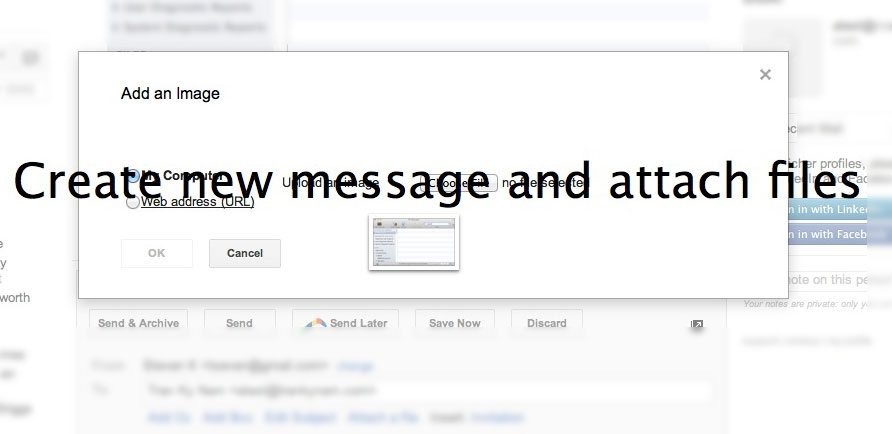
This happened in the old version as well.  Sometimes it did it and
sometimes it didn't.  I usually just hit the arrow in the top right corner
after I began to reply and dragged the image in then, once the new window
popped open.
On Monday, August 6, 2012 4:06:29 PM UTC-4, tseven wrote:
>
> Affects Mailplane 2.5.7-preview3 (#1687)
>
> This issue seems to only occur when replying within a thread. It works
> fine when composing a new e-mail.
>
> *Issue:*
>
> When dragging an image onto the image form for inserting an inline image,
> Mailplane creates a new e-mail with the image attached instead of inserting
> that image into the current e-mail.
>
>
> <https://lh3.googleusercontent.com/-5JrW7Px6c5Q/UCAhOayp5VI/AAAAAAAAI3w/TBMDF5giIKs/s1600/mailplane_inline-attachment-bug.jpg>
>
>
> To replicate the bug:
>
>
>    1. Reply to an e-mail.
>    2. In the reply editor click the "insert image" button on the toolbar
>    (next to the emoticon and link button).
>    3. Drag an image onto the image form model.
>
> To see the correct behavior:
>
>    1. Compose a new e-mail.
>    2. In the editor click the "insert image" button on the toolbar (next
>    to the emoticon and link button).
>    3. Drag an image onto the image form model.
>
>
>
>

--
You received this message because you are subscribed to the Google Groups
"mailplaneapp" group.
To view this discussion on the web visit
https://groups.google.com/d/msg/mailplaneapp/-/2APfSRR00a4J.
To post to this group, send email to [email protected].
To unsubscribe from this group, send email to
[email protected].
For more options, visit this group at
http://groups.google.com/group/mailplaneapp?hl=en.