OprekPC.com Forum Index  -> Windows -> help... IE & OEM
http://www.oprekpc.com/forum/viewtopic.php?t=4165
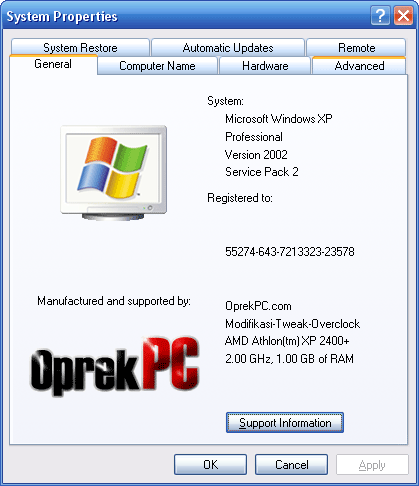
contoh:
http://i66.photobucket.com/albums/h252/oprekpc/balthaZor/OprekPC_OEM.png

1. Siapain gambar dgn nama file oemlogo.bmp
- ukuran = 180x114 pixels, kalo lebih ntar otomatis di-stretch.
- kedalaman warna bebas, tp kalo pengin latarnya jadi transparan harus 256
colors.

2. Kalo pengin nambahin info Manufactured.. & Support Information
ketik di Notepad dgn format spt ini:

[General]
Manufacturer=OprekPC.com
Model=Modifikasi-Tweak-Overclock

[Support Information]
Line1=http://www.oprekpc.com/
Line2=
Line3=
Line4=
Line5=

lalu save dgn nama file oeminfo.ini

3. Kopi kedua file tersebut ke .\WINDOWS\system32

4. Kalo pengin ganti data Registered to:
run regedit, lalu ubah data dari string:

HKEY_LOCAL_MACHINE\SOFTWARE\Microsoft\Windows NT\CurrentVersion
RegisteredOwner=
RegisteredOrganization=

--
cheers ;))
 balthazor[at]oprekpc.com
 http://www.oprekpc.com/forum/login.php

||||||||||||||||||||||||original message|||||||||||||||||||||||||>
Sunday, November 5, 2006, 10:51:54 AM,
"Toni Sepryady" <[EMAIL PROTECTED]> wrote:
> Saya mau tanya bagaimana cara menampilkan gambar Manufacturer and
> supported by pada System Properties seperti buatan virus codex?


Send instant messages to your online friends http://asia.messenger.yahoo.com


Yahoo! Groups Links

<*> To visit your group on the web, go to:
    http://groups.yahoo.com/group/mailplus/

<*> Your email settings:
    Individual Email | Traditional

<*> To change settings online go to:
    http://groups.yahoo.com/group/mailplus/join
    (Yahoo! ID required)

<*> To change settings via email:
    mailto:[EMAIL PROTECTED]
    mailto:[EMAIL PROTECTED]

<*> To unsubscribe from this group, send an email to:
    [EMAIL PROTECTED]

<*> Your use of Yahoo! Groups is subject to:
    http://docs.yahoo.com/info/terms/