Send Motion-user mailing list submissions to
        [email protected]
To subscribe or unsubscribe via the World Wide Web, visit
        https://lists.sourceforge.net/lists/listinfo/motion-user
or, via email, send a message with subject or body 'help' to
        [email protected]

You can reach the person managing the list at
        [email protected]

When replying, please edit your Subject line so it is more specific
than "Re: Contents of Motion-user digest..."


Today's Topics:

   1. Re: events triggered by lost connections (Frank W. Samuelson)
   2. Re: Overlapping images (Chris Dennis)
   3. Re: Overlapping images (tosiara)


----------------------------------------------------------------------

Message: 1
Date: Fri, 15 May 2015 20:56:44 -0400 (EDT)
From: "Frank W. Samuelson" <[email protected]>
Subject: Re: [Motion-user] events triggered by lost connections
To: Motion discussion list <[email protected]>
Message-ID: <alpine.LRH.2.11.1505152041390.32093@localhost>
Content-Type: TEXT/PLAIN; format=flowed; charset=US-ASCII

This is a typical example of the output that I get:
http://www.merrill-samuelson.com/permanent_display/20150513232049.avi

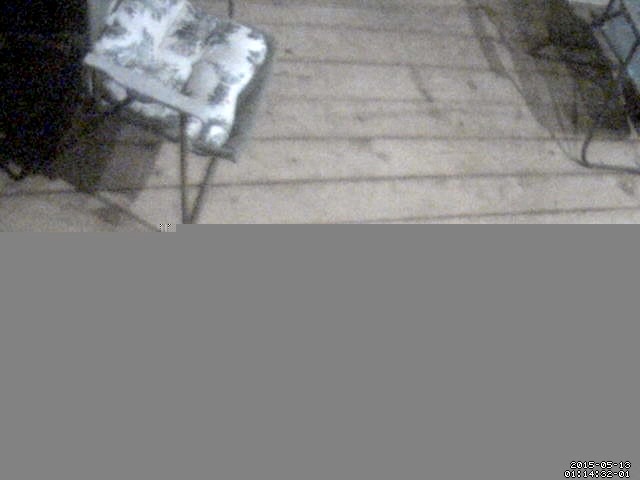
There is a normal frame, then the frame that is partly gray
appears and that frame is repeated about 12 times, then a
fresh working frame appears, presumably when the connection
is functioning again.  Note that the bad frame is
repeated exactly.  The noise pattern does not change at all.
This kind of thing happens once every couple of hours.
Perhaps I should buy a better camera.

Given the absence of a quick, obvious answer, it looks like
it's hacking time.


On Fri, 15 May 2015, tosiara wrote:

> How many broken frames do you get in a row?
> If it is a single frame - maybe setting minimum_motion_frames = 2 would
> help to work around?
>
>
> On Fri, May 15, 2015 at 5:41 AM, Frank W. Samuelson <
> [email protected]> wrote:
>
>> 1.  I like motion, and have been using it for years.
>> It works wonderfully.  Thanks to all who have contributed.
>>
>> 2. Motion occassionally loses contact with my IP webcam.
>> This creates a video with a greyed-out region, like
>> http://www.merrill-samuelson.com/permanent_display/shot1.jpeg
>> Usually the connection is re-established shortly afterward.
>> However, every time this glitch happens, an event is
>> generated and my on_event_start script is executed.
>> Normally these occassional glitches have not bothered me,
>> but now I have hooked my computer to an electronic water hose
>> valve to shower the stray cats who are spraying my house
>> every night, and I need to have a lower false positive rate.
>>
>> I tried setting the minimum_motion_frames to something
>> higher, like 5, thinking that only one frame should really
>> change with the connection is lost.  However this has not
>> helped and every lost connection still creates an event.
>>
>> Is there an easy way to keep lost connections from
>> generating events like this?
>> Or is it time for me to hack the code?
>> I am using motion-3.3.0.trunkREV557-10.el7.nux.x86_64
>> Thanks for any tips.
>>
>> -Frank
>>
>>
>> ------------------------------------------------------------------------------
>> One dashboard for servers and applications across Physical-Virtual-Cloud
>> Widest out-of-the-box monitoring support with 50+ applications
>> Performance metrics, stats and reports that give you Actionable Insights
>> Deep dive visibility with transaction tracing using APM Insight.
>> http://ad.doubleclick.net/ddm/clk/290420510;117567292;y
>> _______________________________________________
>> Motion-user mailing list
>> [email protected]
>> https://lists.sourceforge.net/lists/listinfo/motion-user
>> http://www.lavrsen.dk/twiki/bin/view/Motion/WebHome
>>
>


------------------------------

Message: 2
Date: Sat, 16 May 2015 09:48:32 +0100
From: Chris Dennis <[email protected]>
Subject: Re: [Motion-user] Overlapping images
To: Motion discussion list <[email protected]>
Message-ID: <[email protected]>
Content-Type: text/plain; charset="utf-8"

On 15/05/15 18:39, tosiara wrote:
> Your provided picture has resolution 722x578, while your thread1 config has
> resolution 352x288, can you explain how that can happen?
Yes. I'm using 'stream_secondary on' to use the full picture for output,
although only using a smaller image for motion detection. That feature may be
unique to the mmal version of Motion (see
https://github.com/dozencrows/motion/tree/mmal-test)
> And on the picture I can clearly see two different pictures mixed together.
> How two different pictures can get into motion if you use single config with
> single video source?
They're not different pictures, just different frames from the same camera.
That's the problem that I'm trying to solve.

For completeness, here's my new configuration now that I've stopped using a
separate thread1.conf file:

daemon off
process_id_file /var/run/motion/motion.pid
setup_mode off
logfile /media/wd120/birdbox/motion.logfile
log_level 6
log_type all
videodevice /dev/video0
input -1
norm 0
frequency 0
rotate 0
width 320
height 256
framerate 2
minimum_frame_time 0
netcam_keepalive off
netcam_tolerant_check off
auto_brightness off
brightness 0
contrast 0
saturation 0
hue 0
roundrobin_frames 1
roundrobin_skip 1
switchfilter off
threshold 350
threshold_tune off
noise_level 32
noise_tune on
despeckle_filter EedDl
area_detect 2,4,5,7,8
smart_mask_speed 0
lightswitch 0
minimum_motion_frames 2
pre_capture 0
post_capture 0
event_gap 3
max_movie_time 1800
emulate_motion off
output_pictures on
output_debug_pictures off
output_secondary_pictures on
quality 80
picture_type jpeg
ffmpeg_output_movies on
ffmpeg_output_debug_movies off
ffmpeg_output_secondary_movies on
ffmpeg_timelapse 300
ffmpeg_timelapse_mode daily
ffmpeg_bps 0
ffmpeg_variable_bitrate 15
ffmpeg_video_codec mpeg4
ffmpeg_deinterlace on
use_extpipe off
extpipe_secondary on
snapshot_interval 0
locate_motion_mode off
locate_motion_style redbox
text_right %Y-%m-%d\n%T-%q
text_left Nan and Pop's Birdbox
text_changes off
text_event %Y%m%d%H%M%S
text_double on
target_dir /media/wd120/birdbox/
snapshot_filename %Y-%m-%d/%H/%Y%m%d%H%M%S-snapshot
picture_filename %Y-%m-%d/%H/%Y%m%d%H%M%S-%q
movie_filename %Y-%m-%d/%H/%Y%m%d%H%M%S
timelapse_filename %Y-%m-%d/%Y%m%d-timelapse
ipv6_enabled off
stream_port 8081
stream_quality 90
stream_motion on
stream_secondary on
stream_maxrate 2
stream_localhost off
stream_limit 0
stream_auth_method 0
webcontrol_port 0
webcontrol_localhost off
webcontrol_html_output on
track_type 0
track_auto off
track_iomojo_id 0
track_step_angle_x 10
track_step_angle_y 10
track_move_wait 10
track_speed 255
track_stepsize 40
quiet on


>
> On Fri, May 15, 2015 at 8:19 PM, Chris Dennis <[email protected]
> <mailto:[email protected]>> wrote:
>
>     On 15/05/15 15:21, tosiara wrote:
>     > This seems to be known issue reported few time, like this:
> http://www.lavrsen.dk/foswiki/bin/view/Motion/SupportQuestion2012x02x27x155712
>     >
>     > The only workaround - don't use threads. Start two instances of motion
> process instead
>     >
>     Thanks for your reply, Tosiara, but I'm only using one camera anyway.
> Some of the configuration was in thread1.conf because I initially set it up
> to use the RasPiCam as well.
>
>     I've moved the thread settings back into the main config file now, just
> to make sure that there's no threading going on.  But the problem is just the
> same.
>
>     Regards,
>
>     Chris
>
>
> ------------------------------------------------------------------------------
>     One dashboard for servers and applications across Physical-Virtual-Cloud
>     Widest out-of-the-box monitoring support with 50+ applications
>     Performance metrics, stats and reports that give you Actionable Insights
>     Deep dive visibility with transaction tracing using APM Insight.
>     http://ad.doubleclick.net/ddm/clk/290420510;117567292;y
>     _______________________________________________
>     Motion-user mailing list
>     [email protected]
> <mailto:[email protected]>
>     https://lists.sourceforge.net/lists/listinfo/motion-user
>     http://www.lavrsen.dk/twiki/bin/view/Motion/WebHome
>
>
>
>
> ------------------------------------------------------------------------------
> One dashboard for servers and applications across Physical-Virtual-Cloud
> Widest out-of-the-box monitoring support with 50+ applications
> Performance metrics, stats and reports that give you Actionable Insights
> Deep dive visibility with transaction tracing using APM Insight.
> http://ad.doubleclick.net/ddm/clk/290420510;117567292;y
>
>
> _______________________________________________
> Motion-user mailing list
> [email protected]
> https://lists.sourceforge.net/lists/listinfo/motion-user
> http://www.lavrsen.dk/twiki/bin/view/Motion/WebHome

-------------- next part --------------
An HTML attachment was scrubbed...

------------------------------

Message: 3
Date: Sat, 16 May 2015 12:09:29 +0300
From: tosiara <[email protected]>
Subject: Re: [Motion-user] Overlapping images
To: Motion discussion list <[email protected]>
Message-ID:
        <CACHTdwSSnGDcTUciHY4=uuq1_+vb5jwfxzvfhbolpiewith...@mail.gmail.com>
Content-Type: text/plain; charset="utf-8"

So this may be related to the custom code implemented by
https://github.com/dozencrows/motion/tree/mmal-test
Try removing any secondary sources/frames and see if the issue is gone.
Also recommending you to report the issue in "mmal-test" guthub bug tracker

On Sat, May 16, 2015 at 11:48 AM, Chris Dennis <[email protected]>
wrote:

>  On 15/05/15 18:39, tosiara wrote:
>
>  Your provided picture has resolution 722x578, while your thread1 config
> has resolution 352x288, can you explain how that can happen?
>
> Yes. I'm using 'stream_secondary on' to use the full picture for output,
> although only using a smaller image for motion detection.  That feature may
> be unique to the mmal version of Motion (see
> https://github.com/dozencrows/motion/tree/mmal-test)
>
> And on the picture I can clearly see two different pictures mixed
> together. How two different pictures can get into motion if you use single
> config with single video source?
>
> They're not different pictures, just different frames from the same
> camera.  That's the problem that I'm trying to solve.
>
> For completeness, here's my new configuration now that I've stopped using
> a separate thread1.conf file:
>
> daemon off
> process_id_file /var/run/motion/motion.pid
> setup_mode off
> logfile /media/wd120/birdbox/motion.logfile
> log_level 6
> log_type all
> videodevice /dev/video0
> input -1
> norm 0
> frequency 0
> rotate 0
> width 320
> height 256
> framerate 2
> minimum_frame_time 0
> netcam_keepalive off
> netcam_tolerant_check off
> auto_brightness off
> brightness 0
> contrast 0
> saturation 0
> hue 0
> roundrobin_frames 1
> roundrobin_skip 1
> switchfilter off
> threshold 350
> threshold_tune off
> noise_level 32
> noise_tune on
> despeckle_filter EedDl
> area_detect 2,4,5,7,8
> smart_mask_speed 0
> lightswitch 0
> minimum_motion_frames 2
> pre_capture 0
> post_capture 0
> event_gap 3
> max_movie_time 1800
> emulate_motion off
> output_pictures on
> output_debug_pictures off
> output_secondary_pictures on
> quality 80
> picture_type jpeg
> ffmpeg_output_movies on
> ffmpeg_output_debug_movies off
> ffmpeg_output_secondary_movies on
> ffmpeg_timelapse 300
> ffmpeg_timelapse_mode daily
> ffmpeg_bps 0
> ffmpeg_variable_bitrate 15
> ffmpeg_video_codec mpeg4
> ffmpeg_deinterlace on
> use_extpipe off
> extpipe_secondary on
> snapshot_interval 0
> locate_motion_mode off
> locate_motion_style redbox
> text_right %Y-%m-%d\n%T-%q
> text_left Nan and Pop's Birdbox
> text_changes off
> text_event %Y%m%d%H%M%S
> text_double on
> target_dir /media/wd120/birdbox/
> snapshot_filename %Y-%m-%d/%H/%Y%m%d%H%M%S-snapshot
> picture_filename %Y-%m-%d/%H/%Y%m%d%H%M%S-%q
> movie_filename %Y-%m-%d/%H/%Y%m%d%H%M%S
> timelapse_filename %Y-%m-%d/%Y%m%d-timelapse
> ipv6_enabled off
> stream_port 8081
> stream_quality 90
> stream_motion on
> stream_secondary on
> stream_maxrate 2
> stream_localhost off
> stream_limit 0
> stream_auth_method 0
> webcontrol_port 0
> webcontrol_localhost off
> webcontrol_html_output on
> track_type 0
> track_auto off
> track_iomojo_id 0
> track_step_angle_x 10
> track_step_angle_y 10
> track_move_wait 10
> track_speed 255
> track_stepsize 40
> quiet on
>
>
>
>
>
> On Fri, May 15, 2015 at 8:19 PM, Chris Dennis <[email protected]>
> wrote:
>
>> On 15/05/15 15:21, tosiara wrote:
>> > This seems to be known issue reported few time, like this:
>> http://www.lavrsen.dk/foswiki/bin/view/Motion/SupportQuestion2012x02x27x155712
>> >
>> > The only workaround - don't use threads. Start two instances of motion
>> process instead
>> >
>> Thanks for your reply, Tosiara, but I'm only using one camera anyway.
>> Some of the configuration was in thread1.conf because I initially set it up
>> to use the RasPiCam as well.
>>
>> I've moved the thread settings back into the main config file now, just
>> to make sure that there's no threading going on.  But the problem is just
>> the same.
>>
>> Regards,
>>
>> Chris
>>
>>
>> ------------------------------------------------------------------------------
>> One dashboard for servers and applications across Physical-Virtual-Cloud
>> Widest out-of-the-box monitoring support with 50+ applications
>> Performance metrics, stats and reports that give you Actionable Insights
>> Deep dive visibility with transaction tracing using APM Insight.
>> http://ad.doubleclick.net/ddm/clk/290420510;117567292;y
>> _______________________________________________
>> Motion-user mailing list
>> [email protected]
>> https://lists.sourceforge.net/lists/listinfo/motion-user
>> http://www.lavrsen.dk/twiki/bin/view/Motion/WebHome
>>
>
>
>
> ------------------------------------------------------------------------------
> One dashboard for servers and applications across Physical-Virtual-Cloud
> Widest out-of-the-box monitoring support with 50+ applications
> Performance metrics, stats and reports that give you Actionable Insights
> Deep dive visibility with transaction tracing using APM
> Insight.http://ad.doubleclick.net/ddm/clk/290420510;117567292;y
>
>
>
> _______________________________________________
> Motion-user mailing
> [email protected]https://lists.sourceforge.net/lists/listinfo/motion-userhttp://www.lavrsen.dk/twiki/bin/view/Motion/WebHome
>
>
>
>
> ------------------------------------------------------------------------------
> One dashboard for servers and applications across Physical-Virtual-Cloud
> Widest out-of-the-box monitoring support with 50+ applications
> Performance metrics, stats and reports that give you Actionable Insights
> Deep dive visibility with transaction tracing using APM Insight.
> http://ad.doubleclick.net/ddm/clk/290420510;117567292;y
> _______________________________________________
> Motion-user mailing list
> [email protected]
> https://lists.sourceforge.net/lists/listinfo/motion-user
> http://www.lavrsen.dk/twiki/bin/view/Motion/WebHome
>
>
-------------- next part --------------
An HTML attachment was scrubbed...

------------------------------

------------------------------------------------------------------------------
One dashboard for servers and applications across Physical-Virtual-Cloud
Widest out-of-the-box monitoring support with 50+ applications
Performance metrics, stats and reports that give you Actionable Insights
Deep dive visibility with transaction tracing using APM Insight.
http://ad.doubleclick.net/ddm/clk/290420510;117567292;y

------------------------------

_______________________________________________
Motion-user mailing list
[email protected]
https://lists.sourceforge.net/lists/listinfo/motion-user


End of Motion-user Digest, Vol 108, Issue 8
*******************************************