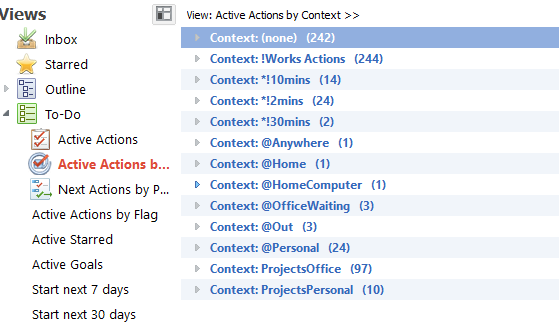
The view that Dwight mentioned is in the Todo section of views on the right
hand side. It is the second item in my list but all I can read is : "Active
Action ...". When you hover over it you see that the full name is : "Active
Actions by Context".
Another, slightly different way to do it is to use the context filters in
the filter section of the left hand side. This will filter only the tasks
with a selected context in the current view/workspace.

I have attached a couple of images showing how each of these look

On Sunday, 13 September 2015 18:53:20 UTC+1, [email protected] wrote:
>
>
> <https://lh3.googleusercontent.com/-u7m_7bu0Wxs/VfaOaP_fUZI/AAAAAAAASBM/7nrxgb0vR9w/s1600/mlo-contextfilter.png>
>
>
> <https://lh3.googleusercontent.com/-RlhoZddEioY/VfaOcCZNs7I/AAAAAAAASBU/MNc8e0FR_Zs/s1600/mlo-contextview.png>
> I'm trying to generate/view all my tasks with a specific @context (like
> @calls, @computer, etc.) across all folders (which I named based on roles
> like personal, business, family, social, etc.).  So if I search "@calls" it
> will pull just all the @calls to-dos pulling from all folders?  I don't see
> this option in the the to-do view options.
>

--
You received this message because you are subscribed to the Google Groups
"MyLifeOrganized" group.
To unsubscribe from this group and stop receiving emails from it, send an email
to [email protected].
To post to this group, send email to [email protected].
Visit this group at http://groups.google.com/group/mylifeorganized.
To view this discussion on the web visit
https://groups.google.com/d/msgid/mylifeorganized/b06dff6c-37dd-40c6-ba65-232019db4853%40googlegroups.com.
For more options, visit https://groups.google.com/d/optout.