> Yeah.  Looks like several of us got/won them.
>
> Ummm, I didn't realize it is only for the board (not the kit).
>
> So, ummm, don't know how to use it.  Might have to give it to someone when I
> get it.
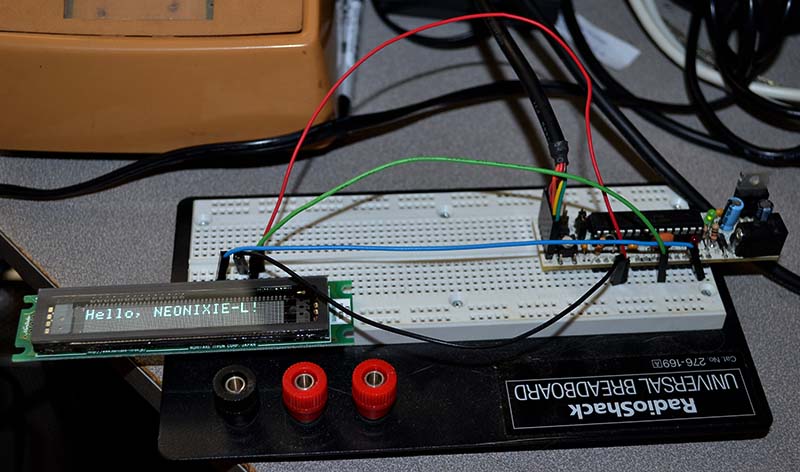
It's really not hard to use.  I soldered the six-pin header to the board,
popped it into a breadboard
with a Boarduino (it's like an Arduino, but plugs into a breadboard) and
connected four wires (ground,
+5V, reset, and serial TX).  I modified the Noritake library (they provide
source on the CD with the display)
to work like an Arduino library (this wasn't hard, it was written for an AVR),
and wrote a trivial "Hello, world!" program.

http://www.vitriol.com/images/tech/noritake.jpg

It works!  You just send the thing serial commands, and it does them.  The
Noritake library deals
with all the low-level stuff, so you just make library calls.  Here's the
entire program:

#include <config.h>
#include <interface.h>
#include <Noritake_VFD_GU7000.h>

Noritake_VFD_GU7000  vfd;

void setup() {
  vfd.GU7000_reset();
  vfd.GU7000_init();
  vfd.GU7000_setFontSize(1,1,false);
}

void loop() {
  vfd.print("Hello, NEONIXIE-L!\n");
}

Once I've cleaned up my somewhat-hacky port of the Noritake library to Arduino,
anybody want it?

- John

--
You received this message because you are subscribed to the Google Groups
"neonixie-l" group.
To post to this group, send an email to [email protected].
To unsubscribe from this group, send email to
[email protected].
For more options, visit this group at
http://groups.google.com/group/neonixie-l?hl=en-GB.