Send netdisco-users mailing list submissions to
        [email protected]
To subscribe or unsubscribe via the World Wide Web, visit
        https://lists.sourceforge.net/lists/listinfo/netdisco-users
or, via email, send a message with subject or body 'help' to
        [email protected]

You can reach the person managing the list at
        [email protected]

When replying, please edit your Subject line so it is more specific
than "Re: Contents of netdisco-users digest..."
Today's Topics:

   1. Re: ND2 strange node behaviour (Eric Miller)
   2. Re: IPv6 support in netdisco ? (Eric Miller)
   3. Re: ND2 strange node behaviour (Nikolaos Milas)
   4. Re: ND2 strange node behaviour (Nikolaos Milas)
   5. Re: ND2 strange node behaviour (Alan Buxey)
   6. Re: ND2 strange node behaviour (Eric Miller)
--- Begin Message ---
Nick,
Can you look to see if this is being caused by Spanning Tree Protocol
(STP) TCN's (Topology Change Notifications)? A TCN shortens the L2
forwarding table aging timer to 15 seconds if using standard 802.1d
while the table is immediately flushed when using Rapid STP.
This Cisco document describes how to identify if this is the issue (see
Track Down the Source of the TCs):
http://www.cisco.com/c/en/us/support/docs/lan-switching/spanning-tree-protocol/28943-170.html#topology_change
Note that in a spanning tree domain under the right conditions this
could be caused by any end station on the network. I have seen this
occurring on a network and in that case it was being caused by the end
station NIC coming in and out of power save mode and the switch port was
not configured for portfast.
Eric

On 2014-05-30 17:56, Nikolaos Milas wrote:
On 30/5/2014 1:44 μμ, Alan Buxey wrote:
That client device seems to be on the default native vlan. Not using
seperate vlan for devices and mgnt? It may very well be a case of cam
table exhaustion if it's one big flat l2 network. Check switch
resources and the SDM profile in use on the switch.
Thank you Alan for your advice.

Yes, we are not using a separate vlan for management. We have a
relatively small network and we are far from table exhaustion. All
switches are Layer 2. Routing is done by a Cisco 3825 with multiple
interfaces.

Some (attempted) troubleshooting -always for the same node:

csw-astr0#sh clock
23:12:58.425 EET Fri May 30 2014
csw-astr0#sh ip arp | incl 0004.0092.aa9d
Internet  195.251.202.16         12   0004.0092.aa9d ARPA   Vlan1

So, the MAC address is in the arp table, but:

csw-astr0#sh mac-address-table address 0004.0092.aa9d
           Mac Address Table
-------------------------------------------

Vlan    Mac Address       Type        Ports
----    -----------       --------    -----

...it is not available in the mac-address-table. If we ping the
associated IP address:

csw-astr0#ping 195.251.202.16

Type escape sequence to abort.
Sending 5, 100-byte ICMP Echos to 195.251.202.16, timeout is 2 seconds:
!!!!!
Success rate is 100 percent (5/5), round-trip min/avg/max = 1/2/9 ms

...then the mac address shows up in the mac-address-table:

csw-astr0#sh clock
23:13:26.603 EET Fri May 30 2014
csw-astr0#sh mac-address-table address 0004.0092.aa9d
           Mac Address Table
-------------------------------------------

Vlan    Mac Address       Type        Ports
----    -----------       --------    -----
    1    0004.0092.aa9d    DYNAMIC     Fa0/3
Total Mac Addresses for this criterion: 1

...but after a few seconds, it is no more available:

csw-astr0#sh clock
23:13:45.167 EET Fri May 30 2014
csw-astr0#sh mac-address-table address 0004.0092.aa9d
           Mac Address Table
-------------------------------------------

Vlan    Mac Address       Type        Ports
----    -----------       --------    -----

Yet, there is no problem with table space:

    csw-astr0#sh mac-address-table count

    Mac Entries for Vlan 1:
    ---------------------------
    Dynamic Address Count  : 26
    Static  Address Count  : 0
    Total Mac Addresses    : 26

    Mac Entries for Vlan 100:
    ---------------------------
    Dynamic Address Count  : 4
    Static  Address Count  : 0
    Total Mac Addresses    : 4

    Total Mac Address Space Available: 7418

Also:

    csw-astr0#show sdm prefer
      The current template is "default" template.
      The selected template optimizes the resources in
      the switch to support this level of features for
      0 routed interfaces and 255 VLANs.

       number of unicast mac addresses:   8K
       number of IPv4 IGMP groups:        0.25K
       number of IPv4/MAC qos aces:       0
       number of IPv4/MAC security aces:  0.25K

Indeed, if I do a "ping 195.251.202.16" (either on the switch or from
another box) and then I IMMEDIATELY force a macsuck in ND2, then the
node (since it has been included for a short while -a few seconds- in
the MAC table) appears in ND2.

But why the particular MAC address is getting removed from the
MAC-Address-table so quickly? Any ideas will be appreciated!

Thanks,
Nick

------------------------------------------------------------------------------
Time is money. Stop wasting it! Get your web API in 5 minutes.
www.restlet.com/download
http://p.sf.net/sfu/restlet
_______________________________________________
Netdisco mailing list
[email protected]
https://lists.sourceforge.net/lists/listinfo/netdisco-users
--- End Message ---
--- Begin Message ---
Netdisco gets the IP addresses while reading the arp cache of routers,
it does not query the end stations directly for this information. If
you do not have global IPv6 routing configured, I suspect the router
would not be populating the IPv6 arp table. Can you look at the router
to see if it has the information?
Eric

On 2014-05-30 23:03, Andrew Daviel wrote:
I see on the website that IPv6 is "supported" in netdisco since version
1.1 or so.

How do I actually find IPv6 information ?

I just installed netdisco 2. I was hoping to find some Scope:Link
information (fe80:: addresses) being used on our network, but I can't
find
anything - while Linux computers generate an address based on MAC
address,
and I can find that in netdisco, others e.g. Windows generate random
addresses).
We have a Juniper EX8000 series router and Avaya switches. We don't
have
any global IPv6 outing configured yet, but we have been getting
Scope:Link
traffic including a flood from some broken Intel drivers.
--- End Message ---
--- Begin Message ---
On 31/5/2014 4:21 μμ, Eric Miller wrote:
Can you look to see if this is being caused by Spanning Tree Protocol
(STP) TCN's (Topology Change Notifications)? A TCN shortens the L2
forwarding table aging timer to 15 seconds if using standard 802.1d
while the table is immediately flushed when using Rapid STP.
Thanks Eric,

I hope you could help in troubleshooting this.

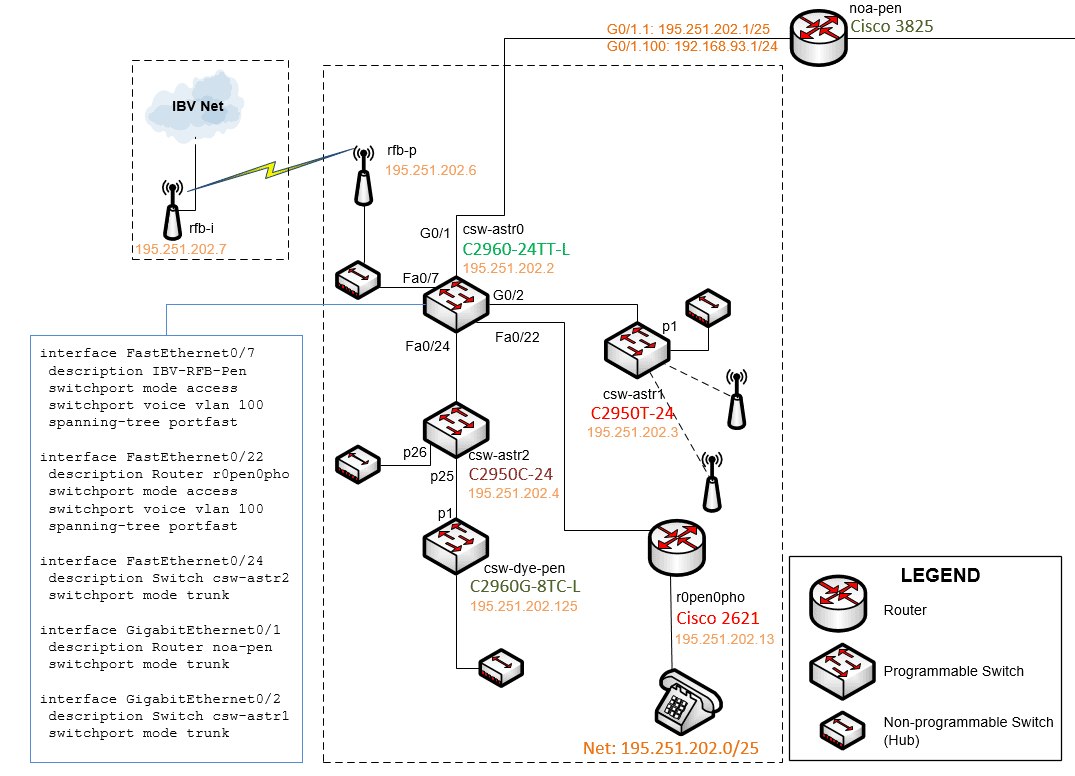
The topology of the switch discussed is:

   http://iweb.noa.gr/files/nd2/csw-astr0-topology.png

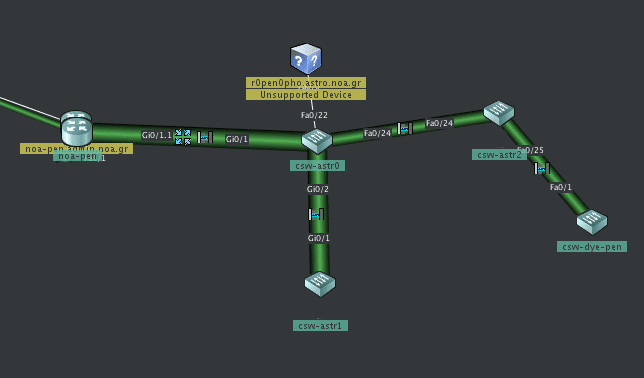
and as presented by Cisco CNA:

   http://iweb.noa.gr/files/nd2/csw-astr0-topology-cna.png

You can also check the full switch configuration here:

   http://iweb.noa.gr/files/nd2/csw-astr0-config.txt
(Note that I have later removed vlan 100 from ports 3 and 4, for testing
purposes.)
My STP debugging sessions are here:

   http://iweb.noa.gr/files/nd2/stp-session0.txt
   http://iweb.noa.gr/files/nd2/stp-session1.txt
   http://iweb.noa.gr/files/nd2/stp-session2.txt
Although I don't know much about STP, I can tell that all STP activity I
see is on ports Fa0/7 and Fa0/24.
If you can see something suspicious and advise me accordingly, please do.
I guess, since we don't use STP at all, I could disable STP altogether
on our two currently used vlans:
   no spanning-tree vlan 1
   no spanning-tree vlan 100

Thanks,
Nick
--- End Message ---
--- Begin Message ---
On 31/5/2014 7:05 μμ, Nikolaos Milas wrote:
I guess, since we don't use STP at all, I could disable STP altogether
on our two currently used vlans:

     no spanning-tree vlan 1
     no spanning-tree vlan 100
So, I disabled STP on this switch that and the problem disappeared (on
this switch)!
Now dynamic addresses in the mac table have doubled:

   csw-astr0# show mac-address-table count

   Mac Entries for Vlan 1:
   ---------------------------
   Dynamic Address Count  : 51
   Static  Address Count  : 0
   Total Mac Addresses    : 51

   Mac Entries for Vlan 100:
   ---------------------------
   Dynamic Address Count  : 4
   Static  Address Count  : 0
   Total Mac Addresses    : 4

   Total Mac Address Space Available: 7393
But, I still don't understand why this happened and how it can be
avoided without disabling STP. If someone can explain things, I will
appreciate it!
Nick
--- End Message ---
--- Begin Message ---
Hi

Would need to know your topology more intimately and the configuration for
uplinks. Looking at eg the spanning-tree root etc would help to.  You say you
don't 'use' spanning-tree but it's active and on by default (for a reason! ) so
there's something at play here

alan
--
Sent from my Android device with K-9 Mail. Please excuse my brevity.
--- End Message ---
--- Begin Message ---
Nick,

In the previous debugging information you provided

csw-astr0#show spanning-tree vlan 1 detail
The line “Number of topology changes 5583310 last change occurred
00:00:01 ago from FastEthernet0/24”
indicates that STP TCN's are a problem. These should occur rarely, yet
this switch has seen 5,583,310 ! When you turned off STP the switch
stopped listening for TCN's.
The last change came in on FastEthernet0/24, so you need to look at
csw-astr2 and csw-dye-pen with the same show spanning-tree vlan 1 detail
command to see where the TCN's are originating.
You should make sure that postfast is enabled on all ports which could
be used for an end station. Portfast suppresses the STP TCN's. Don't
enable portfast on connections to other switches. If TCN's are
originating from an end station port without portfast enabled then most
likely you have a link flapping (up/down) somewhere in the network.
Also, note that if you have an unmanaged switch in your network
participating in spanning-tree but not portfast capable it could be the
source of the TCN's.
Each time a TCN's is received it reduces the ageing timer to 15 seconds,
TCN's are propagated to every switch in the VLAN (spanning-tree domain)
regardless of where it originated. This explains why the mac addresses
are disappearing so quickly.
Eric

On 2014-05-31 14:18, Nikolaos Milas wrote:
On 31/5/2014 7:05 μμ, Nikolaos Milas wrote:
I guess, since we don't use STP at all, I could disable STP altogether
on our two currently used vlans:

     no spanning-tree vlan 1
     no spanning-tree vlan 100
So, I disabled STP on this switch that and the problem disappeared (on
this switch)!

Now dynamic addresses in the mac table have doubled:

    csw-astr0# show mac-address-table count

    Mac Entries for Vlan 1:
    ---------------------------
    Dynamic Address Count  : 51
    Static  Address Count  : 0
    Total Mac Addresses    : 51

    Mac Entries for Vlan 100:
    ---------------------------
    Dynamic Address Count  : 4
    Static  Address Count  : 0
    Total Mac Addresses    : 4

    Total Mac Address Space Available: 7393

But, I still don't understand why this happened and how it can be
avoided without disabling STP. If someone can explain things, I will
appreciate it!

Nick

------------------------------------------------------------------------------
Time is money. Stop wasting it! Get your web API in 5 minutes.
www.restlet.com/download
http://p.sf.net/sfu/restlet
_______________________________________________
Netdisco mailing list
[email protected]
https://lists.sourceforge.net/lists/listinfo/netdisco-users
--- End Message ---
------------------------------------------------------------------------------
Time is money. Stop wasting it! Get your web API in 5 minutes.
www.restlet.com/download
http://p.sf.net/sfu/restlet
_______________________________________________
Netdisco mailing list - Digest Mode
[email protected]
https://lists.sourceforge.net/lists/listinfo/netdisco-users