This very article aims at throwing light on some of the lesser known Linux
commands which surely will help you to handle your Desktop/Server more
efficiently.
1. sudo !! command
Running the command without specifying *sudo command* will give you
permission denied error. So, you don’t need to rewrite the whole command
again just put ‘*!!*‘ will grab the last command.

$ apt-get update

E: Could not open lock file /var/lib/apt/lists/lock - open (13: Permission
denied)
E: Unable to lock directory /var/lib/apt/lists/
E: Could not open lock file /var/lib/dpkg/lock - open (13: Permission denied)
E: Unable to lock the administration directory (/var/lib/dpkg/), are you root?

$ sudo !!

sudo apt-get update
[sudo] password for server:
…
..
Fetched 474 kB in 16s (28.0 kB/s)
Reading package lists... Done
server@localhost:~$

2. python command

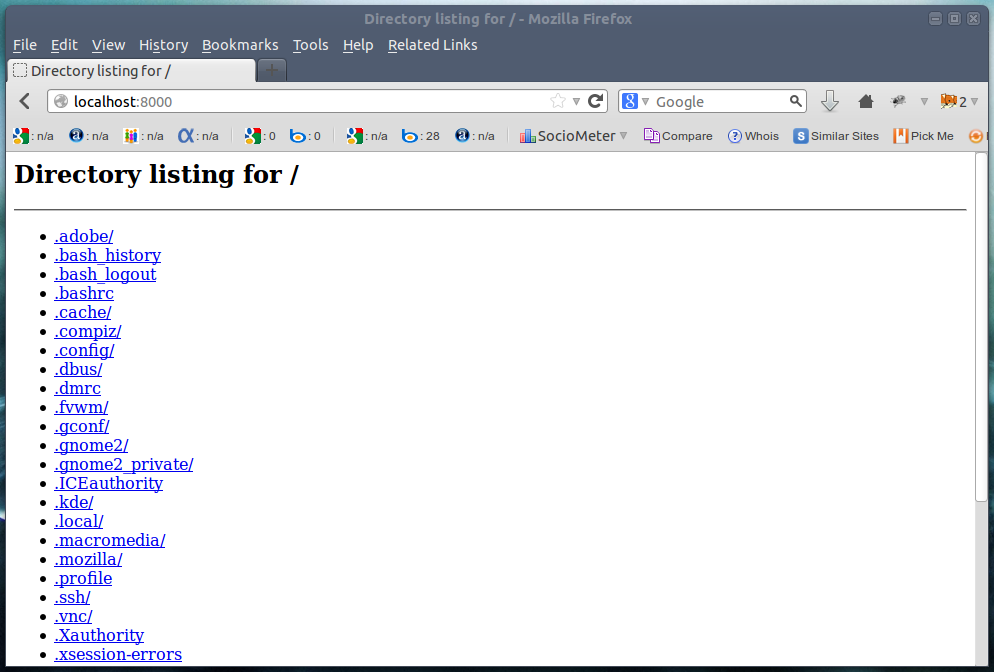
The below command generates a simple web page over HTTP for the directory
structure tree and can be accessed at port *8000* in browser till interrupt
signal is sent.

# python -m SimpleHTTPServer

[image: python -m SimpleHTTPServer]
<http://www.tecmint.com/wp-content/uploads/2013/10/Python-m.png>

<http://www.tecmint.com/wp-content/uploads/2013/10/Python-m.png>

Directory Structure Tree
3. mtr Command

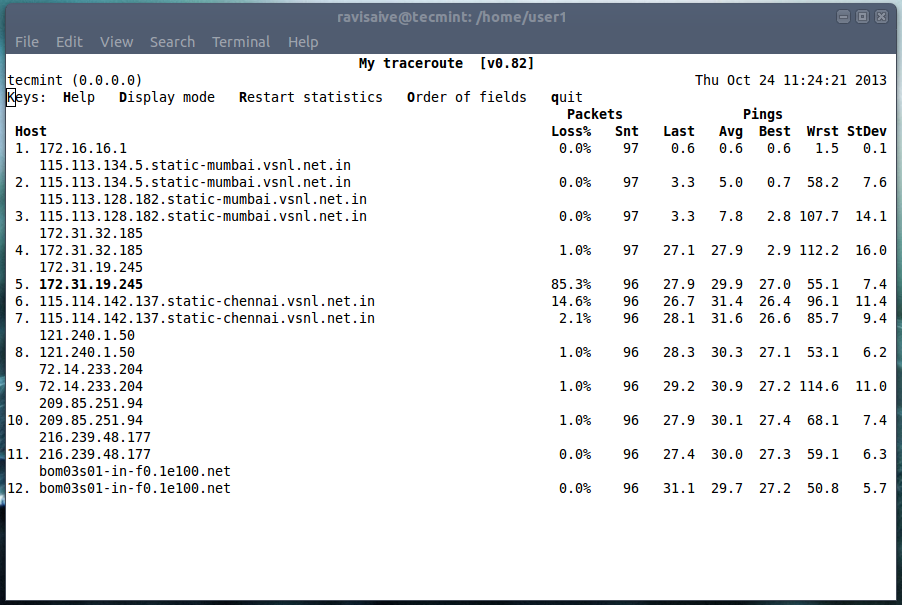
Most of us are familiar with *ping* and *traceroute*. How about combining
the functionality of both the command into one with *mtr command.* In case *
mtr* is not installed into your machine,*apt* or *yum* the required package.

$ sudo apt-get install mtr (On *Debian* based Systems)

# yum install mtr (On *Red Hat* based Systems)

Now run *mtr command* to start investigating the network connection between
the host *mtr runs* on and *google.com*.

# mtr google.com

[image: mtr command]
<http://www.tecmint.com/wp-content/uploads/2013/10/mtr-command.png>

<http://www.tecmint.com/wp-content/uploads/2013/10/mtr-command.png>

mtr command
4. Ctrl+x+e Command

This command is very much useful for administrator and developers. To
Automate day-to-day task an administrator needs to open editor by typing *vi
*, *vim*, *nano*, etc. How about firing instant editor (from terminal).

Just Press “*Ctrl-x-e”* from the terminal prompt and start working in
editor.
5. nl Command

The “*nl command*” number the lines of a file. Number the lines of a file
say ‘*one.txt*‘ with lines say (*Fedora*, *Debian*, *Arch*, *Slack* and *
Suse*). First list the content of a file “*one.txt*” using cat
command<http://www.tecmint.com/13-basic-cat-command-examples-in-linux/>
.

# cat one.txt

fedora
debian
arch
slack
suse

Now run “*nl command*” to list them in a numbered fashion.

# nl one.txt

1 fedora
2 debian
3 arch
4 slack
5 suse

6. shuf Command

The “*shuf*” command randomly select *lines*/*files*/*folder* from a *file*/
*folder*. First list the contents of a folder using ls
command<http://www.tecmint.com/15-basic-ls-command-examples-in-linux/>
.

# ls

Desktop  Documents  Downloads  Music  Pictures  Public  Templates  Videos

#  ls | shuf (shuffle Input)

Music
Documents
Templates
Pictures
Public
Desktop
Downloads
Videos

#  ls | shuf -n1 (pick on random selection)

Public

# ls | shuf -n1

Videos

# ls | shuf -n1

Templates

# ls | shuf -n1

Downloads

*Note*: You can always replace ‘*n1*‘ with ‘*n2*‘ to pick two random
selection or any other number of random selection using *n3*, *n4.*…
7. ss Command

The “*ss*” stands for socket statistics. The command investigates the
socket and shows information similar to netstat
command<http://www.tecmint.com/20-netstat-commands-for-linux-network-management/>.

It can display more *TCP* and state informations than other tools.

# ss

State      Recv-Q Send-Q      Local Address:Port          Peer Address:Port
ESTAB      0      0           192.168.1.198:41250        *.*.*.*:http
CLOSE-WAIT 1      0               127.0.0.1:8000             127.0.0.1:41393
ESTAB      0      0           192.168.1.198:36239        *.*.*.*:http
ESTAB      310    0               127.0.0.1:8000             127.0.0.1:41384
ESTAB      0      0           192.168.1.198:41002       *.*.*.*:http
ESTAB      0      0               127.0.0.1:41384            127.0.0.1:8000

8. last Command

The “*last*” command show the history of last logged in users. This command
searches through the file “*/var/log/wtmp*” and shows a list of *logged-in*
 and *logged-out* users along with *tty’s*.

#  last
server   pts/0        :0               Tue Oct 22 12:03   still logged in
server   tty8         :0               Tue Oct 22 12:02   still logged in
…
...
(unknown tty8         :0               Tue Oct 22 12:02 - 12:02  (00:00)
server   pts/0        :0               Tue Oct 22 10:33 - 12:02  (01:29)
server   tty7         :0               Tue Oct 22 10:05 - 12:02  (01:56)
(unknown tty7         :0               Tue Oct 22 10:04 - 10:05  (00:00)
reboot   system boot  3.2.0-4-686-pae  Tue Oct 22 10:04 - 12:44  (02:39)

wtmp begins Fri Oct  4 14:43:17 2007

9. curl ifconfig.me

So how do you obtain your *External IP address*? Using google?. Well the
command output your external IP address right into your terminal.

# curl ifconfig.me

*Note:* You might don’t have curl package installed, you have to *apt*/*yum* to
install package.
10. tree command

Get the current directory structure in tree like format.

# tree

.
|-- Desktop
|-- Documents
|   `-- 37.odt
|-- Downloads
|   |-- attachments.zip

|   |-- ttf-indic-fonts_0.5.11_all.deb
|   |-- ttf-indic-fonts_1.1_all.deb
|   `-- wheezy-nv-install.sh
|-- Music
|-- Pictures
|   |-- Screenshot from 2013-10-22 12:03:49.png
|   `-- Screenshot from 2013-10-22 12:12:38.png
|-- Public
|-- Templates
`-- Videos

10 directories, 23 files

11. pstree

This commands shows all the processes running currently along with
associated child process, in a tree like format similar to ‘*tree*‘ command
output.

# pstree
init─┬─NetworkManager───{NetworkManager}
     ├─accounts-daemon───{accounts-daemon}
     ├─acpi_fakekeyd
     ├─acpid
     ├─apache2───10*[apache2]
     ├─at-spi-bus-laun───2*[{at-spi-bus-laun}]
     ├─atd
     ├─avahi-daemon───avahi-daemon
     ├─bluetoothd
     ├─colord───{colord}
     ├─colord-sane───2*[{colord-sane}]
     ├─console-kit-dae───64*[{console-kit-dae}]
     ├─cron
     ├─cupsd
     ├─2*[dbus-daemon]
     ├─dbus-launch
     ├─dconf-service───2*[{dconf-service}]
     ├─dovecot─┬─anvil
     │         ├─config
     │         └─log
     ├─exim4
     ├─gconfd-2
     ├─gdm3─┬─gdm-simple-slav─┬─Xorg
     │      │
├─gdm-session-wor─┬─x-session-manag─┬─evolution-a+
     │      │                 │                 │
├─gdu-notific+
     │      │                 │                 │
├─gnome-scree+
     │      │                 │                 │
├─gnome-setti+
     │      │                 │                 │
├─gnome-shell+++
     │      │                 │                 │
├─nm-applet──+++
     │      │                 │                 │                 ├─ssh-agent
     │      │                 │                 │
├─tracker-min+
     │      │                 │                 │
├─tracker-sto+
     │      │                 │                 │
└─3*[{x-sessi+
     │      │                 │                 └─2*[{gdm-session-wor}]
     │      │                 └─{gdm-simple-slav}
     │      └─{gdm3}
     ├─6*[getty]
     ├─gnome-keyring-d───9*[{gnome-keyring-d}]
     ├─gnome-shell-cal───2*[{gnome-shell-cal}]
     ├─goa-daemon───{goa-daemon}
     ├─gsd-printer───{gsd-printer}
     ├─gvfs-afc-volume───{gvfs-afc-volume}

That’s all for now. In the next article of mine I would cover certain other
lesser known Linux commands which would be fun. Till then stay tuned and
connected to *Tecmint*. Like and share us and help us get spread.

--
You received this message because you are subscribed to the Google Groups
"NFORCEIT" group.
To unsubscribe from this group and stop receiving emails from it, send an email
to [email protected].
To post to this group, send an email to [email protected].
For more options, visit https://groups.google.com/groups/opt_out.