Unsurprisingly, there is some question about the methods employed by
Backblaze in their analysis.  Here's a link to a rebuttal, and as Howard
says, YMMV:
http://www.enterprisestorageforum.com/storage-hardware/selecting-a-disk-drive-how-not-to-do-research-1.html


On Wed, Jan 22, 2014 at 10:06 AM, Jack Coats <[email protected]> wrote:

> I found this post very interesting on current drive lifetimes in constant
> use. ... Jack
>
> ---------- Forwarded message ----------
> From: Backblaze Blog <[email protected]>
> Date: Wed, Jan 22, 2014 at 3:34 AM
> Subject: What Hard Drive Should I Buy? - Backblaze Blog
>
>
>
>     What Hard Drive Should I Buy? - Backblaze Blog<http://blog.backblaze.com>
>   [image:
> Link to Backblaze Blog] <http://blog.backblaze.com>
> ------------------------------
>
> What Hard Drive Should I
> Buy?<http://feedproxy.google.com/~r/backblaze/~3/H5gCLWTW04o/?utm_source=feedburner&utm_medium=email>
>
> Posted: 21 Jan 2014 05:54 AM PST
>
> [image:
> blog-which-drive-to-buy]<http://blog.backblaze.com/wp-content/uploads/2014/01/blog-which-drive-to-buy.jpg>
>
> My last two blog posts were about expected drive
> lifetimes<http://blog.backblaze.com/2013/11/12/how-long-do-disk-drives-last/>and
>  drive
> reliability<http://blog.backblaze.com/2013/12/04/enterprise-drive-reliability/>.
> These posts were an outgrowth of the careful work that we've done at
> Backblaze <http://www.Backblaze.com> to find the most cost-effective disk
> drives. Running a truly unlimited online
> backup<http://blog.backblaze.com/2011/02/03/backblaze-is-committed-to-unlimited-backup/>service
>  for only $5 per month means our cloud storage needs to be very
> efficient and we need to quickly figure out which drives work.
>
> Because Backblaze has a history of openness, many readers expected more
> details in my previous posts. They asked what drive models work best and
> which last the longest. Given our experience with over 25,000 drives, they
> asked which ones are good enough that we would buy them again. In this
> post, I'll answer those questions.
>
> *Drive Population*
>
> At the end of 2013, we had 27,134 consumer-grade drives spinning in Backblaze
> Storage
> Pods<http://blog.backblaze.com/2013/02/20/180tb-of-good-vibrations-storage-pod-3-0/>.
> The breakdown by brand looks like this:
>   Hard Drives by Manufacturer Used by Backblaze
>   Brand Number
> of Drives Terabytes Average
> Age in Years  Seagate 12,765 39,576 1.4  Hitachi 12,956 36,078 2.0  Western
> Digital 2,838 2,581 2.5  Toshiba 58 174 0.7  Samsung 18 18 3.7
>
> As you can see, they are mostly Seagate and Hitachi drives, with a good
> number of Western Digital thrown in. We don't have enough Toshiba or
> Samsung drives for good statistical results.
>
> Why do we have the drives we have? Basically, we buy the least expensive
> drives that will work. When a new drive comes on the market that looks like
> it would work, and the price is good, we test a pod
> full<http://blog.backblaze.com/2013/10/28/alas-poor-stephen-is-dead/>and see
> how they perform. The new drives go through initial setup tests, a
> stress test, and then a couple weeks in production. (A couple of weeks is
> enough to fill the pod with data.) If things still look good, that drive
> goes on the buy list. When the price is right, we buy it.
>
> We are willing to spend a little bit more on drives that are reliable,
> because it costs money to replace a drive. We are not willing to spend a
> lot more, though.
>
> *Excluded Drives*
>
> Some drives just don't work in the Backblaze environment. We have not
> included them in this study. It wouldn't be fair to call a drive "bad" if
> it's just not suited for the environment it's put into.
>
> We have some of these drives running in storage pods, but are in the
> process of replacing them because they aren't reliable enough. When one
> drive goes bad, it takes a lot of work to get the RAID back on-line if the
> whole RAID is made up of unreliable drives. It's just not worth the trouble.
>
> The drives that just don't work in our environment are Western Digital
> Green 3TB drives and Seagate LP (low power) 2TB drives. Both of these
> drives start accumulating errors as soon as they are put into production.
> We think this is related to vibration. The drives do somewhat better in the
> new low-vibration Backblaze Storage
> Pod<http://blog.backblaze.com/2013/02/20/180tb-of-good-vibrations-storage-pod-3-0/>,
> but still not well enough.
>
> These drives are designed to be energy-efficient, and spin down
> aggressively when not in use. In the Backblaze environment, they spin down
> frequently, and then spin right back up. We think that this causes a lot of
> wear on the drive.
>
> *Failure Rates*
>
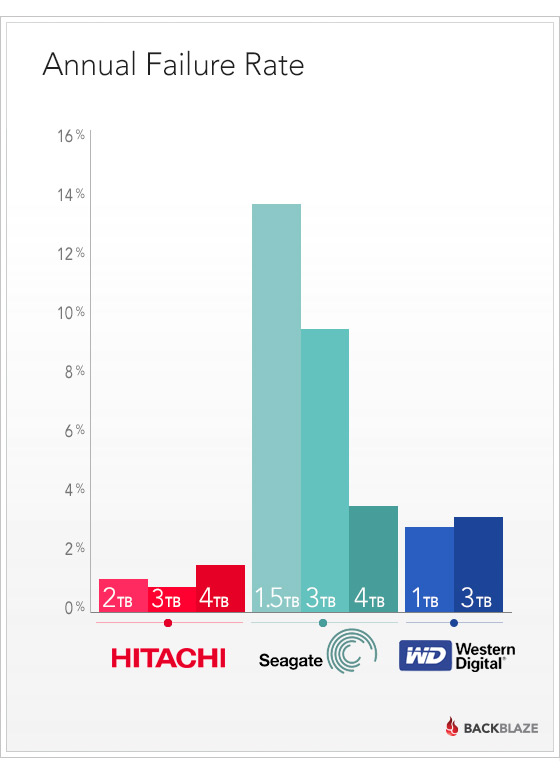
> We measure drive reliability by looking at the annual failure rate, which
> is the average number of failures you can expect running one drive for a
> year. A failure is when we have to replace a drive in a pod.
>
> [image:
> blog-fail-drives-manufacture]<http://blog.backblaze.com/wp-content/uploads/2014/01/blog-fail-drives-manufacture.jpg>
>
> This chart has some more details that don't show up in the pretty chart,
> including the number of drives of each model that we have, and how old the
> drives are:
>   Number of Hard Drives by Model at Backblaze
>   Model Size Number
> of Drives Average
> Age in
> Years Annual
> Failure
> Rate  Seagate Desktop HDD.15
> (ST4000DM000) 4.0TB 5199 0.3 3.8%  Hitachi GST Deskstar 7K2000
> (HDS722020ALA330) 2.0TB 4716 2.9 1.1%  Hitachi GST Deskstar 5K3000
> (HDS5C3030ALA630) 3.0TB 4592 1.7 0.9%  Seagate Barracuda
> (ST3000DM001) 3.0TB 4252 1.4 9.8%  Hitachi Deskstar 5K4000
> (HDS5C4040ALE630) 4.0TB 2587 0.8 1.5%  Seagate Barracuda LP
> (ST31500541AS) 1.5TB 1929 3.8 9.9%  Hitachi Deskstar 7K3000
> (HDS723030ALA640) 3.0TB 1027 2.1 0.9%  Seagate Barracuda 7200
> (ST31500341AS) 1.5TB 539 3.8 25.4%  Western Digital Green
> (WD10EADS) 1.0TB 474 4.4 3.6%  Western Digital Red
> (WD30EFRX) 3.0TB 346 0.5 3.2%  Seagate Barracuda XT
> (ST33000651AS) 3.0TB 293 2.0 7.3%  Seagate Barracuda LP
> (ST32000542AS) 2.0TB 288 2.0 7.2%  Seagate Barracuda XT
> (ST4000DX000) 4.0TB 179 0.7 n/a  Western Digital Green
> (WD10EACS) 1.0TB 84 5.0 n/a  Seagate Barracuda Green
> (ST1500DL003) 1.5TB 51 0.8 120.0%
>
> The following sections focus on different aspects of these results.
>
> *1.5TB Seagate Drives*
>
> The Backblaze team has been happy with Seagate Barracuda LP 1.5TB drives.
> We've been running them for a long time - their average age is pushing 4
> years. Their overall failure rate isn't great, but it's not terrible either.
>
> The non-LP 7200 RPM drives have been consistently unreliable. Their
> failure rate is high, especially as they're getting older.
>   1.5 TB Seagate Drives Used by Backblaze
>   Model Size Number
> of Drives Average
> Age in
> Years Annual
> Failure
> Rate  Seagate Barracuda LP
> (ST31500541AS) 1.5TB 1929 3.8 9.9%  Seagate Barracuda 7200
> (ST31500341AS) 1.5TB 539 3.8 25.4%  Seagate Barracuda Green
> (ST1500DL003) 1.5TB 51 0.8 120.0%
>
> The Seagate Barracuda Green 1.5TB drive, though, has not been doing well.
> We got them from Seagate as warranty replacements for the older drives, and
> these new drives are dropping like flies. Their average age shows 0.8
> years, but since these are warranty replacements, we believe that they are
> refurbished drives that were returned by other customers and erased, so
> they already had some usage when we got them.
>
> *Bigger Seagate Drives*
>
> The bigger Seagate drives have continued the tradition of the 1.5Tb
> drives: they're solid workhorses, but there is a constant attrition as they
> wear out.
>   2.0 to 4.0 TB Seagate Drives Used by Backblaze
>   Model Size Number
> of Drives Average
> Age in
> Years Annual
> Failure
> Rate  Seagate Desktop HDD.15
> (ST4000DM000) 4.0TB 5199 0.3 3.8%  Seagate Barracuda
> (ST3000DM001) 3.0TB 4252 1.4 9.8%  Seagate Barracuda XT
> (ST33000651AS) 3.0TB 293 2.0 7.3%  Seagate Barracuda LP
> (ST32000542AS) 2.0TB 288 2.0 7.2%  Seagate Barracuda XT
> (ST4000DX000) 4.0TB 179 0.7 n/a
>
> The good pricing on Seagate drives along with the consistent, but not
> great, performance is why we have a lot of them.
>
> *Hitachi Drives*
>
> If the price were right, we would be buying nothing but Hitachi drives.
> They have been rock solid, and have had a remarkably low failure rate.
>   Hitachi Drives Used by Backblaze
>   Model Size Number
> of Drives Average
> Age in
> Years Annual
> Failure
> Rate  Hitachi GST Deskstar 7K2000
> (HDS722020ALA330) 2.0TB 4716 2.9 1.1%  Hitachi GST Deskstar 5K3000
> (HDS5C3030ALA630) 3.0TB 4592 1.7 0.9%  Hitachi Deskstar 5K4000
> (HDS5C4040ALE630) 4.0TB 2587 0.8 1.5%  Hitachi Deskstar 7K3000
> (HDS723030ALA640) 3.0TB 1027 2.1 0.9%
>
> *Western Digital Drives*
>
> Back at the beginning of Backblaze, we bought Western Digital 1.0TB
> drives, and that was a really good choice. Even after over 4 years of use,
> the ones we still have are going strong.
>
> We wish we had more of the Western Digital Red 3TB drives (WD30EFRX).
> They've also been really good, but they came after we already had a bunch
> of the Seagate 3TB drives, and when they came out their price was higher.
>   Western Digital Drives Used by Backblaze
>   Model Size Number
> of Drives Average
> Age in
> Years Annual
> Failure
> Rate  Western Digital Green
> (WD10EADS) 1.0TB 474 4.4 3.6%  Western Digital Red
> (WD30EFRX) 3.0TB 346 0.5 3.2%  Western Digital Green
> (WD10EACS) 1.0TB 84 5.0 n/a
>
> *What About Drives That Don't Fail Completely?*
>
> Another issue when running a big data center is how much personal
> attention each drive needs. When a drive has a problem, but doesn't fail
> completely, it still creates work. Sometimes automated recovery can fix
> this, but sometimes a RAID array needs that personal touch to get it
> running again.
>
> Each storage pod runs a number of RAID arrays. Each array stores data
> reliably by spreading data across many drives. If one drive fails, the data
> can still be obtained from the others. Sometimes, a drive may "pop out" of
> a RAID array but still seem good, so after checking that its data is intact
> and it's working, it gets put back in the RAID to continue operation. Other
> times a drive may stop responding completely and look like it's gone, but
> it can be reset and continue running.
>
> Measuring the time spent in a "trouble" state like this is a measure of
> how much work a drive creates. Once again, Hitachi wins. Hitachi drives get
> "four nines" of untroubled operation time, while the other brands just get
> "two nines".
>   Untroubled Operation of Drives by Manufacturer used at Backblaze
>   Brand Active Trouble Number of Drives  Seagate 99.72 0.28% 12459  Western
> Digital 99.83 0.17% 933  Hitachi 99.99 0.01% 12956
>
> *Drive Lifetime by Brand*
>
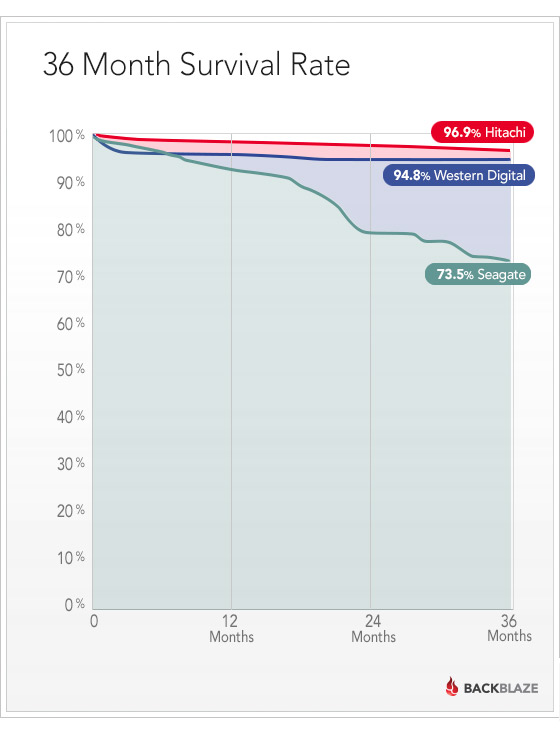
> The chart below shows the cumulative survival rate for each brand. Month
> by month, how many of the drives are still alive?
>
> [image:
> blog-36-month-drive-survival-rate]<http://blog.backblaze.com/wp-content/uploads/2014/01/blog-survival-drives-by-month.jpg>
>
> Hitachi does really well. There is an initial die-off of Western Digital
> drives, and then they are nice and stable. The Seagate drives start strong,
> but die off at a consistently higher rate, with a burst of deaths near the
> 20-month mark.
>
> Having said that, you'll notice that even after 3 years, by far most of
> the drives are still operating.
>
> *What Drives Is Backblaze Buying Now?*
>
> We are focusing on 4TB drives for new pods. For these, our current
> favorite is the Seagate Desktop HDD.15 (ST4000DM000). We'll have to keep an
> eye on them, though. Historically, Seagate drives have performed well at
> first, and then had higher failure rates later.
>
> Our other favorite is the Western Digital 3TB Red (WD30EFRX).
>
> We still have to buy smaller drives as replacements for older pods where
> drives fail. The drives we absolutely won't buy are Western Digital 3TB
> Green drives and Seagate 2TB LP drives.
>
> A year and a half ago, Western Digital acquired the Hitachi disk drive
> business. Will Hitachi drives continue their excellent performance? Will
> Western Digital bring some of the Hitachi reliability into their
> consumer-grade drives?
>
> At Backblaze, we will continue to monitor and share the performance of a
> wide variety of disk drive models.
>
>  --
> --
> You received this message because you are subscribed to the Google Groups
> "NLUG" group.
> To post to this group, send email to [email protected]
> To unsubscribe from this group, send email to
> [email protected]
> For more options, visit this group at
> http://groups.google.com/group/nlug-talk?hl=en
>
> ---
> You received this message because you are subscribed to the Google Groups
> "NLUG" group.
> To unsubscribe from this group and stop receiving emails from it, send an
> email to [email protected].
> For more options, visit https://groups.google.com/groups/opt_out.
>

--
--
You received this message because you are subscribed to the Google Groups
"NLUG" group.
To post to this group, send email to [email protected]
To unsubscribe from this group, send email to
[email protected]
For more options, visit this group at
http://groups.google.com/group/nlug-talk?hl=en

---
You received this message because you are subscribed to the Google Groups
"NLUG" group.
To unsubscribe from this group and stop receiving emails from it, send an email
to [email protected].
For more options, visit https://groups.google.com/groups/opt_out.