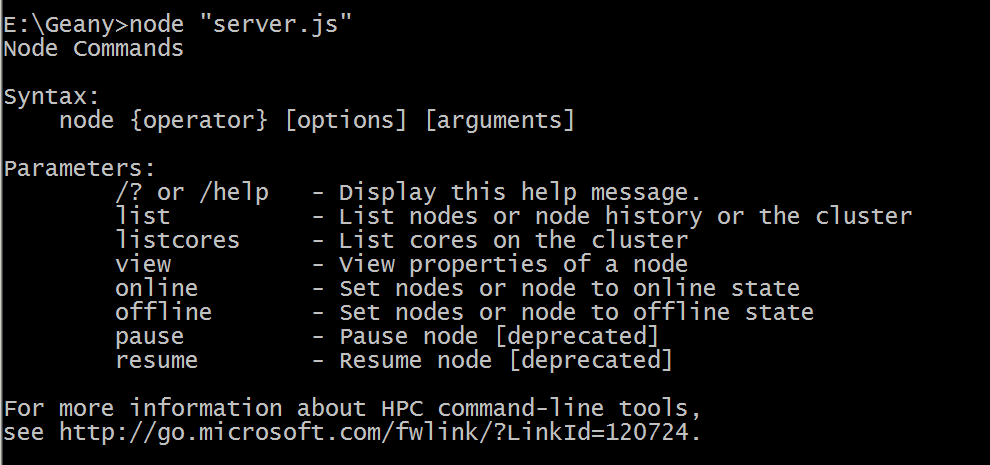
Thanks all. There is some MS tool named Node which already installed in my
computer and I did not know about it so even after installing NodeJs I was
not able to run the files. I have changed the path and the issue has been
solved.
On Thursday, January 9, 2014 8:56:46 PM UTC+5:30, Animesh Pandey wrote:
>
>
> <https://lh4.googleusercontent.com/-lIA5f3vb-t0/Us68dde8fvI/AAAAAAAAAlU/2J6KvaPQNvM/s1600/output.PNG>
> I have recently installed nodejs on Windows. But whenever I execute any
> javascript file I always get the output as in the image. I have seen almost
> all websites on tutorials of NodeJs but could not find the mistake that I
> might be doing!
>
> Please help.
>

--
--
Job Board: http://jobs.nodejs.org/
Posting guidelines:
https://github.com/joyent/node/wiki/Mailing-List-Posting-Guidelines
You received this message because you are subscribed to the Google
Groups "nodejs" group.
To post to this group, send email to [email protected]
To unsubscribe from this group, send email to
[email protected]
For more options, visit this group at
http://groups.google.com/group/nodejs?hl=en?hl=en

---
You received this message because you are subscribed to the Google Groups
"nodejs" group.
To unsubscribe from this group and stop receiving emails from it, send an email
to [email protected].
For more options, visit https://groups.google.com/groups/opt_out.