Send Notepad-plus-plus mailing list submissions to
        [email protected]
To subscribe or unsubscribe via the World Wide Web, visit
        https://lists.sourceforge.net/lists/listinfo/notepad-plus-plus
or, via email, send a message with subject or body 'help' to
        [EMAIL PROTECTED]

You can reach the person managing the list at
        [EMAIL PROTECTED]

When replying, please edit your Subject line so it is more specific
than "Re: Contents of Notepad-plus-plus digest..."


Today's Topics:

   1. [notepad-plus - Help] RE: Bug? How insert \n      NOT <br \> in
      html files? (SourceForge.net)
   2. [notepad-plus - Open Discussion] RE: Displaying   all changes
      (SourceForge.net)
   3. [notepad-plus - Help] RE: Win32Exception crash (SourceForge.net)
   4. [notepad-plus - Help] RE: Win32Exception crash (SourceForge.net)
   5. [notepad-plus - Help] v5.1 typing a colon ":"     removes all
      indention (SourceForge.net)
   6. [notepad-plus - Help] RE: v5.1 typing a colon     ":" removes all
      indention (SourceForge.net)
   7. [notepad-plus - Help] how do I open window        manager?
      (SourceForge.net)
   8. [notepad-plus - Open Discussion] RE: "open        file" function in
      5.1 or above (SourceForge.net)
   9. [notepad-plus - Help] RE: Associate a file        extension with a
      language? (SourceForge.net)


----------------------------------------------------------------------

Message: 1
Date: Sun, 30 Nov 2008 13:11:02 +0000
From: "SourceForge.net" <[EMAIL PROTECTED]>
Subject: [Notepad-plus-plus] [notepad-plus - Help] RE: Bug? How insert
        \n      NOT <br \> in html files?
To: [EMAIL PROTECTED]
Message-ID: <[EMAIL PROTECTED]>
Content-Type: text/plain; charset="UTF-8"


Read and respond to this message at:
https://sourceforge.net/forum/message.php?msg_id=5738573
By: harrybharry

Some plugin does that. Look in TextFX or other plugin options to disable it

______________________________________________________________________
You are receiving this email because you elected to monitor this forum.
To stop monitoring this forum, login to SourceForge.net and visit:
https://sourceforge.net/forum/unmonitor.php?forum_id=331754


------------------------------

Message: 2
Date: Sun, 30 Nov 2008 13:43:15 +0000
From: "SourceForge.net" <[EMAIL PROTECTED]>
Subject: [Notepad-plus-plus] [notepad-plus - Open Discussion] RE:
        Displaying      all changes
To: [EMAIL PROTECTED]
Message-ID: <[EMAIL PROTECTED]>
Content-Type: text/plain; charset="UTF-8"


Read and respond to this message at:
https://sourceforge.net/forum/message.php?msg_id=5738664
By: janschreiber

The Compare plugin can be used to compare the current state of a file to last
saved state.

______________________________________________________________________
You are receiving this email because you elected to monitor this forum.
To stop monitoring this forum, login to SourceForge.net and visit:
https://sourceforge.net/forum/unmonitor.php?forum_id=331753


------------------------------

Message: 3
Date: Sun, 30 Nov 2008 18:36:04 +0000
From: "SourceForge.net" <[EMAIL PROTECTED]>
Subject: [Notepad-plus-plus] [notepad-plus - Help] RE: Win32Exception
        crash
To: [EMAIL PROTECTED]
Message-ID: <[EMAIL PROTECTED]>
Content-Type: text/plain; charset="UTF-8"


Read and respond to this message at:
https://sourceforge.net/forum/message.php?msg_id=5739533
By: atom0s

I get this exact same error when editing php files. However it happens at random
anywhere in the file(s) for me.

______________________________________________________________________
You are receiving this email because you elected to monitor this forum.
To stop monitoring this forum, login to SourceForge.net and visit:
https://sourceforge.net/forum/unmonitor.php?forum_id=331754


------------------------------

Message: 4
Date: Sun, 30 Nov 2008 18:49:45 +0000
From: "SourceForge.net" <[EMAIL PROTECTED]>
Subject: [Notepad-plus-plus] [notepad-plus - Help] RE: Win32Exception
        crash
To: [EMAIL PROTECTED]
Message-ID: <[EMAIL PROTECTED]>
Content-Type: text/plain; charset="UTF-8"


Read and respond to this message at:
https://sourceforge.net/forum/message.php?msg_id=5739566
By: atom0s

Quick update, this does appear to be a plugin issue. I reinstalled twice and
no fix, but, after renaming my plugin folder to something else so they don't
load, I no longer seem to get the crash.

______________________________________________________________________
You are receiving this email because you elected to monitor this forum.
To stop monitoring this forum, login to SourceForge.net and visit:
https://sourceforge.net/forum/unmonitor.php?forum_id=331754


------------------------------

Message: 5
Date: Mon, 01 Dec 2008 03:35:37 +0000
From: "SourceForge.net" <[EMAIL PROTECTED]>
Subject: [Notepad-plus-plus] [notepad-plus - Help] v5.1 typing a colon
        ":"     removes all indention
To: [EMAIL PROTECTED]
Message-ID: <[EMAIL PROTECTED]>
Content-Type: text/plain; charset="UTF-8"


Read and respond to this message at:
https://sourceforge.net/forum/message.php?msg_id=5741168
By: phaxmohdem

I've never had this problem until I upgraded to 5.1, but when editing in PHP
mode, every time I type a colon ":" it always removes all indention for the
line I am typing on.  Very annoying.  Any fixes, or should I just revert to
a previous version.

______________________________________________________________________
You are receiving this email because you elected to monitor this forum.
To stop monitoring this forum, login to SourceForge.net and visit:
https://sourceforge.net/forum/unmonitor.php?forum_id=331754


------------------------------

Message: 6
Date: Mon, 01 Dec 2008 03:42:18 +0000
From: "SourceForge.net" <[EMAIL PROTECTED]>
Subject: [Notepad-plus-plus] [notepad-plus - Help] RE: v5.1 typing a
        colon   ":" removes all indention
To: [EMAIL PROTECTED]
Message-ID: <[EMAIL PROTECTED]>
Content-Type: text/plain; charset="UTF-8"


Read and respond to this message at:
https://sourceforge.net/forum/message.php?msg_id=5741184
By: phaxmohdem

Found out this is related to the nppAutoIndent plugin, and only happens in
"smart
Indent" mode.  don't know how to fix this though besides turning off smart
indent.

______________________________________________________________________
You are receiving this email because you elected to monitor this forum.
To stop monitoring this forum, login to SourceForge.net and visit:
https://sourceforge.net/forum/unmonitor.php?forum_id=331754


------------------------------

Message: 7
Date: Mon, 01 Dec 2008 13:51:39 +0000
From: "SourceForge.net" <[EMAIL PROTECTED]>
Subject: [Notepad-plus-plus] [notepad-plus - Help] how do I open
        window  manager?
To: [EMAIL PROTECTED]
Message-ID: <[EMAIL PROTECTED]>
Content-Type: text/plain; charset="UTF-8"


Read and respond to this message at:
https://sourceforge.net/forum/message.php?msg_id=5743055
By: maketop

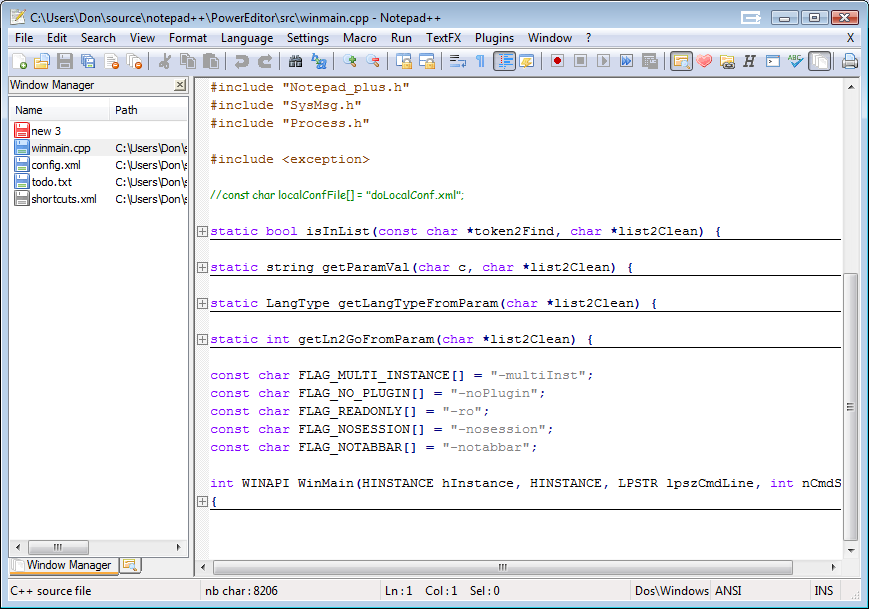
hello, I see this screenshot
(http://notepad-plus.sourceforge.net/commun/screenshots/scrsh_withWM.png), but
I can't where can I open this feature? any advise?

______________________________________________________________________
You are receiving this email because you elected to monitor this forum.
To stop monitoring this forum, login to SourceForge.net and visit:
https://sourceforge.net/forum/unmonitor.php?forum_id=331754


------------------------------

Message: 8
Date: Mon, 01 Dec 2008 13:53:05 +0000
From: "SourceForge.net" <[EMAIL PROTECTED]>
Subject: [Notepad-plus-plus] [notepad-plus - Open Discussion] RE:
        "open   file" function in 5.1 or above
To: [EMAIL PROTECTED]
Message-ID: <[EMAIL PROTECTED]>
Content-Type: text/plain; charset="UTF-8"


Read and respond to this message at:
https://sourceforge.net/forum/message.php?msg_id=5743064
By: lunatic4

I can confirm this bug in 5.1.1 Unicode version.

N++ doesn't seem to do anything when you highlight a path to a file that you
know exists and try to open the file.  However if you highlight a part of the
path, N++ will warn you that the file doesnt exist and it will ask if you want
to create it.

______________________________________________________________________
You are receiving this email because you elected to monitor this forum.
To stop monitoring this forum, login to SourceForge.net and visit:
https://sourceforge.net/forum/unmonitor.php?forum_id=331753


------------------------------

Message: 9
Date: Mon, 01 Dec 2008 14:49:22 +0000
From: "SourceForge.net" <[EMAIL PROTECTED]>
Subject: [Notepad-plus-plus] [notepad-plus - Help] RE: Associate a
        file    extension with a language?
To: [EMAIL PROTECTED]
Message-ID: <[EMAIL PROTECTED]>
Content-Type: text/plain; charset="UTF-8"


Read and respond to this message at:
https://sourceforge.net/forum/message.php?msg_id=5743254
By: gpalmer711

Take a look at the langs.model.xml which should be in your notepad++
installation
folder.

In there you will find entries for all the languages that are currently
supported.
Find the python entry and add a to the ext attribute.

______________________________________________________________________
You are receiving this email because you elected to monitor this forum.
To stop monitoring this forum, login to SourceForge.net and visit:
https://sourceforge.net/forum/unmonitor.php?forum_id=331754


------------------------------

-------------------------------------------------------------------------
This SF.Net email is sponsored by the Moblin Your Move Developer's challenge
Build the coolest Linux based applications with Moblin SDK & win great prizes
Grand prize is a trip for two to an Open Source event anywhere in the world
http://moblin-contest.org/redirect.php?banner_id=100&url=/

------------------------------

_______________________________________________
Notepad-plus-plus mailing list
[email protected]
https://lists.sourceforge.net/lists/listinfo/notepad-plus-plus


End of Notepad-plus-plus Digest, Vol 31, Issue 1
************************************************